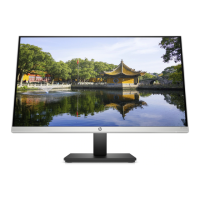
This document outlines the maintenance and service procedures for the HP Series 7 Pro 740pm monitor, providing essential information for trained service personnel. It covers safety guidelines, product features, an illustrated parts catalog, and detailed removal and replacement procedures for various components.
Function Description
The HP Series 7 Pro 740pm is a high-performance curved monitor designed for professional use, offering advanced display capabilities and integrated features for enhanced productivity and conferencing. It functions as a primary display for computers and other source devices, supporting multiple video inputs and USB connectivity.
Important Technical Specifications
Display:
- Screen Size: 100.8 cm (39.7 in) curved diagonal viewable screen area.
- Resolution: 5120 × 2160 @ 60 Hz, with full-screen support for lower resolutions and custom scaling to preserve original aspect ratio.
- Panel Type: Liquid crystal display (LCD) with active matrix and in-plane switching (IPS).
- Backlight: LED backlight.
- Color Gamut: Wide color gamut providing coverage of sRGB and P3(D65) color spaces.
- Surface: Nonglare panel.
- Viewing Angle: Wide viewing angle.
Integrated Features:
- Camera: Integrated pop-up infrared (IR) and RGB camera with noise-canceling microphones, supporting Microsoft Windows® Hello.
- HP Device Bridge Technology: Allows a single keyboard and mouse to control software and transfer files/data across two connected computers.
- Dual Picture beside Picture (PbP): Enables simultaneous viewing of DisplayPort, HDMI, and Thunderbolt inputs on each half of the screen.
- OSD Buttons: Five on-screen display (OSD) buttons, four of which are reconfigurable for quick access to common operations.
- Security: Security cable slot on the rear for an optional security cable.
- Cable Management: Feature for organizing cables and cords.
Connectivity:
- Video Inputs:
- DisplayPort™ video input (cable included in select regions).
- HDMI video input.
- Two USB Type-C® Thunderbolt™ ports (cable included in select regions), providing DisplayPort output and supporting charging for small external devices.
- Network: RJ-45 (network) jack.
- USB Downstream: Four USB ports (downstream), supporting battery charging.
- Plug and Play: Capability if supported by the operating system.
Physical Adjustments:
- Stand: Removable stand for flexible monitor head mounting solutions.
- HP Quick Release 2: Device for quick attachment/detachment of the monitor head to the stand.
- VESA Mounting: VESA® mounting bracket (100 × 100 mm) for attaching to wall-mount devices, swing arms, or workstations.
- Ergonomics: Tilt, swivel, and height adjustment capabilities.
Power:
- Energy Saver: Feature to meet requirements for reduced power consumption.
Usage Features
The monitor is designed for ease of use and versatility in various professional environments. Its wide viewing angle and high resolution make it suitable for detailed work and collaborative viewing. The integrated camera and microphones facilitate video conferencing and secure login via Windows Hello. The HP Device Bridge technology streamlines workflows by allowing seamless control and data transfer between multiple computers using a single set of peripherals. Dual PbP functionality enhances multitasking by displaying content from two different sources simultaneously. The OSD provides extensive adjustments for screen optimization and color space presets (P3(D65)). Physical adjustments like tilt, swivel, and height, along with VESA mounting options, ensure ergonomic comfort and flexible placement.
Maintenance Features
This guide provides comprehensive maintenance and service information for the HP Series 7 Pro 740pm monitor, intended for trained service personnel only.
Safety and Precautions:
- Trained Personnel: Only trained service personnel familiar with the product should perform service.
- Safety Information: Emphasizes reading "Important Safety Information" before any maintenance.
- Working Environment: Requires a dry, clean, and government-safety-compliant working environment.
- Personal Safety: Use proper safety devices and ensure others are safe during servicing.
- Power Disconnection: Always disconnect power before opening the product's cabinet.
- ESD Protection: Follow ESD safety procedures when handling electrical components.
- Battery Handling: Do not disassemble or expose batteries to high temperatures; refer to government requirements for battery recycling/disposal.
- High Voltage Area: Primary side is a high voltage area; exercise caution.
Repair Guidelines:
- Professional Repair: Repair must be performed by professional service technicians in a repair center; end users should not attempt these procedures.
- Lead-Free Solder: Use lead-free solder wire for soldering to meet RoHS requirements.
- Capacitor Replacement: Match polarity as printed on the PCB and ensure specifications/part numbers match the BOM. Insert new parts carefully to avoid short circuits.
- Board Protection: Do not get the board wet.
- Soldering Technique: Work quickly to avoid overheating the circuit board; keep the soldering iron tip clean and tinned.
- Post-Repair Inspection: Perform a close inspection of the circuit board and a function test to confirm proper power supply operation.
Parts and Ordering:
- Illustrated Parts Catalog: Provides detailed diagrams and part numbers for major components.
- Power Board: Available for purchase by HP authorized repair centers.
- Capacitors and Connectors: Available from EU distributors like Digi-Key and Würth Elektronik.
- Cables: Can be purchased from the HP part store.
- Power Supplies: Internal and external power supplies available from EET.
Disassembly and Reassembly Procedures:
- Preparation: Includes cleaning the disassembly room, identifying the area, preparing for material flow, and having necessary equipment (press fixture, working table, screwdriver, knife, gloves, cleaning cloth, ESD protection, scraper bar).
- Step-by-Step Instructions: Detailed instructions for removing the rear cover, EMI AL and screws, cables, bracket assembly, USB board, hinge bracket holder, webcam module assembly, AL tape, speaker assembly, bezel assembly, middle cover assembly, power key BD, joystick board, power board, driver board, and interface board.
- Connector Repair: Specific procedures for repairing HDMI, DP, USB-C, RJ45, and USB-A connectors, including desoldering and replacement.
Function Test and Troubleshooting:
- Post-Repair Testing: Includes tests for HDMI, DP, USB-C Alt-Mode, USB-C PD Function, and USB Hub to confirm all functions are working.
- Troubleshooting Guide: A table listing common problems, possible causes, and recommended solutions (e.g., blank screen, image issues, OSD lockout, power button lockout, non-functional camera/USB ports).
Firmware Updates:
- Firmware updates are available at support.hp.com if needed.
This comprehensive guide ensures that service personnel can safely and effectively maintain and repair the HP Series 7 Pro 740pm monitor, adhering to all necessary safety and regulatory standards.

 Need help?

 To Next Page
 General