Model 8901B Service
PI0 A13 CONTROLLER ASSEMBLY
--1
-----
r
I
I
I
1
7
TO OTHER SECTIONS
,
SELECTBUFFERS
PI0 A3 AUOlO
OE.EMPWASIS
AN0 OUTPUT ASSEMULY
--1
--
I---
I
I
INSTRUMENT
BUS
PIOU9 CPU ENABLEOECODER
I
I
SELECT DECODER
I
PI
ILI
&G
TO
RF
&
AUDIO SECTIONS
!
TO
AUOlO SECTION
I
I10
10
'
r31H1
".
G
OG.
lG,
FOIL1
PIILI
ull
26
TO
AUOIOSECTION
I
z
e-2'LI
OEMUX
3G'
TO
OIGITAL SECTION
c*3'L'
r4
ILI
TO
REMOTE
INTERFACE
11011
'
.l
'
110
12
5G
'
110
13
'G
I
TOKEYBOARO
AND DISPLAY
'
cJIH1
.2
;;
r=7ILl
'
/
SO
IHI
I
A
I1
IHI
1/001
'
/
SO
IHI
I
I1
IHI
1/001
I
$2
/HI
$3
IHI
i
I
I10
02
1\
rZ'L)
*.
'
s3'0
110
03
$2
/HI
I
$3
IHI
i
I
I10
02
1\
rZIL)
110
03
'
s3'0
I
l.J
$=
I
-i4
I
u
I
I
I-4
ILI
I
I
HIGWPASS
FILTER CONTROL
REG
OATA BUFFERS
I
I
NO
HPF
ILI
50
HZ
HPF
ILI
300
HZ
HPF (L)
0.E PRE-OISPON ILI
I
0-E PRE.OISPOFF ILI
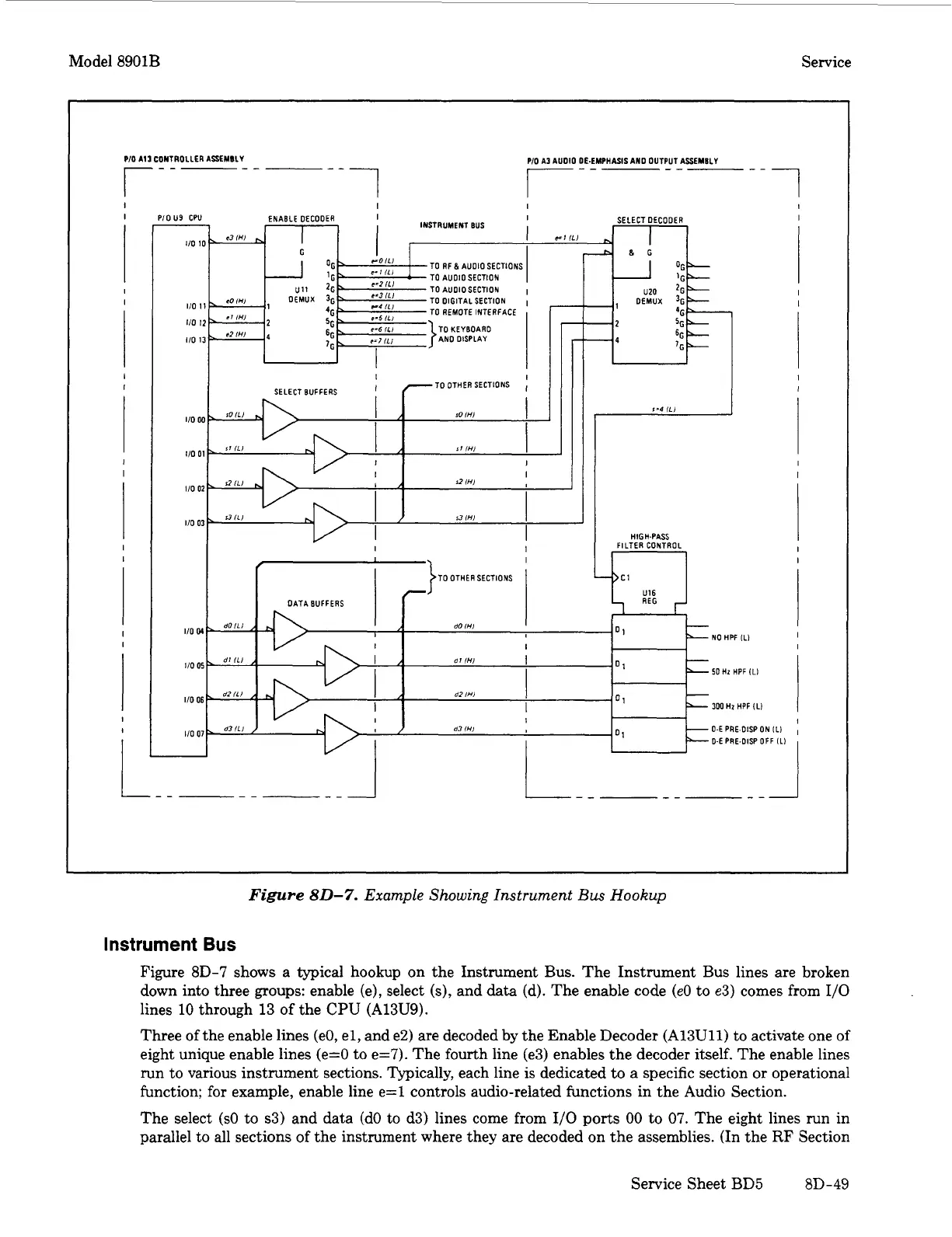
Figure
80-7.
Example Showing Instrument
Bus
Hookup
Instrument
Bus
Figure
8D-7
shows a typical hookup on the Instrument Bus. The Instrument Bus lines are broken
down into three groups: enable (e), select
(s),
and
data
(d). The enable code
(e0
to
e3)
comes from
1/0
lines 10 through
13
of
the
CPU
(A13U9).
Three of the enable lines (eo, el, and e2) are decoded by the Enable Decoder (A13Ull)
to
activate one
of
eight unique enable lines (e=O to e=7). The fourth line (e3) enables the decoder itself. The enable lines
run to various instrument sections. Typically, each line is dedicated to a specific section
or
operational
function; for example, enable line e=l controls audio-related functions in the Audio Section.
The select
(SO
to s3) and data (do
to
d3) lines come from
1/0
ports
00
to
07.
The eight lines run in
parallel to all sections of the instrument where they are decoded on the assemblies. (In the
RF
Section
Service Sheet
BD5
m-49


 To Next Page