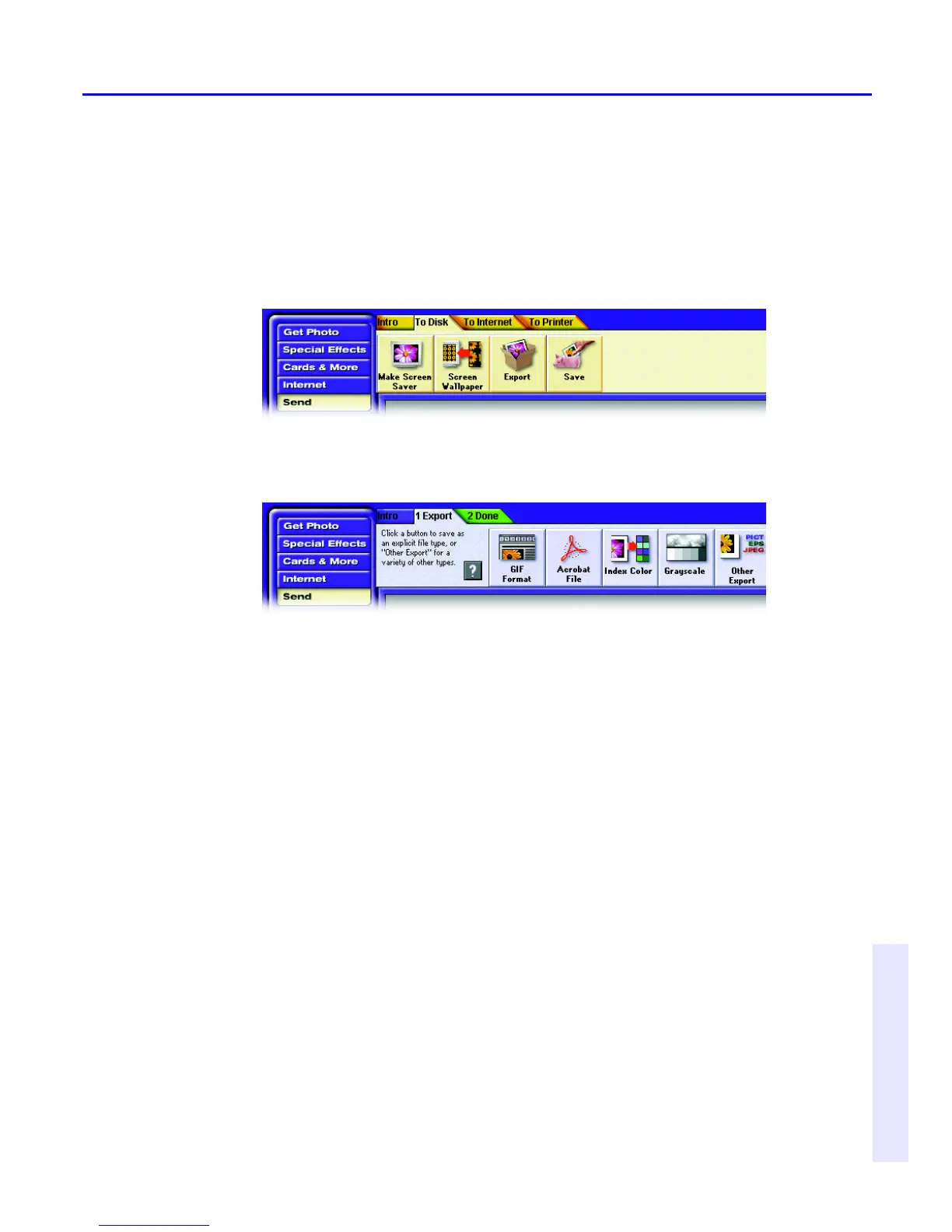
2. Click the button that matches the destination of your photo, and follow
the
instructions on the tabs.
To send a photo to a file format for use in another program:
1. With a photo open, complete any activity you may be using, click the
Send button, and then click the To Disk tab.
2. Click the Export button and then click the 1 Export tab.
Click the button that matches how the photo will be used. The following
list of
typical uses can help you choose:
■ To make a photo you can use on a World Wide Web page, click GIF
Format.
■ To make a photo that will print well from a desktop-publishing program,
click
Other Export, and then choose EPS or TIFF from the Save As menu.
■ To make a photo readable on many kinds of computers and over the Web
(using
free Acrobat Reader software), click Create Acrobat File.
■ To make a photo that displays well on a system that cannot display more
than
256 colors, click Index Color.
■ To make a black-and-white version of a color photo, click Grayscale.
■ To save in another format not already mentioned, click Other Export
and
then choose a file format from the Save As menu.
3. Specify a location and filename for the photo, and click Save. After
PhotoDeluxe finishes saving the photo, click Done.



 To Next Page