2 • HP Photosmart D5300 series
4
5
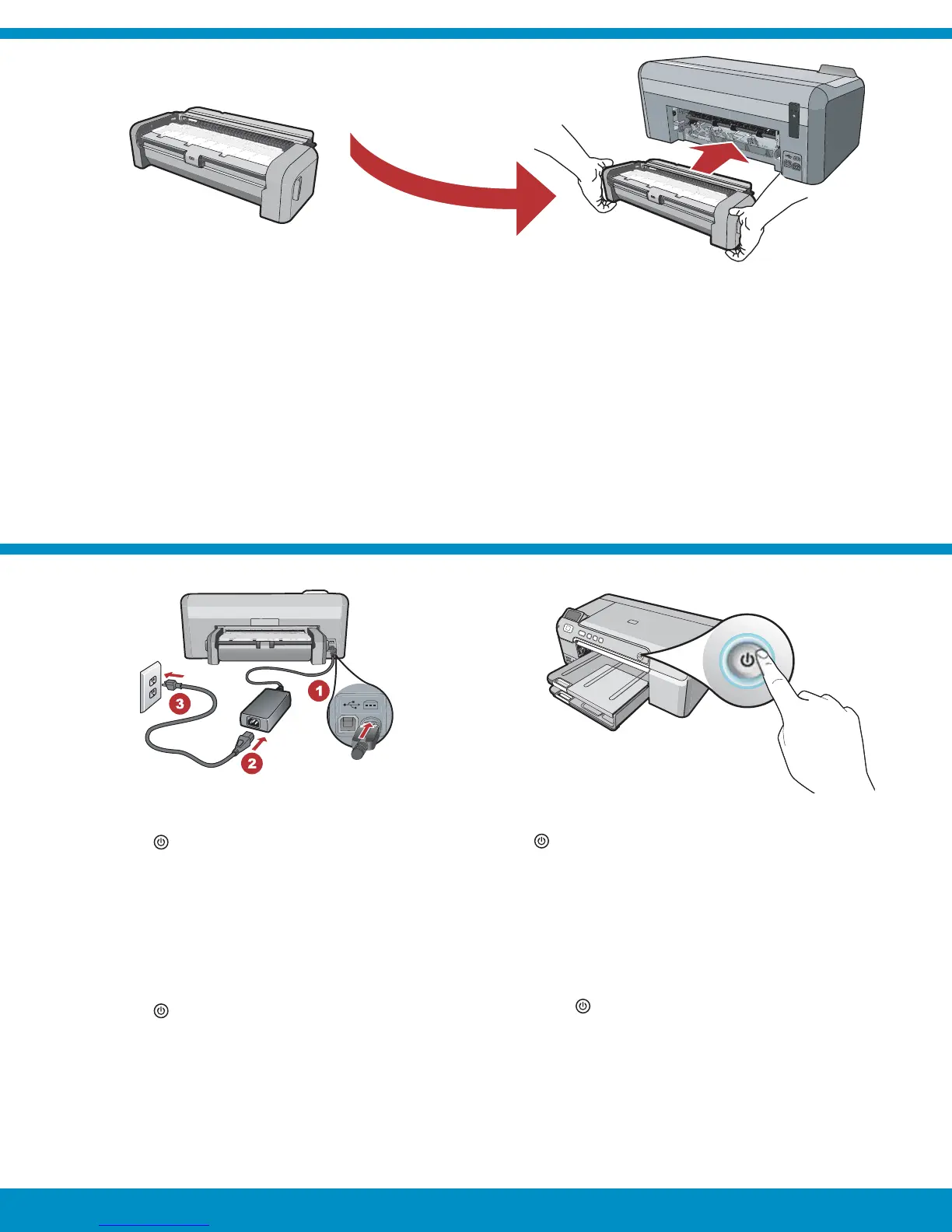
Firmly insert the two-sided printing accessory into the
back of the device until both sides snap into place.
Note : Do not press the buttons on either side of the
accessory when inserting it.
Connect the power cord and adapter.
Press
to turn on the HP Photosmart.
NOTE: Pay attention to the helpful messages
and animations in the display during the setup
process.
a.
b.
࠱Ԥ᭦ӾᬃጊጊڠଢЙᜈᎵᄉՐΞὋᄯҁˏΞ
ᩙጊҁnj
ᘜὙឯӇڙଢЙឞᬃௐԌ߱ʶΞʼᄉᨍnj
ᤋଋႂຸጲ֖ᦠ٧nj
ʽ HP Photosmartnj
ซὙ߶ᜈር˖ឯซࡕ࣪ʼ௬ᇧᄉథၸζ
ো֖Үႆnj
a.
b.
#⌧᠊#┎#⋷ỎẲᝂ⓮#⌧᠊┊##ㄚጷ#㋮᠆#┦ᝂ┷ⓚ#
ዢ❖#┻⯮⓮#ቍ᠊⍦#Ỏ#ᦖ⍊ູ⁋ၞၺ1#
#
ⷦⱂ#=#ᦖ⍊ູⓚ#ዢ#⋷ỎẲᝂ#⌧⡓⓮#⍊ጺ#ᨚげᅚ#
ྚᜊ❖#₃⎺1##
#▚⑦#⳪ቲ⏖#⍊Ⴇ⻆ᜒ#⎆㋿ၞၺ1#
ᨚげⓚ#ྡྷᖂ HP Photosmartᜒ#ⳃၞၺ.
##
ⷦⱂ=##Ẻ⯮#▫#ᅯ⋞#ኪ›㊢ᖞ┊⓮#ᅚᝦ#
❖#ᦥ#⋶ၞ┊Ữ⍦#⚒⓮㋮₃⎺1
a.
b.
૽キㄇӬ֬え˴ỻߗ߸တҘ⡶⇦᱿⋍ㄇŊ᳅ӷ
қㄇⵣ ߗહ ӷȯ
ᘜา 㖈တҘえ˴ᆹʃ⣬ྈ˶ɺㄇʀ᱿ྈ⸹ȯ
ʀヅℬ⎞Ⱨݽȯ
ྈʁ
֯רۓ HP Photosmartȯ
ᘜา㖈 મ⡶⳧ỄʑŊ⦼ᘜาㆴḻݽʀӛ᱿
ሷᮢ⤻ُՒᯉȯ
a.
b.
ab



 To Next Page