Hardware options installation 68
6.
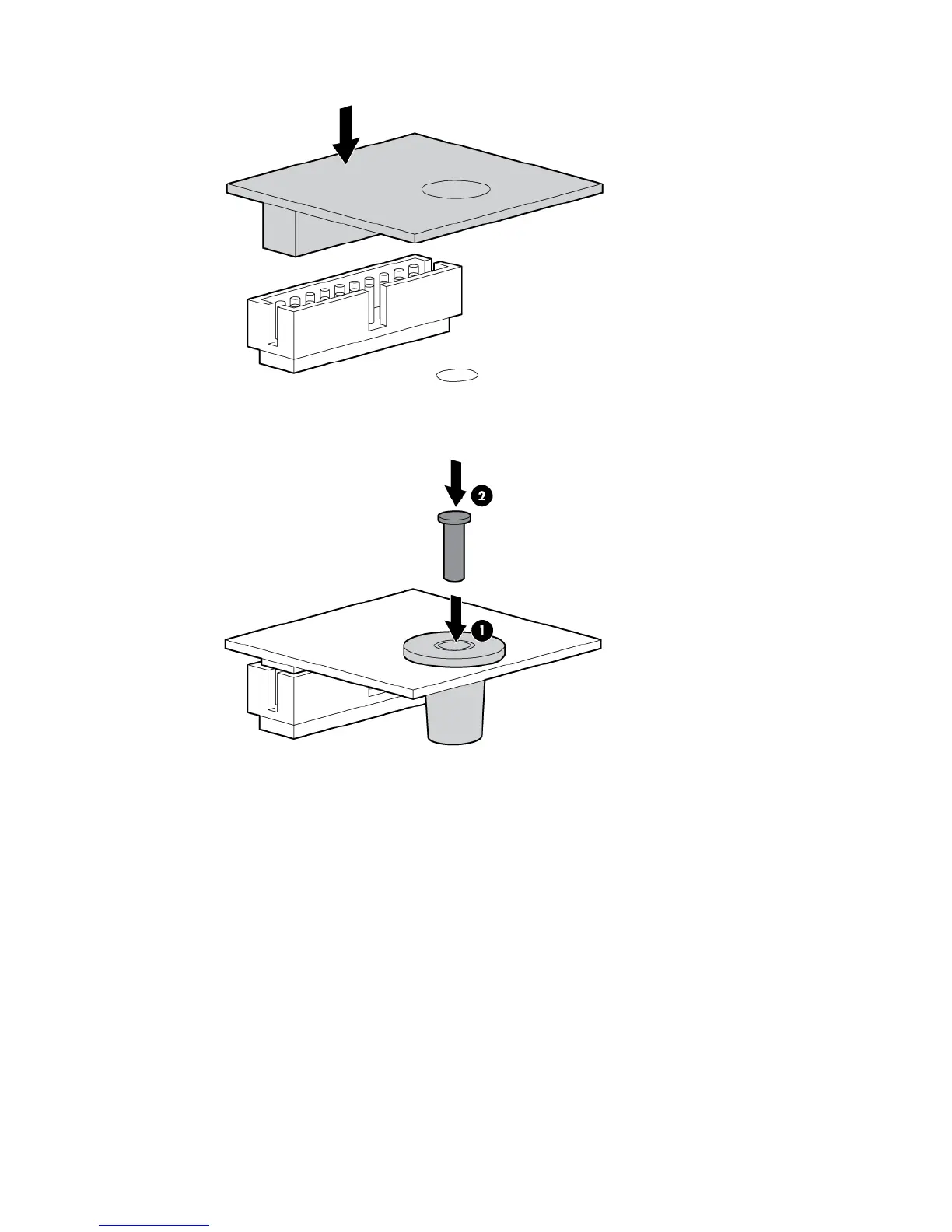
Install the TPM board. Press down on the connector to seat the board.
7. Install the TPM security rivet by pressing the rivet firmly into the system board.
8. Install the SPI board.
9. Install the access panel (on page 27).
10. Slide the server back into the rack.
11. Power up the server (on page 25).
Enabling the Trusted Platform Module
1. When prompted during the start-up sequence, access RBSU by pressing the F9 key.
2. From the Main Menu, select Server Security.
3. From the Server Security Menu, select Trusted Platform Module.
4. From the Trusted Platform Module Menu, select TPM Functionality.
5. Select Enable, and then press the Enter key to modify the TPM Functionality setting.
6. Press the Esc key to exit the current menu, or press the F10 key to exit RBSU.
7. Reboot the server.






 To Next Page