EasyManua.ls Logo

HP HP-11C - Clearing Prefixes; One-Number Functions

HP HP-11C
264 pages
Print Icon
To Next Page IconTo Next Page
To Previous Page IconTo Previous Page
Loading...
Section
1:
Getting
Started
21
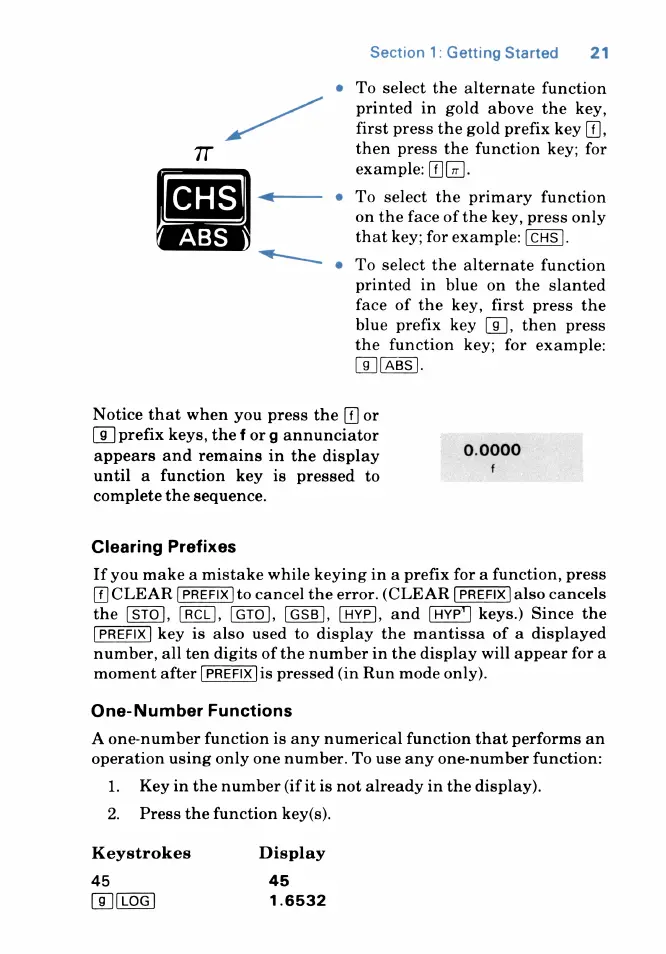
¢
To
select
the
alternate
function
printed
in
gold
above
the
key,
first
press
the
gold
prefix
key
[f],
then
press
the
function
key;
for
example:
[f][#].
e
To
select
the
primary
function
on
the
face
of
the
key,
press
only
that
key;
for
example:
[CHS].
T
&
To
select
the
alternate
function
printed
in
blue
on
the
slanted
face
of
the
key,
first
press
the
blue
prefix
key
[g],
then
press
the
function
key;
for
example:
[9](aBS].
Notice
that
when
you
press
the
or
(9]
prefix
keys,
the
f
or
g
annunciator
appears
and
remains
in
the
display
until
a
function
key
is
pressed
to
complete
the
sequence.
0.0000
Clearing
Prefixes
If
you
make
a
mistake
while
keying
in
a
prefix
for
a
function,
press
CLEAR
to
cancel
the
error.
(CLEAR
also
cancels
the
[ST0],
[RCL],
[GTO], [GSB],
[HYP],
and
keys.)
Since
the
key
is
also
used
to
display
the
mantissa
of
a
displayed
number,
all
ten
digits
of
the
number
in
the
display
will
appear
for
a
moment
after
[PREFIX]is
pressed
(in
Run
mode
only).
One-Number
Functions
A
one-number
function
is
any
numerical
function that
performs
an
operation
using
only
one
number.
To
use
any
one-number
function:
1.
Keyin
the
number
(if
it
is
not
already
in
the
display).
2.
Press
the
function
key(s).
Keystrokes
Display
45
45
[9])(Log)
1.6532

Table of Contents

Related product manuals