EasyManua.ls Logo

HP HP-25 - Entering Numerical Data

HP HP-25
131 pages
Print Icon
To Next Page IconTo Next Page
To Previous Page IconTo Previous Page
Loading...
14
Getting
Started
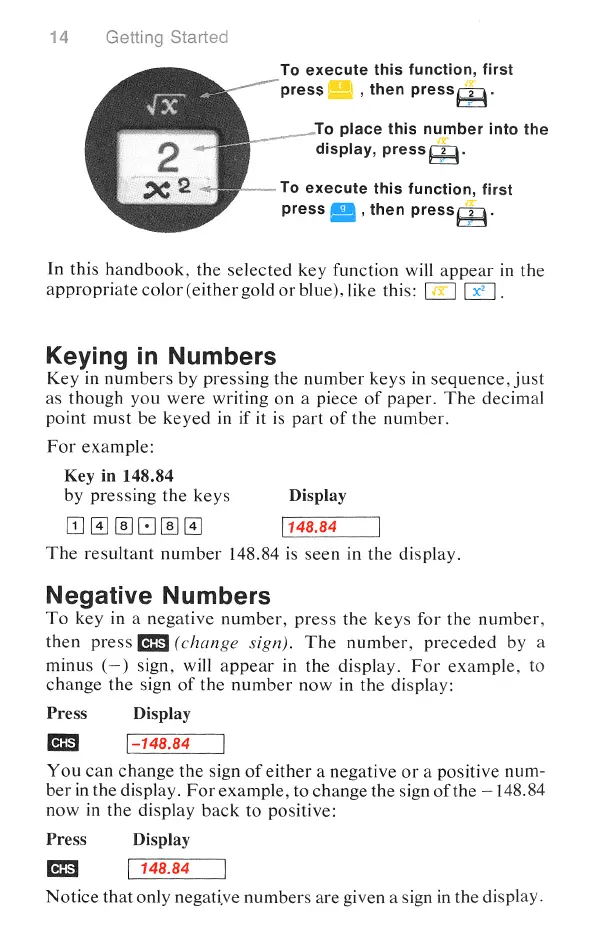
_To
execute
this
function,
first
“press
|,
then
press.
9
...To
place
this
number
into
the
display,
pressé.
-
To
execute
this
function,
first
press
,
then
pressé.
In
this
handbook,
the
selected
key
function
will
appear
in
the
appropriate
color
(either
gold
or
blue),
like
this:
i
Keying
in
Numbers
Key
in
numbers
by
pressing
the
number
keys
in
sequence,
just
as
though
you
were
writing
on
a
piece
of
paper.
The
decimal
point
must
be
keyed
in
if
it
is
part
of
the
number.
For
example:
Key
in
148.84
by
pressing
the
keys
Display
(1]
[a]
(-] (4]
148.84
The
resultant
number
148.84
is
seen
in
the
display.
Negative
Numbers
To
key
in
a
negative
number,
press
the
keys
for
the
number,
then
press
(B9
(change
sign).
The
number,
preceded
by
a
minus
(—)
sign,
will
appear
in
the
display.
For
example,
to
change
the
sign
of
the
number
now
in
the
display:
Press
Display
-148.84
You
can
change
the
sign
of
either
a negative
or
a
positive
num-
ber
in
the
display.
For
example,
to
change
the
sign
of
the
—148.84
now
in
the
display
back
to
positive:
Press
Display
CHS 148.84
Notice
that
only
negative
numbers
are
given
a
sign
in
the
display.

Table of Contents

Related product manuals