EasyManua.ls Logo

HP HP-25 - Editing a Program

HP HP-25
131 pages
Print Icon
To Next Page IconTo Next Page
To Previous Page IconTo Previous Page
Loading...
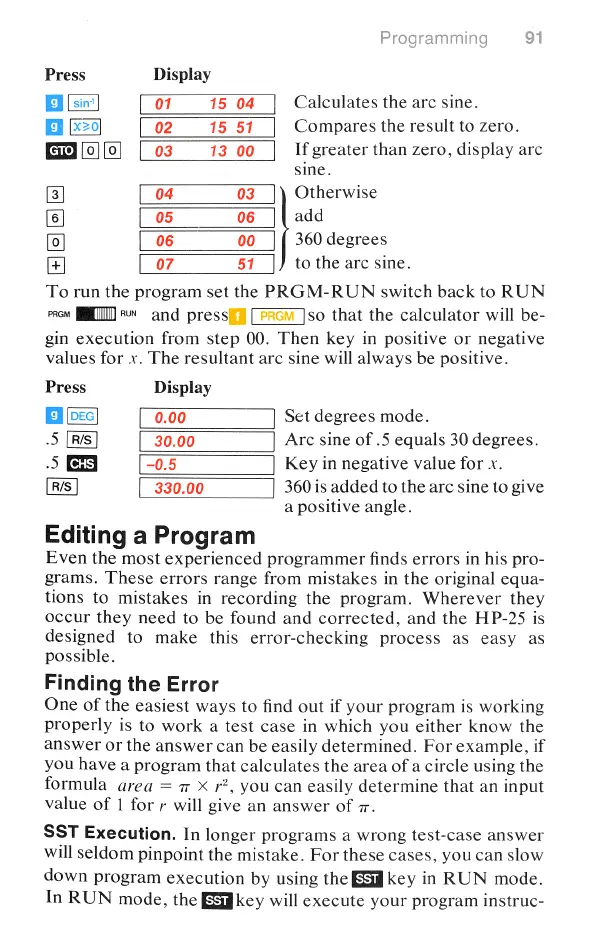
Press
Display
B
01
15
04
Calculates
the arc
sine.
Bl
02
15
51
Compares
the
result
to
zero.
[0][o]
If
greater
than
zero,
display
arc
sine.
04
03
Otherwise
[6)
05
06
||
add
[o]
06
00
360
degrees
07
51
to
the
arc
sine.
To
run
the
program
set
the
PRGM-RUN
switch
back
to
RUN
rrov
[T~
and
pressf
[P
so
that
the
calculator
will
be-
gin
execution
from
step
00.
Then
key
in
positive
or negative
values
for
x.
The
resultant
arc
sine
will
always
be
positive.
Press
Display
B
Set
degrees
mode.
.5
Arc
sine
of
.5
equals
30
degrees.
.5
Key
in
negative
value
for
x.
R/S
360
is
added
to
the
arc
sine
to
give
a
positive
angle.
Editing
a
Program
Even
the
most
experienced
programmer
finds
errors
in
his
pro-
grams.
These
errors
range
from
mistakes
in
the
original
equa-
tions
to
mistakes
in
recording
the
program.
Wherever
they
occur
they
need
to
be
found
and
corrected,
and
the
HP-25
is
designed
to
make
this
error-checking
process
as
easy
as
possible.
Finding
the
Error
One
of
the
easiest
ways
to
find
out
if
your
program
is
working
properly
is
to
work
a
test
case
in
which
you
either
know
the
answer
or
the
answer
can
be
easily
determined.
For
example,
if
you
have
a
program
that
calculates
the
area
of
a
circle
using
the
formula
area
=
7
X
r2,
you
can
easily
determine
that
an
input
value
of
1
for
r
will
give
an
answer
of
7.
SST
Execution.
In
longer
programs
a
wrong
test-case
answer
will
seldom
pinpoint
the
mistake.
For
these
cases,
you
can
slow
down
program
execution
by
using
the
3
key
in
RUN
mode.
In
RUN
mode,
the
B
key
will
execute
your
program
instruc-

Table of Contents

Related product manuals