Table 2-8 Special keys and their descriptions
Component Description
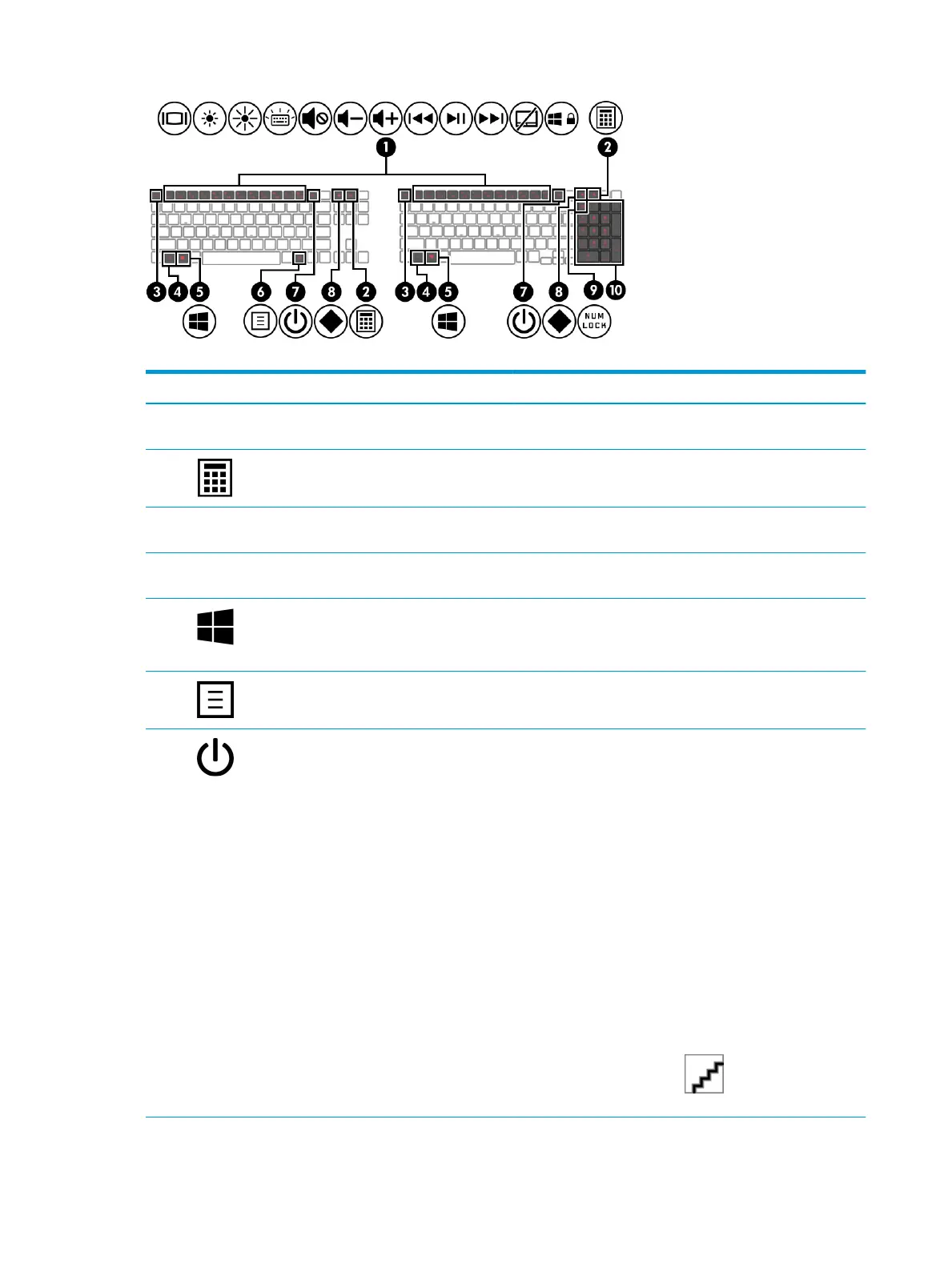
(1) Action keys Execute frequently used system functions as dened by the icon
symbols on f1 through f12 function keys.
(2) Calculator key Opens the calculator.
NOTE: Pressing the key again closes the calculator.
(3) esc key Displays system information when pressed in combination with
the fn key.
(4) fn key Executes specic functions when pressed in combination with
another key.
(5) Windows key Opens the Start menu.
NOTE: Pressing the Windows key again will close the Start
menu.
(6) Windows application key Displays options for a selected object.
(7) Power button ● When the computer is o, press the button briey to turn
on the computer.
● When the computer is on, press the button briey to
initiate Sleep.
● When the computer is in the Sleep state, press the button
briey to exit Sleep (select products only).
● When the computer is in Hibernation, press the button
briey to exit Hibernation.
IMPORTANT: Pressing and holding down the power button
results in the loss of unsaved information.
If the computer has stopped responding and shutdown
procedures are ineective, press and hold the power button
down for at least 10 seconds to turn o the computer.
To learn more about your power settings, see your power
options:
▲ Right-click the Power icon , and then select Power
Options.
12 Chapter 2 Components



 To Next Page
 Loading...








