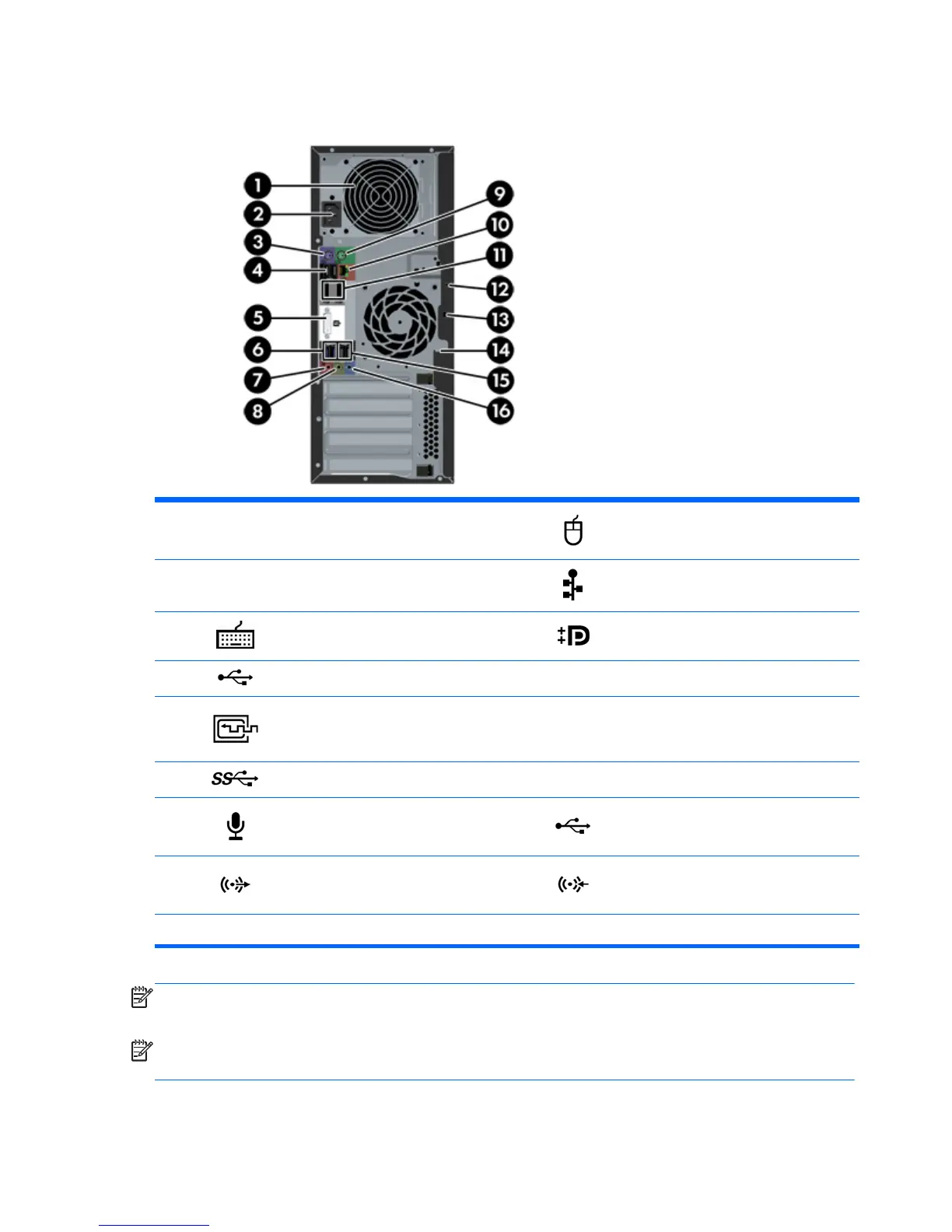
Rear panel
1
Power supply Built-In Self Test (BIST)
LED
9 PS/2 mouse connector
2 Power cord connector 10
RJ-45 Ethernet connector
3
PS/2 keyboard connector 11 Dual-Mode DisplayPort (2)
4
USB 2.0 ports (2) 12 Universal chassis clamp opening
5
DVI-I connector 13 Cable lock slot
6
USB 3.0 ports (2) 14 Padlock loop
7
Microphone connector 15 USB 2.0 ports (2)
8
Audio line-out connector 16 Audio line-in connector
NOTE: The labels for the rear panel connectors use industry-standard icons and colors.
NOTE:
The DP and DVI-I ports are not supported when the system is configured with Intel Xeon E3-12x0 v3 processors. Also, if a discrete graphics card
is installed these ports are disabled by default.
NOTE:
Simultaneous usage of integrated Intel HD graphics and discrete graphics cards (in order to drive more than two displays) can be enabled using
Computer (f10) Setup Utility. However, HP recommends using only discrete graphics cards to drive three or more displays.
10 Chapter 2 Workstation features



 To Next Page