
 Need help?
Do you have a question about the HP x2 210 G1 and is the answer not in the manual?
Identifies components on the right side of the HP Pavilion x2 detachable notebook PC.
Identifies components on the left side of the HP Pavilion x2 detachable notebook PC.
Details the components of the display, including webcam, antennas, and ambient light sensor.
Identifies components located on the top edge of the HP Pavilion x2 detachable notebook PC.
Identifies components on the bottom edge, including docking port and regulatory labels.
Explains how to find the product and serial numbers on the HP Pavilion x2 detachable tablet.
Lists and illustrates the main internal components of the HP Pavilion x2 detachable tablet.
Lists and provides part numbers for miscellaneous accessories and components for the tablet.
Lists the tools necessary for performing removal and replacement procedures on the tablet.
Provides general guidelines and precautions for servicing the HP Pavilion x2 detachable tablet.
Details specific instructions for handling and removing plastic components from the tablet.
Provides guidance on safely disconnecting and reconnecting cables and connectors.
Explains the importance and methods of grounding to prevent electrostatic discharge damage.
Details precautions to prevent damage to electronic components from electrostatic discharge.
Provides instructions for safely packaging and transporting the HP Pavilion x2 detachable tablet.
Outlines recommended practices for setting up a safe and effective service workstation.
Step-by-step instructions on how to detach the tablet from its keyboard base.
Detailed instructions for removing and replacing the tablet's back cover.
Procedure for safely removing and replacing the battery in the HP Pavilion x2 detachable.
Detailed instructions for removing and replacing the main system board.
Instructions for replacing the keyboard base assembly, including the clickpad.
Steps for replacing the hard drive, which is available on select HP Pavilion x2 models.
Instructions on how to access and start the BIOS setup utility on the tablet.
Guides users through the process of updating the BIOS setup utility.
How to check the current version of the BIOS installed on the device.
Instructions on how to download the correct BIOS update file for the tablet.
Guidance on synchronizing the tablet and keyboard for specific product configurations.
Steps to download the HP PC Hardware Diagnostics UEFI tool onto a USB drive.
How to access and initiate the BIOS setup utility in Windows 8.1.
Guides users through updating the BIOS setup utility on the tablet.
Method to check the current BIOS version installed on the device.
Instructions for downloading the appropriate BIOS update file.
How to use the HP PC Hardware Diagnostics UEFI tool for testing.
Steps to transfer the HP PC Hardware Diagnostics UEFI tool to a USB drive.
Guides on creating recovery media and system backups for Windows 10.
Instructions for restoring the system using HP Recovery Manager or recovery media.
Guides on creating recovery media and system backups for Windows 8.1.
Instructions for restoring the system using HP Recovery Manager or recovery media.
Details power cord requirements applicable to all countries and regions.
Specifies power cord requirements tailored for particular countries and regions.
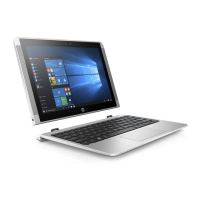
This document serves as a comprehensive Maintenance and Service Guide for the HP Pavilion x2 Detachable Notebook PC and the HP x2 210 G1 Tablet. It is specifically intended for HP authorized service providers, offering detailed information on the device's components, maintenance procedures, and troubleshooting.
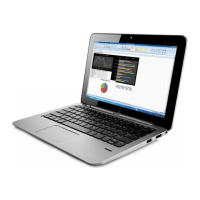
The guide begins with an overview of the product, outlining its key features and functionalities. It then delves into the external component identification, providing a visual and descriptive breakdown of the device's various ports, buttons, and indicators. The right side of the tablet features volume buttons for controlling speaker volume, a Windows button to open the Start menu, and a memory card reader for storing and accessing information. The memory card reader allows for easy insertion and removal of optional memory cards. An HDMI port is present for connecting to external video or audio devices, such as high-definition televisions. A USB Type-C port supports charging and data transfer, and can also connect to various video devices like DisplayPort, VGA, and HDMI. An AC adapter and battery light indicate the charging status of the device, with white indicating a full charge or disconnection, and amber indicating charging or a low battery level. A USB 3.0 port on the right side provides enhanced USB power performance for compatible devices.
On the left side, an audio-out (headphone)/audio-in (microphone) jack allows connection to powered stereo speakers, headphones, earbuds, or a headset. This jack supports both audio-out and audio-in functionalities, but does not support microphone-only devices. The guide emphasizes the importance of lowering the volume setting before using headphones or earbuds to reduce the risk of personal injury.
The display section details the components visible on the screen area. Two WLAN antennas are integrated for sending and receiving wireless signals, though they are not externally visible. A webcam is included for recording video, capturing photographs, and facilitating video conferencing. A webcam light indicates when the webcam is in use. An ambient light sensor automatically adjusts the display brightness based on environmental lighting conditions. Two speakers produce sound for the device.
The top edge of the tablet features a power button, which serves multiple functions: turning the tablet on when off, initiating sleep when on, and exiting sleep or hibernation states. A caution is provided regarding holding down the power button, as it can lead to loss of unsaved information. If the tablet becomes unresponsive, holding the power button for at least 10 seconds will force a shutdown. Internal microphones are also located on the top edge for recording sound.
The bottom edge of the tablet includes alignment posts that facilitate the opening and closing of the display, and a docking port that connects the tablet to the keyboard base. Product and regulatory information, including the serial number and product number, are also located on the bottom edge.
A significant portion of the guide is dedicated to the illustrated parts catalog, which provides a visual representation and spare part numbers for all major components of the tablet. This section is crucial for authorized service providers to identify and order correct replacement parts. The product number and serial number are etched on the tablet's bottom edge and also located on a label inside the back cover, which is essential information for support and warranty purposes. The catalog lists various components such as the display panel assembly (available in different finishes), battery, webcam, power/volume button board, speaker kit, audio board, middle frame, touch board, POGO (10-pin) docking connector board (with variations for products with or without a hard drive), wireless antenna, and system board. The system board descriptions include details about the processor, graphics subsystem, system memory, and eMMC hard drive capacity, as well as the operating system preinstalled. Thermal material kits are also listed.
The catalog further details the back cover, top cover with keyboard (with variations for products with or without a hard drive and different finishes), TouchPad board, display cable, hinges (with variations for products with or without a hard drive), hinge covers (also with variations and finishes), hinge connector, hard drive (for select products only, including different capacities), and keyboard board (with variations for products with or without a hard drive).
Beyond the major components, a section on miscellaneous parts lists accessories such as the 15-W AC adapter, duck head adapter, rubber kit, screw kit, a case (for use in Europe), and a DIB HP Stereo 3.5mm headset.
The guide then moves into removal and replacement preliminary requirements, detailing the tools needed for service, general service considerations, and specific guidelines for handling plastic parts, cables, and connectors. Crucially, it includes grounding guidelines to prevent electrostatic discharge (ESD) damage, emphasizing the importance of using an ESD wrist strap and working on an ESD mat. Packaging and transporting guidelines are provided to ensure components are handled safely, and workstation guidelines outline best practices for a service environment.
The core of the service guide lies in the removal and replacement procedures for authorized service provider parts. This section provides step-by-step instructions for releasing the tablet from the keyboard base and for replacing various components. These procedures include unlocking the device and disabling Always On Remote Management (for select products), removing and replacing the back cover, battery, audio board, speakers, touch board, system board, and wireless antenna. Each procedure is designed to be followed meticulously by authorized personnel to ensure proper service and functionality.
Further sections cover using Setup Utility (BIOS) in Windows 10 and Windows 8.1, including starting and updating the BIOS, determining the BIOS version, downloading updates, and synchronizing the tablet and keyboard. It also details using HP PC Hardware Diagnostics (UEFI) in both Windows 10 and 8.1, including downloading the diagnostics to a USB device.
Specifications are briefly mentioned, followed by extensive sections on backing up, restoring, and recovering in Windows 10 and Windows 8.1. These sections cover creating recovery media and backups, using Windows tools for restore and recovery, and utilizing HP Recovery Manager. Important information about what to know before getting started, using the HP Recovery partition, and using HP Recovery media to recover the system is provided. Procedures for changing the computer boot order and removing the HP Recovery partition are also included.
Finally, the guide addresses power cord set requirements for all countries and specific regions, and concludes with information on recycling, underscoring HP's commitment to environmental responsibility. This comprehensive guide ensures that authorized service providers have all the necessary information to maintain and service the HP Pavilion x2 Detachable Notebook PC and HP x2 210 G1 Tablet effectively and safely.
 General
| Form factor | Convertible (Detachable) |
|---|---|
| Product type | Hybrid (2-in-1) |
| Product color | Silver |
| Country of origin | China |
| Stepping | C0 |
| Tjunction | 90 °C |
| Processor cache | 2 MB |
| Processor family | Intel Atom® |
| Processor series | Intel Atom x5 Series |
| Processor socket | BGA 592 |
| Processor threads | 4 |
| Processor codename | Cherry Trail |
| Processor frequency | 1.44 GHz |
| Processor cache type | Smart Cache |
| Processor lithography | 14 nm |
| Processor manufacturer | Intel |
| Processor front side bus | - MHz |
| PCI Express slots version | 2.0 |
| Processor boost frequency | 1.84 GHz |
| Processor operating modes | 64-bit |
| PCI Express configurations | 1x1 |
| Scenario Design Power (SDP) | 2 W |
| Maximum number of PCI Express lanes | 1 |
| Discrete graphics card | No |
| On-board graphics card | Yes |
| Number of execution units | 12 |
| Discrete graphics card model | Not available |
| On-board graphics card model | Intel® HD Graphics |
| Maximum on-board graphics card memory | 2 GB |
| On-board graphics card base frequency | 200 MHz |
| On-board graphics card dynamic frequency (max) | 500 MHz |
| Memory clock speed | 1866 MHz |
| Memory form factor | On-board |
| Internal memory type | LPDDR3-SDRAM |
| Maximum internal memory | 4 GB |
| Flash memory | 64 GB |
| Storage media | eMMC |
| Flash drive interface | Flash |
| Compatible memory cards | MicroSD (TransFlash) |
| HD type | WXGA |
| Display surface | Matt |
| Display diagonal | 10.1 \ |
| Touch technology | Multi-touch |
| Touchscreen type | Capacitive |
| Display resolution | 1280 x 800 pixels |
| Native aspect ratio | 16:10 |
| Number of built-in speakers | 2 |
| Rear camera resolution (numeric) | 5 MP |
| Wi-Fi standards | 802.11b, 802.11g, Wi-Fi 4 (802.11n), 802.11a, Wi-Fi 5 (802.11ac) |
| USB 2.0 ports quantity | USB 2.0 ports have a data transmission speed of 480 Mbps, and are backwards compatible with USB 1.1 ports. You can connect all kinds of peripheral devices to them. |
| VGA (D-Sub) ports quantity | 0 |
| Sustainability certificates | EPEAT Silver, ENERGY STAR |
| Pointing device | Clickpad |
| Processor code | SR29Z |
| Processor ARK ID | 87383 |
| Processor package size | 17 x 17 mm |
| Intel Identity Protection Technology version | 1.00 |
 Weight and Dimensions
| Depth | 183 mm |
|---|---|
| Height | 23.5 mm |
| Weight | 1200 g |
| Depth (tablet mode) | 173 mm |
| Width (tablet mode) | 265 mm |
| Height (tablet mode) | 9.2 mm |
| Weight (tablet mode) | 590 g |

 To Next Page