Turn
26
™
PUNCH MACHINE
™
No. 1200PCH
Due to the profile of some key blanks they may not
fit under the punch. Follow these steps to adjust
for this:
1. Load the particular key blank (that does not fit
under the punch).
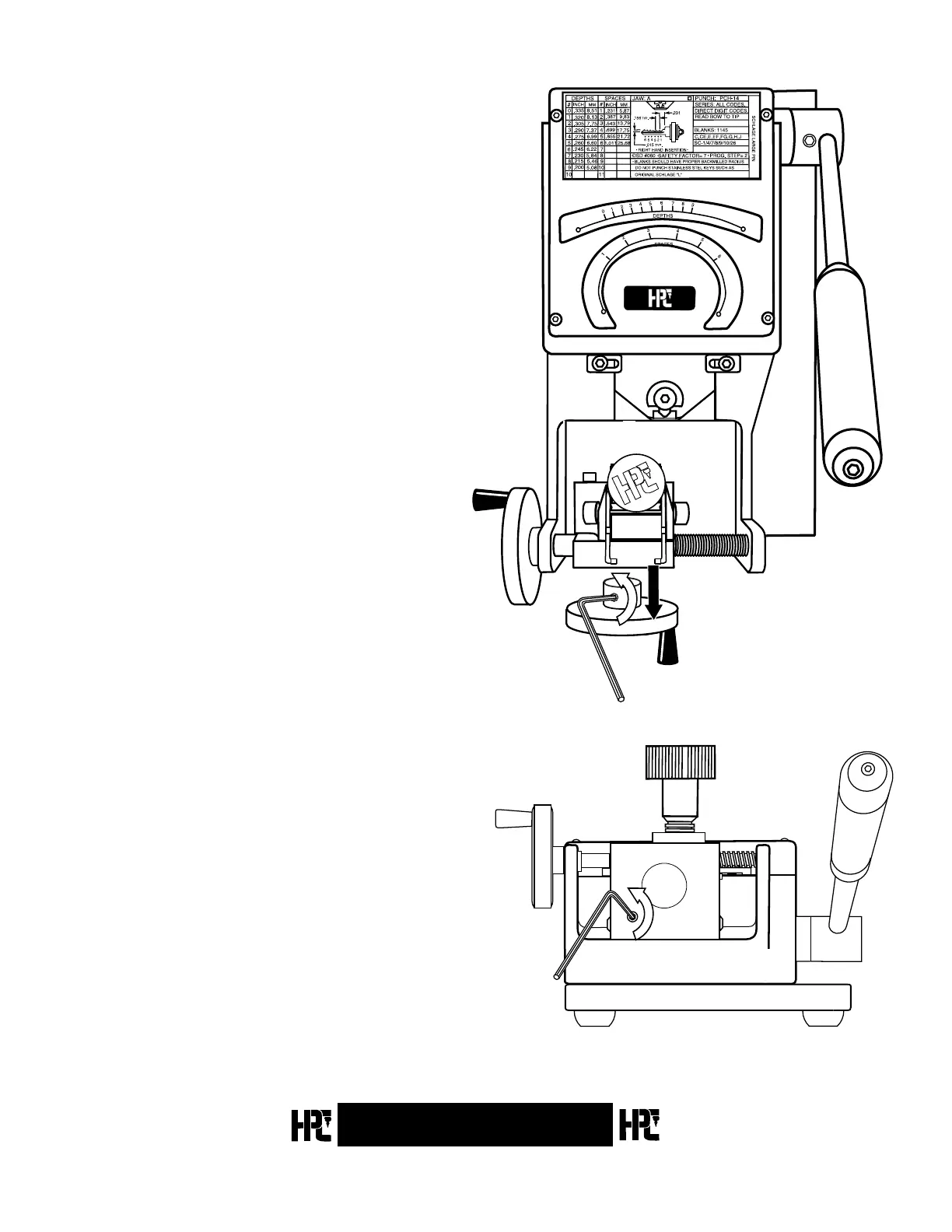
2. Loosen the 2 set screws on the Depth Crank and
remove the Depth Crank (Fig. 3.14).
3. Loosen the set screw on the carriage to free-up
the carriage (Fig. 3.15).
4. Replace the Depth Crank and tighten the set
screws on the crank.
5. Turn the Depth Crank to move the carriage so
the key blank engages the punch. Verify the
blank now clears the punch.
6. Loosen the set screws on the Depth Crank and
remove the Depth Crank.
7. Holding the carriage in the proper position,
tighten the set screw on the carriage.
8. Replace the Depth Crank and tighten the set
screws.
Fig. 3.14
Fig. 3.15


 To Next Page