General Information
8
The Instruction of the Control Modes:
No. Mode No. Mode
1 RED 7 White
2 GREEN 8 3-Colors Jump Change
3 Blue 9 7-Colors Jump Change
4 Yellow 10 3-Colors Flashing
5 Purple 11 7-Colors Flashing
6 Cyan 12 Black
In Mode 1-7 : “+” and “–“ control the brightness
In Mode 8-11: “+” and “–“ control the changing speed
When there is no operation about 30 secs, the controller will fall into sleep to save power.
Any button would wake the controller.
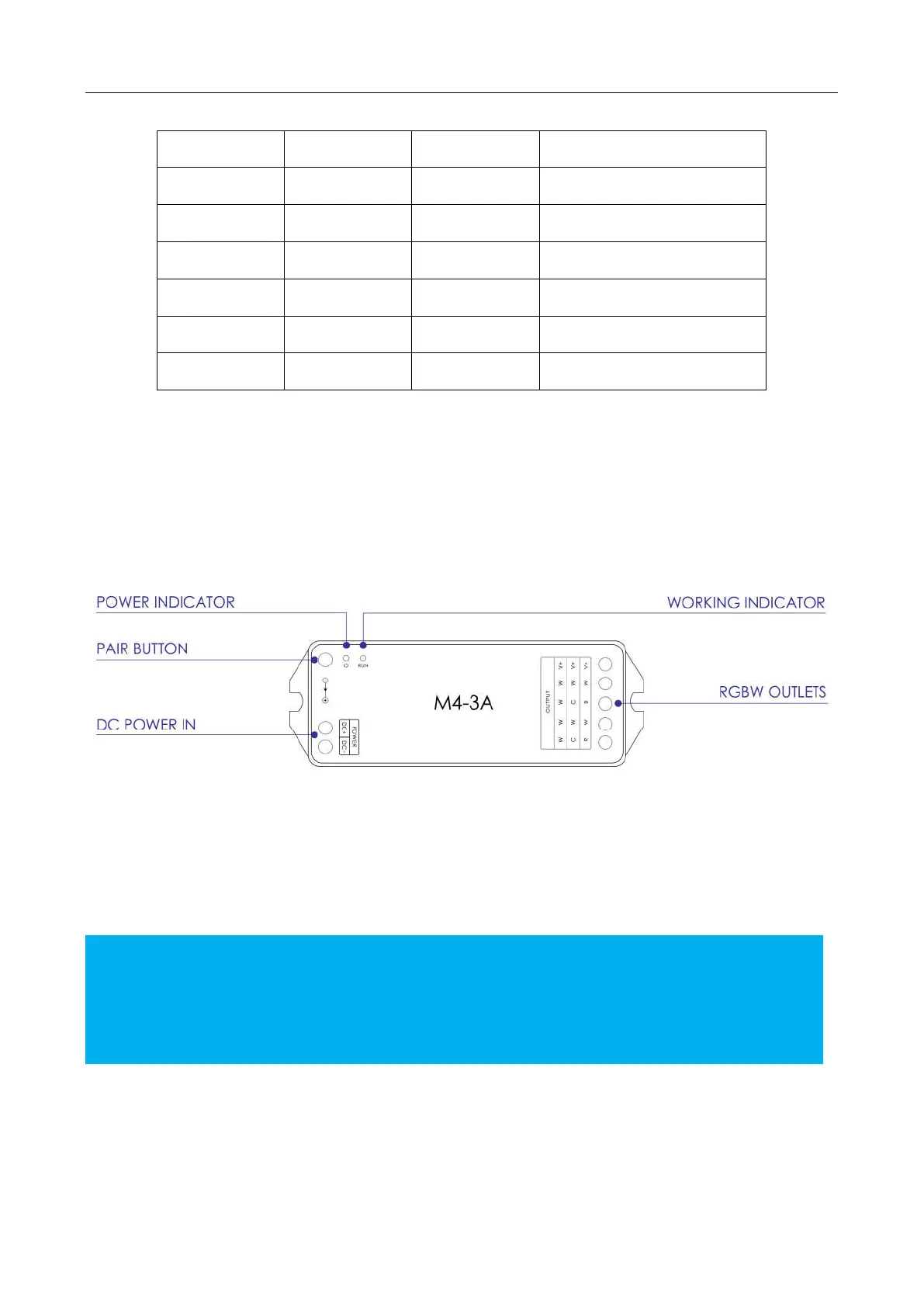
Instruction of M4-3A RGBW Control Converter/Receiver
Figure 7.
The Converter/Receiver M4-3A and Remote Controller M4 are already paired. If you find
the connection is failed. You might need to reset the connection:
Click the pair button for a short time, the operating indicator would keep working,
click any button on the remote controller M4. It would flash a few times, and pair
successfully.
Press the pair button for over 5 seconds. It would delete the pair.


 To Next Page