3
BEFORE USING
1. OVERVIEW
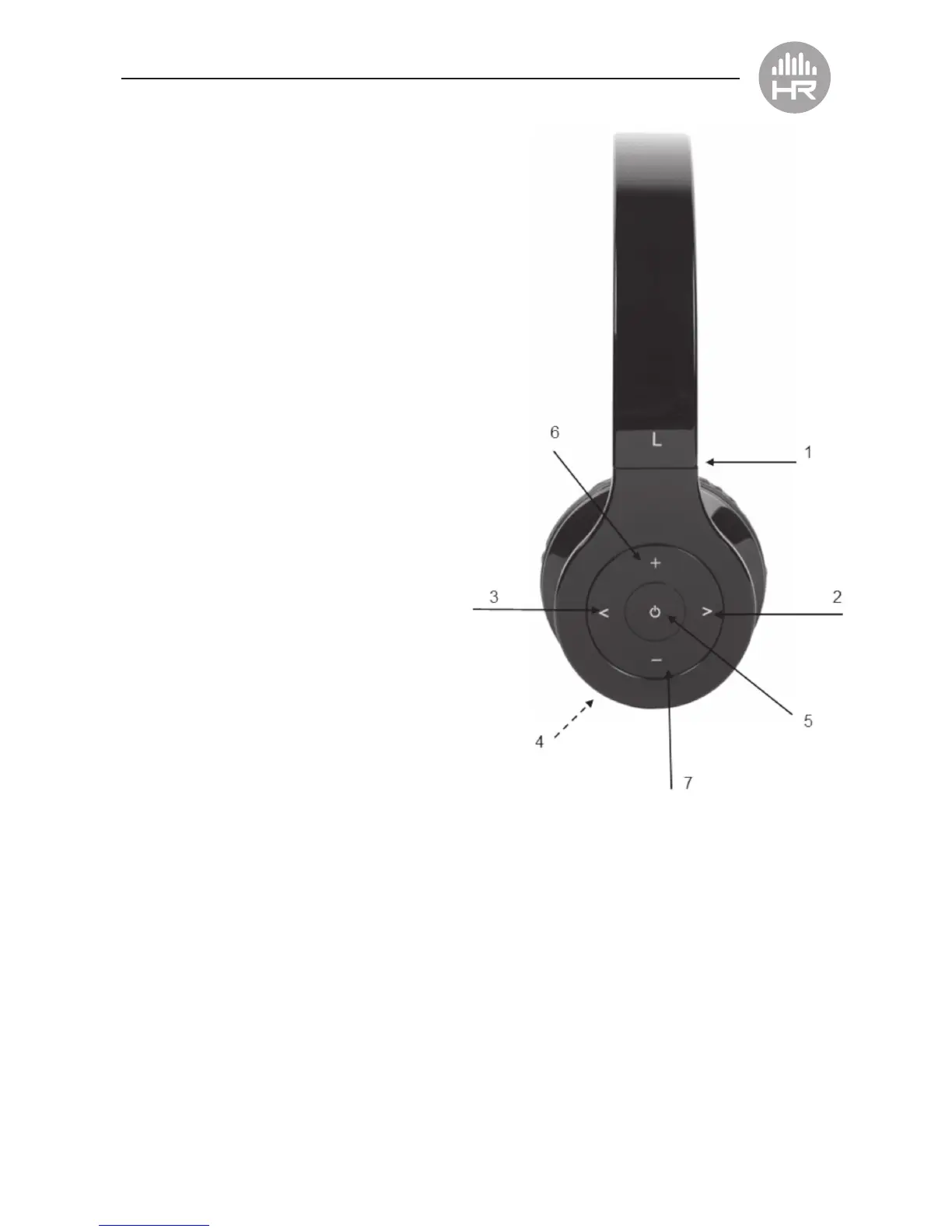
1. The Headset expands for a comfortable t.
2. > Key : next track
3. < Key : last track
4. LED Indicator for different status
5. Multifunction button (MFB): Switch on/off the
headset, answer, stop call, voice dial, redial last
number, pause and play
6. + Key: volume up
7. – Key: volume down
2. CHARGING THE HEADSET
• First time charging:
Please be sure the battery has been charged
fully before use.
• When you hear the warning indicator tones of
“DU DU DU” and, at the same time, the
red light blinks twice.
Please charge the battery fully.
A. Charging the battery
with Micro USB cable
• Step 1:
Insert the USB charging cable into the
USB port which supports 5V power
(such as AC/DC USB adapter or PC USB port).
• Step 2:
Connect the charging cable to the charging port of the headset.
• When the red light is on, the headset is charging.
• When the blue light is on, the headset is fully charged.
• It takes approximately 3 hours to fully charge the headset.
Note: when you plug in the charger cable, please turn off the headphones.


 To Next Page