SMARTPHONE GUIDE
P A GE 35
The materials contained herein are the proprietary information of Impact Resource Group.
No dissemination of these materials is permitted without expressed written consent.
Impact Resource Group © 02072012
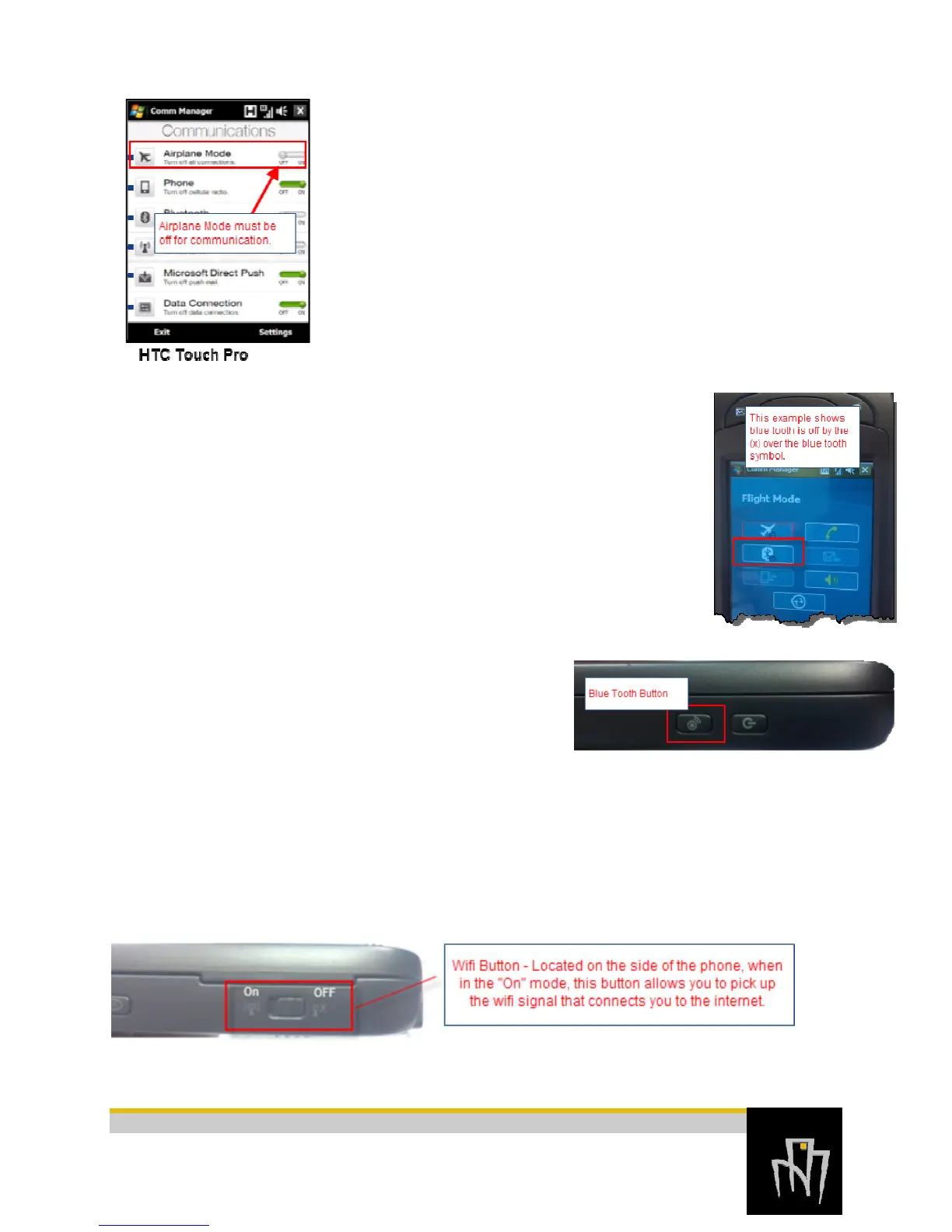
HTC Touch Pro – Use one of the following methods:
• On the TouchFLO 3D Home screen, slide to the Settings tab and
then touch Communications.
• Touch Start > Programs > Comm Manager
• Touch Start > Settings > Connections tab > Comm Manger
Question:
On the Sprint Mogul, why does the blue light blink?
Answer:
If your phone is blinking a blue light this indicates that your blue tooth is
running. This doesn’t hurt your phone, but it will run your battery power
down faster. You can tell from your Comm Manager screen if the blue tooth is
running. If there is an (X) over the blue tooth symbol (pictured left) the blue
tooth is in “OFF” mode. Your blue tooth can be controlled by the button on
the side of your phone.
Question:
On the Sprint Mogul, what is the On and Off switch on the side of the phone for?
Answer:
The Spring Mogul has a button on the side of the phone that allows you to turn WiFi mode on
and off.



 To Next Page