
 Need help?
Do you have a question about the Huawei AR Series and is the answer not in the manual?
Procedure for mounting the router on a desk, including attaching rubber pads and connecting the ground cable.
Steps for wall mounting, including marking holes and securing screws for specific router series.
Detailed procedure for wall mounting specific AR router models using expansion bolts.
Instructions for installing routers in 19-inch standard cabinets or racks, including rail spacing.
Procedure for installing cards into SIC slots without removing guide rails.
Procedure for installing cards into larger slots by removing guide rails and filler panels.
Steps to log in to the router using the console interface and terminal simulation software.
Steps to log in to the router via the web interface using a network cable and browser.
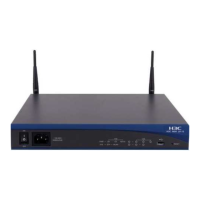
This document serves as a Quick Start Guide for Huawei AR650, AR1600, AR6100, AR6200, and AR6300 Series Routers, detailing installation, initial login, and safety guidelines. The guide emphasizes that installation, cable connection, and login methods are generally similar across most AR series routers, using specific models like AR651W-X4, AR651F-Lite, and AR6280 as examples for illustration.
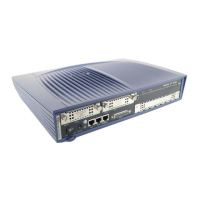
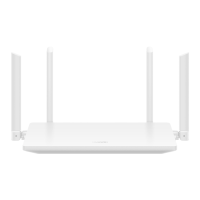
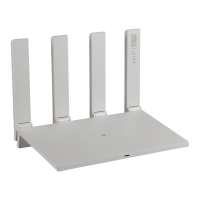
The Huawei AR series routers are designed to provide robust network connectivity, supporting various deployment scenarios including desk mounting, wall mounting, and cabinet/rack mounting. These routers are capable of handling different types of cards (MIC, SIC, WSIC, XSIC, and SRU) to expand their functionality and adapt to diverse network requirements. They support both AC and DC power supplies, ensuring flexibility in power infrastructure. For models with Wi-Fi or LTE/3G capabilities, external antennas can be installed to enhance wireless signal reception. The routers offer multiple interfaces, including Ethernet ports, console ports, and USB ports, facilitating connection to various network devices, PCs, and storage media. The management interface (MGMT) allows for web-based configuration, providing a user-friendly graphical interface for network setup and management.
The routers offer flexible installation options to suit different environments. For desk mounting, rubber pads are attached to the bottom of the chassis, and the router is simply placed on a desk. A security lock can be optionally installed to protect against theft. For wall mounting, specific models like AR651, AR657, AR651-X8, AR651U-A4, AR651W, AR657W, and AR651W-X4 have a standard distance of 185 mm between installation holes, while AR6120 series routers require 270 mm. The guide provides detailed steps for marking positions, drilling holes, fixing screws, and hanging the router, ensuring the panel with interfaces faces down to protect them from water. For AR651F-Lite/AR651C models, mounting brackets are fixed to the sides of the router, and then the router is secured to the wall using expansion bolts. Cabinet/rack mounting is supported for 19-inch standard cabinets/racks, with specific requirements for models like AR6140-9G-2AC/AR6140-16G4XG/AR6140-S regarding distances between front and rear mounting brackets and the use of floating nuts. For heavier models like AR6280/AR6300/AR6300-S, guide rails are recommended for support.
Card installation is a key feature, allowing users to customize router functionality. The guide covers two scenarios: installing cards without removing guide rails and installing cards after removing guide rails (for larger cards like WSIC). Cards are hot-swappable, meaning they can be installed or removed while the router is powered on. The process involves loosening captive screws, pulling out filler panels, turning eject levers, pushing the card into the slot, and then securing it.
Initial login to the router can be performed via a console interface or a web interface. For console login, a PC is connected to the router's console interface using a console cable. Terminal simulation software is used with specific communication parameters (transmission rate: 9600, data bit: 8, parity bit: None, stop bit: 1, flow control mode: None). The default username is "admin" and the password varies by version (e.g., "admin@huawei.com" for V300R019C00 and later, or "Admin@huawei" for other versions). For web login, a PC is connected to the MGMT interface, assigned an IP address on the same network segment as the router (e.g., 192.168.1.x), and then the router's IP address (https://192.168.1.1) is accessed via a web browser. The same default credentials are used for web login. The web interface provides a graphical tool for configuration, complementing the command-line interface.
The guide emphasizes several safety and maintenance considerations. Before installation, users are advised to ensure the site environment is free from flammable or explosive gases, smoke, and excessive humidity. Proper ventilation is crucial, with at least 50 mm clearance at the rear and sides of the chassis for heat dissipation. For multiple routers in a cabinet, a minimum of 1 U (44.45 mm) distance between each router is recommended. Temperature and humidity at the installation site must meet the router's operational requirements.
During installation and maintenance, ESD protection measures, such as wearing ESD gloves or wrist straps, are mandatory to prevent damage to the equipment. Users are warned against looking into optical modules or fibers without eye protection due to laser beams. Power cables should not be installed while the power is on, and the router should not be powered on until all installation and cabling are complete. The guide also cautions against placing other objects on the router.
Cable connection guidelines include keeping power cables at least 10 cm away from signal cables and ensuring the bend radius of optical fibers is larger than 40 mm. For grounding, specific instructions are provided for attaching M4 and M6 lugs. If the router uses AC power, local standard-compliant cables must be used. For DC power, correct polarity connection is critical. The ground cable for AR651F-Lite/AR651C routers must be routed from the top.
When installing cards, users are advised to push them slowly into the slot. If resistance or inclination is felt, the card should be pulled out and reinserted to avoid damaging connectors. Filler panels must be installed in vacant slots to maintain proper airflow and prevent dust ingress.
The document also directs users to the Huawei enterprise technical support website (http://support.huawei.com/enterprise) for comprehensive product documentation and to the Huawei enterprise support community (http://support.huawei.com/ecommunity) for technical assistance and to post questions. This ensures that users have access to detailed information and support for ongoing maintenance and troubleshooting. The guide also mentions the "Open Source Software Notice" for information on open-source components used in the product.
 General
| Humidity | 5% to 95% (non-condensing) |
|---|---|
| Routing Performance | Varies by model |
| Forwarding Capacity | Varies by model |
| WAN Ports | Varies by model |
| LAN Ports | Varies by model |
| Security Features | Firewall, IPS |
| Management | Web, CLI, SNMP |
| Routing Protocols | RIP, OSPF, IS-IS, BGP |
| Power Supply | AC, DC (varies by model) |
| Operating Temperature | 0°C to 45°C |
| Storage Temperature | -40°C to 70°C |
| Product Series | AR Series |
| Interface Options | Serial |





 To Next Page

