Getting to Know Your USB Stick
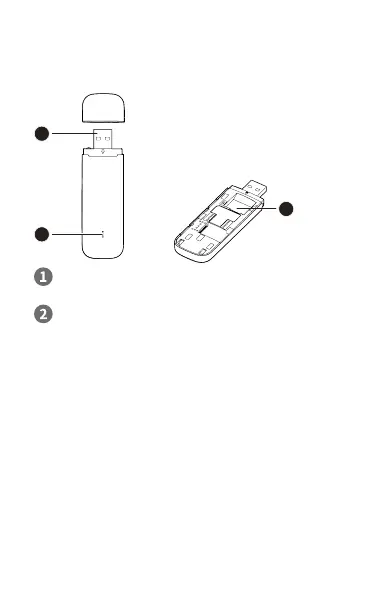
The following figure shows the appearance of the USB
Stick. It is provided only for your reference. The actual
product may be different.
USB Connector
It connects the USB Stick to a PC.
Indicator
It indicates the status of the USB Stick.
• Green, blinking twice every 2s: No service/The network
is not registered.
• Green, blinking once every 0.2s: The software of the
USB Stick is being upgraded.
• Green, blinking once every 2s: The 2G network has
already been registered.
• Blue, blinking once every 2s: The 3G /3G+ network has
already been registered.
• Cyan, blinking once every 2s: The LTE network has
already been registered.
• Green, solid: The USB Stick is connected to a 2G
network.
• Blue, solid: The USB Stick is connected to a 3G network.
English
1



 To Next Page