Need help?
Do you have a question about the Huawei E392 and is the answer not in the manual?
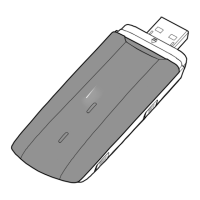
Connects the USB Stick to a PC.
Allows tying the cap and USB Stick together to prevent loss.
Explains the status of the USB Stick via LED light indicators.
Provides the slot for inserting a SIM or USIM card.
Slot for inserting a microSD card for additional memory.
Instructions on how to connect the USB Stick to a PC's USB port.
Steps to install the management program on your PC.
Details on how the management program starts automatically or manually.
Procedure for safely removing the USB Stick from the PC.
Guide to uninstalling the management program from the PC.
The Huawei E392 4G USB Stick is a portable device designed to provide high-speed wireless network access. It functions as a modem, allowing users to connect to 2G, 3G, 3G+, and 4G networks through a personal computer (PC).
The primary function of the Huawei E392 4G USB Stick is to establish an internet connection for a PC via cellular networks. It acts as an interface between the PC's USB port and the wireless network, translating cellular signals into data that the computer can use. The device supports various network technologies, indicated by its LED indicator, which changes color and blinking pattern to reflect the current network status. For instance, a green light blinking twice every 2 seconds signifies that the USB Stick is powered on, while a blue light blinking at the same rate indicates registration with a 3G/3G+ network. A solid green light means a connected 2G network, and a solid cyan light denotes a connected 3G+/4G network. The USB Stick also features a SIM/USIM card slot, which is essential for network authentication and access, as well as a microSD card slot for expandable storage, making it a versatile tool for both connectivity and data management. An RF Output Power Port is included, allowing for the connection of an external antenna to enhance signal reception and overall performance, though the antenna itself is sold separately.
The Huawei E392 4G USB Stick is designed for ease of use and portability. To begin, the user inserts a SIM/USIM card into the designated slot, ensuring proper alignment with the beveled edge. A microSD card can also be inserted for additional storage, following the same alignment guidelines. Once the cards are in place, the USB Stick is plugged into an available USB port on a PC. The device is hot-swappable, meaning it can be connected and disconnected without needing to restart the computer, though proper removal procedures are recommended to prevent data corruption or device damage.
Upon connection, the PC's operating system (OS) typically detects the new hardware automatically and initiates the installation wizard for the management program. If the auto-run feature does not activate, users can manually launch the AutoRun.exe file from the driver path. The installation process is guided by on-screen instructions, and once completed, a shortcut icon for the management program appears on the desktop. This program manages the connection, allowing users to monitor network status, send and receive messages, and configure settings. The management program starts automatically when the USB Stick is connected to the PC, or it can be launched manually via the desktop shortcut.
The USB Stick's compact design, including a strap hole, allows users to secure the cap to the device, preventing loss. This feature enhances its portability, making it convenient for users who travel frequently or need internet access on the go. The indicator light provides immediate visual feedback on the device's operational status, helping users quickly ascertain if it is powered on, registering with a network, or connected.
Maintaining the Huawei E392 4G USB Stick primarily involves careful handling and proper software management. Users are advised not to remove the microSD or SIM/USIM card while the device is in use, as this can lead to data corruption or damage to the cards and the USB Stick itself. When disconnecting the USB Stick from the PC, it is crucial to follow the recommended removal procedure: double-clicking the "Unplug or Eject Hardware" icon in the notification area, selecting the corresponding hardware, and clicking "Stop." This ensures that all data transfer is complete and the device is safely dismounted from the system, preventing potential file system errors or hardware issues.
For software maintenance, the management program can be uninstalled through the PC's "Control Panel > Add or Remove Programs" utility. This ensures a clean removal of the software when it is no longer needed or if a reinstallation is required. Keeping the device's software updated, though not explicitly detailed in the provided text, is generally good practice for optimal performance and security. The indicator light also serves as a diagnostic tool, providing immediate feedback on the device's status, which can help in troubleshooting connectivity issues. For example, if the light is off when the device is connected, it might indicate a power issue or that the USB Stick is not properly recognized by the PC. The inclusion of an RF Output Power Port suggests that users can potentially upgrade their signal reception by connecting an external antenna, which can be a maintenance or upgrade option for users in areas with weak signal strength.
 General
| USB powered | Yes |
|---|---|
| Power consumption | 800 mA |
| Device type | Cellular wireless network equipment |
| Product color | Black |
| Compatible memory cards | MicroSD (TransFlash) |
| Operating temperature (T-T) | -10 - 40 °C |
| Operating relative humidity (H-H) | 5 - 95 % |
| Data network | 4G, CSD, EDGE, GPRS, HSDPA, HSPA+, HSUPA, LTE, UMTS, WCDMA |
| GSM bands supported | 850, 900, 1800, 1900 MHz |
| Market positioning | Portable |
 Weight and Dimensions
| Depth | 13.8 mm |
|---|---|
| Width | 35 mm |
| Height | 100 mm |
| Weight | 40 g |


 To Next Page