9
3 Installation
Installing the UIM Card (Optional)
Caution:
y Consult your service provider to decide whether to use a user identity module
(UIM) card.
y The UIM card and its golden contact can be easily damaged by a scratch or
bend. Be careful when installing or removing the UIM card.
Press and hold
to power off your FWT. Then disconnect it from the power socket.
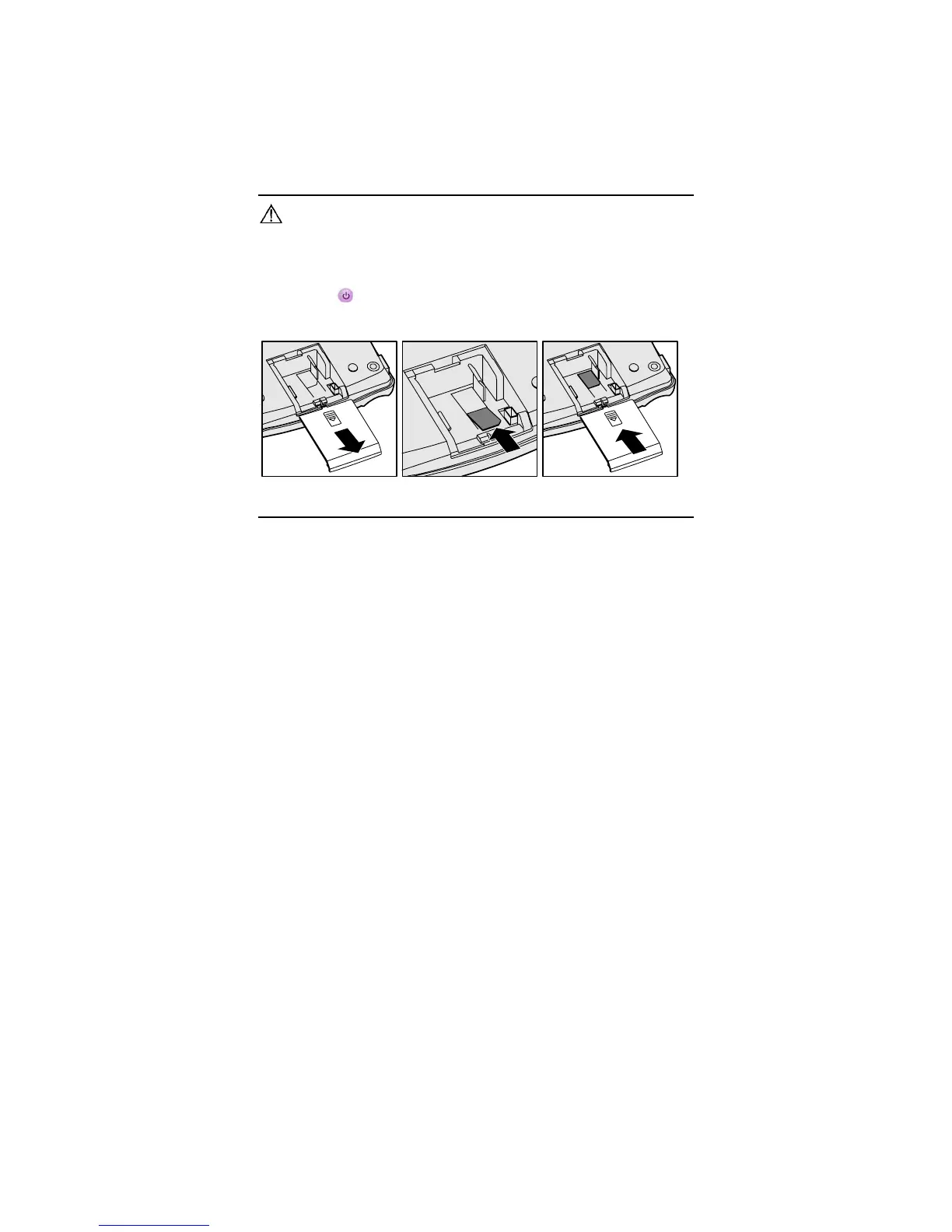
Install the UIM card according to the following figure. Make sure that the golden contact of
the UIM card is facing downwards.
Installing the Power Adapter or the Battery
Note:
y The FWT can be powered by the power adapter or the battery.
y If the FWT is connected to the outdoor antenna, disconnect the outdoor antenna
before replacing the battery.
y If the FWT is connected to the power adapter and the battery is inserted, the
FWT is powered by the power adapter, and meanwhile, the battery is charged.
y Charge the battery for at least eight hours for the first time. If a fully-charged
battery is left unused for a long time, charge it for at least five minutes before
using it again.



 To Next Page