Need help?
Do you have a question about the Huawei EV750 and is the answer not in the manual?
Covers RF exposure compliance and electromagnetic interference precautions.
Guidelines for safe operation while driving and using accessories.
Important cautions for operating the device in specific hazardous environments or conditions.
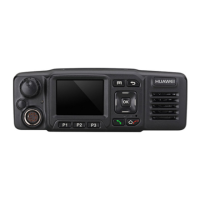
Describes the physical appearance and dimensions of the EV750 device.
Details the keys on the EV750 and its portable microphone.
Explains the icons displayed on the EV750 home screen.
Identifies and describes the various ports available on the EV750.
Step-by-step instructions for turning on the EV750 device.
Step-by-step instructions for turning off the EV750 device.
How to adjust the speaker volume using the device controls.
Instructions for joining, making, and receiving group calls.
How to make and answer point-to-point calls on the EV750.
Procedures for initiating emergency calls and using Direct Mode Operation (DMO).
Explains how to monitor and upload video streams using the EV750.
Refers to other functions available in the full user guide.

 To Next Page
 General