Need help?
Do you have a question about the Huawei OptiX RTN 320 and is the answer not in the manual?
Safety measures for installing the OAU 2A in elevated positions.
Guidelines for installation during adverse weather conditions.
Safety procedures for handling and moving heavy equipment.
Critical safety steps for connecting DC power to the OAU 2A.
Requirements for managing service cables to prevent hazards.
Measures to protect IF ports when they are not in use.
Recommended outdoor network cable setup for local maintenance.
Guidelines for grounding network cables during local maintenance.
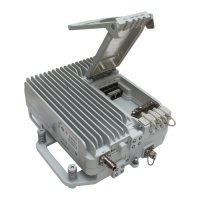
Details the physical layout and connector ports of the OAU 2A unit.
Covers ground, fiber, and DC power cables, including stripping guides.
Steps for preparing tools and stripping outdoor network cables.
Guide to arranging wires and crimping RJ45 connectors.
Procedures for testing cable continuity and terminating the second end.
Step-by-step guide for terminating power cables using a tool-less connector.
Instructions for terminating a ground cable with an OT terminal.
Steps for installing the OAU 2A at a 1+0 site.
Steps for powering on and configuring the OAU 2A after installation.
Steps for installing the OAU 2A at a 2+0 or 1+1 site.
Steps for powering on and configuring the OAU 2A after installation.
Steps for installing the OAU 2A at an XPIC site.
Steps for powering on and configuring the OAU 2A after installation.
Steps for installing the OAU 2A at an Intra-NE 2x2 MIMO site.
Steps for powering on and configuring the OAU 2A after installation.
Steps for installing the OAU 2A at a 4x4 MIMO site.
Steps for powering on and configuring the OAU 2A after installation.
Guide for mounting the OAU 2A unit onto a pole.
Guide for mounting the OAU 2A unit onto a wall.
Procedures for connecting ground and IF cables to the OAU 2A.
Steps for safely opening and closing the OAU 2A's maintenance compartment.
Guide for connecting DC power and outdoor network cables.
Instructions for grounding cable shield layers to prevent lightning damage.
Procedure for connecting outdoor fiber optic cables.
Final steps to secure the maintenance compartment cover.
Steps for mounting and connecting a signal lightning surge protector.
Procedure for installing the ground cable for the surge protector.
Identifying optimal locations for grounding outdoor network cables.
Identifying optimal locations for grounding DC power cables.
Identifying optimal locations for grounding IF cables.
Guide on how to install a ground clip onto a cable.
Steps for installing the outdoor optical splitter on a wall.
Steps for installing the outdoor optical splitter on a pole.
Guide for routing and securing outdoor fiber optic cables.
Connecting fibers to the optical splitter and relevant ports.
Final steps to close and secure the optical splitter enclosure.
Standards for bending, binding, and routing cables.
Specific guidelines for laying cables outdoors.
Procedure for attaching identification labels to cables.
Method for waterproofing cable connections using tapes.
Steps and precautions for powering on the OAU 2A unit.
Using the Web LCT to load network element data.
Checklist for verifying the completeness and correctness of installation.
Overview of the alignment scope's components and important notes.
Steps for attaching support rods to the antenna for the alignment scope.
Procedures for attaching and adjusting the alignment scope.
Instructions for packing the alignment scope and its accessories.
 General
| Humidity | 5% to 95% (Non-condensing) |
|---|---|
| Power Supply | -48 V DC |
| Temperature Range | -40°C to +70°C |
| Interface | Ethernet |
| Modulation Scheme | QPSK, 16QAM, 64QAM |
| Channel Spacing | 3.5 MHz, 7 MHz, 14 MHz, 28 MHz, 56 MHz, 112 MHz |

 To Next Page