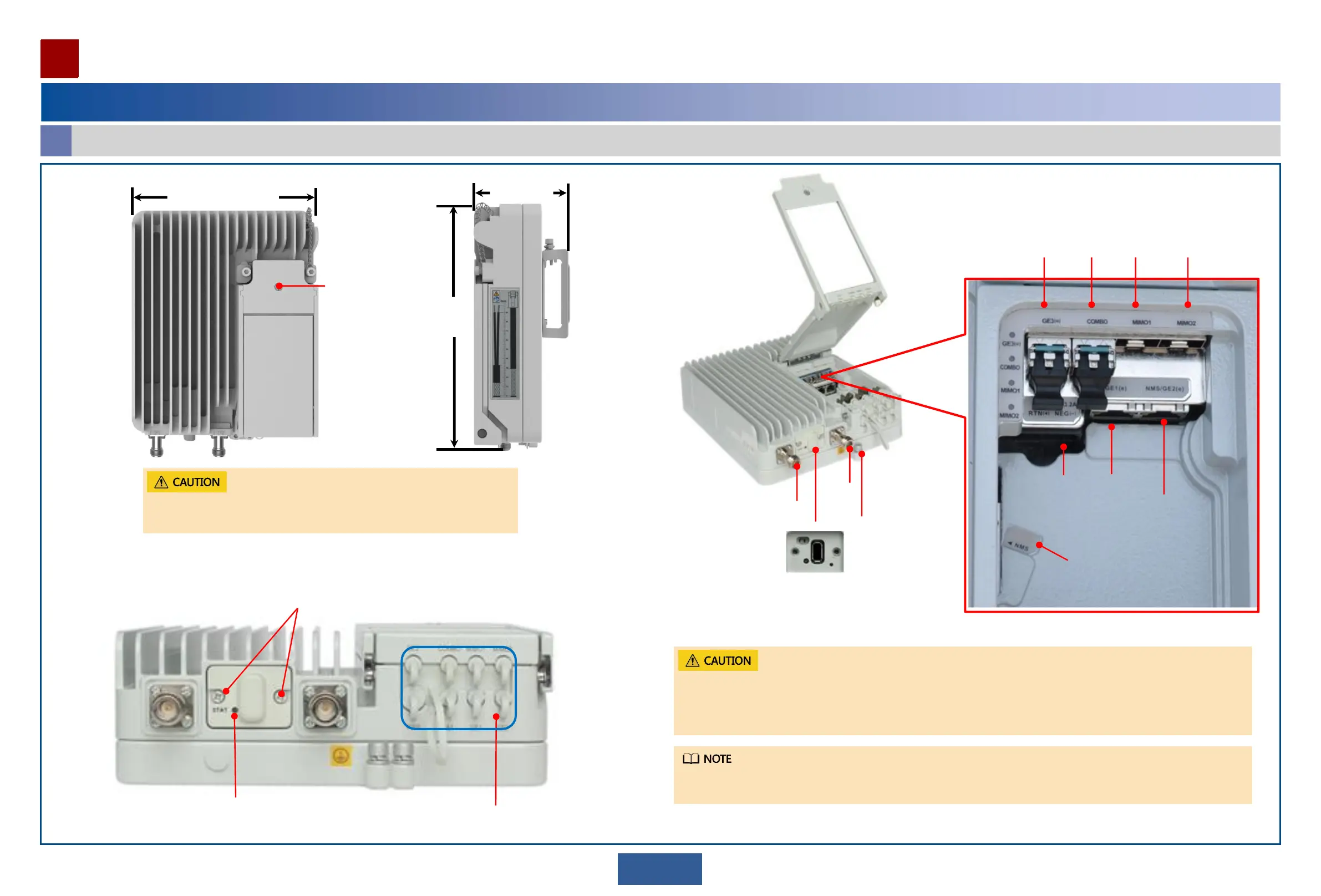
Front view
IF1
Ground
screw
GE3(o) COMBO MIMO2MIMO1
NMS/GE2 (e)
GE1 (e)
IF2
WLAN
module
USB port
compartment
Bottom view
System
indicator
Cable trough and
waterproof blocks
Screw of the
maintenance
compartment
Screws of the
USB port
compartment
• Do not keep the USB port compartment open. Close the USB port compartment when no operation is performed.
• When closing the USB port compartment, ensure that the fall-prevention strip is not pinched by the USB port
compartment cover.
• If the cable trough is not used, plug the cable holes with waterproof blocks.
• Do not keep the maintenance compartment open.
• Close the maintenance compartment after maintenance is complete.
DC power
port
NMS
210mm
290mm
102mm
4
When the GE electrical module is used, and the network cable length is no less than 2 m, a signal lightning surge
protector must be provided to protect devices.
A
Appearance and ports
Equipment Components
Equipment Introduction


 To Next Page