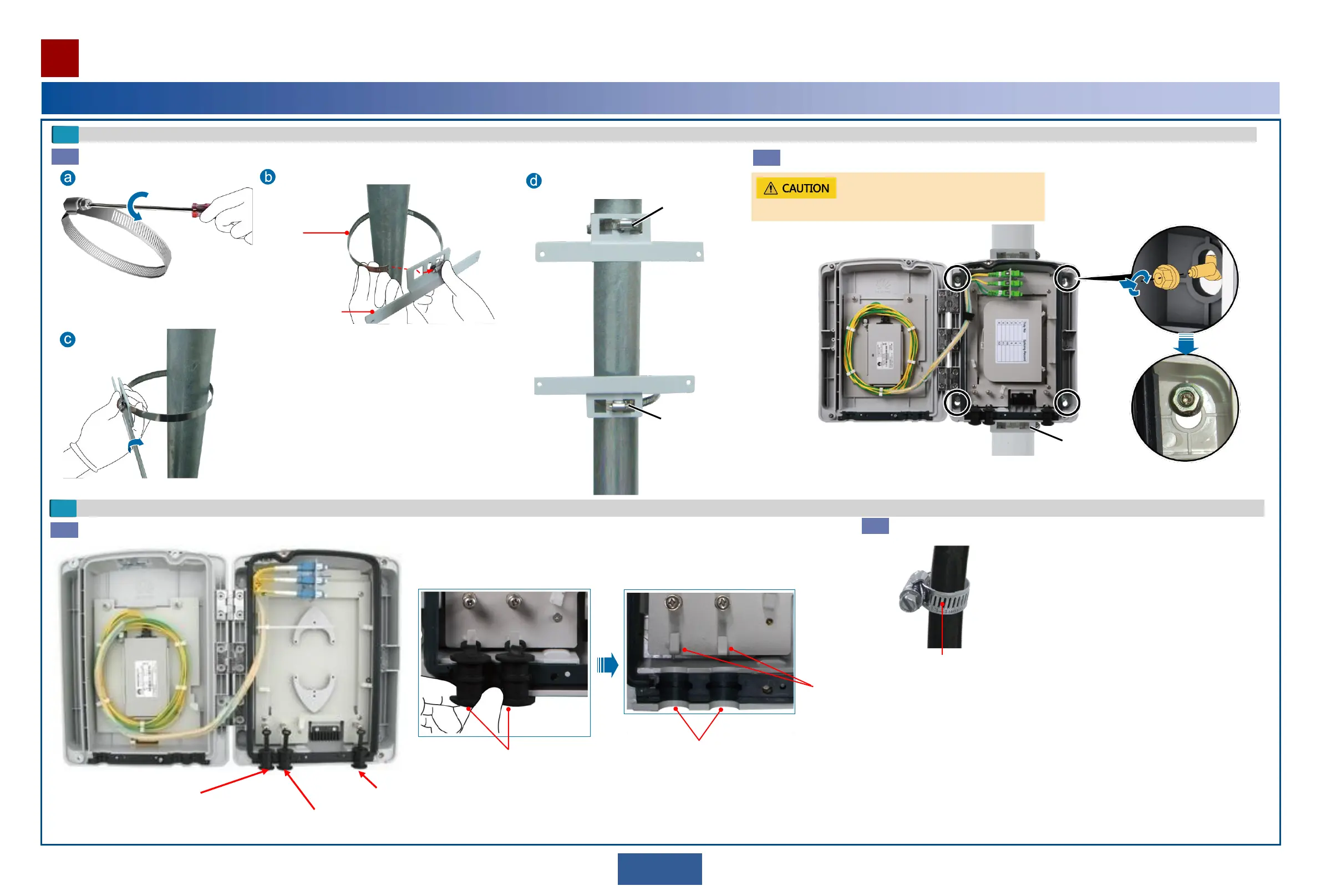
Optional: pole-mounting
Install the pole assembly on the pole.
Assembly
Hold hoop
Loosen the screw on the hold hoop.
Install the pole assembly on the pole.
Tighten the
screw on the
hold hoop.
Tighten the
hold hoop.
Partially
tighten the
hold hoop.
Complete installation of the pole
assembly.
Fix the case on the pole assembly and tighten the lower hold hoop.
Fix the upper end of the case and then the lower end.
Route in and fix cables.
Determine the holes through which fibers are routed in and remove the hole blocks.
Connected to the fiber outlet
on the main OAU 2A.
Connected to the fiber outlet
on the standby OAU 2A.
Connected to the fiber outlet
on the customer equipment.
Hole blocks
Outdoor fiber trough
Fix hose clamps on outdoor fibers.
Hose clamp
Hooks to fix
hose clamps
Tighten the
hold hoop.
4
4
a
b
5
a
b
21
Installing the Outdoor Optical Splitter
Installation Reference


 To Next Page