ODU
OAU 2A
1
2
OAU 2A
1
2
OAU 2A
1
4
2
OAU 2AOAU 2A
1
3
1
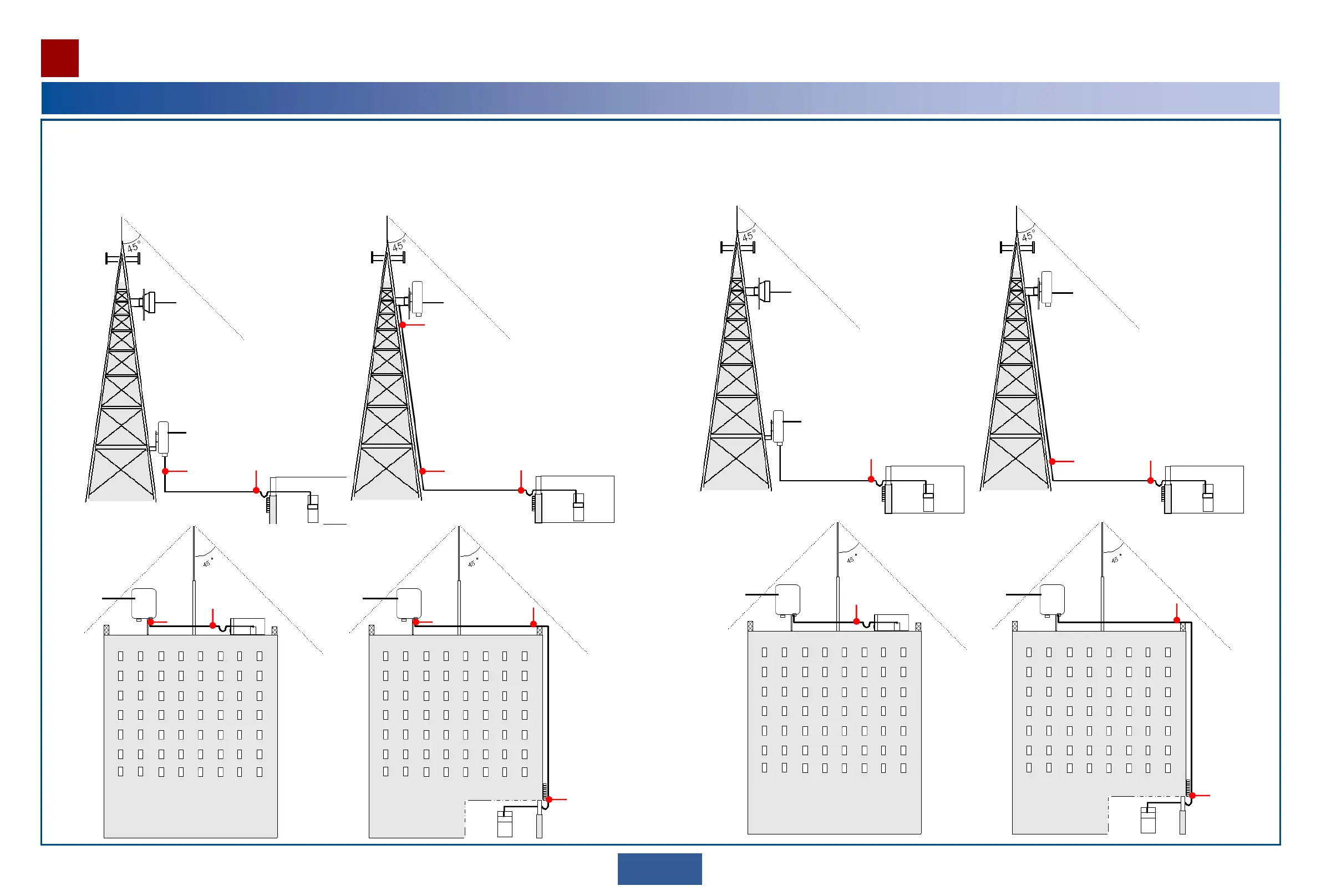
Select ground points for the outdoor network cable.
Ground the outdoor network cable at the following positions:
1. About 0.5 m to 1 m away from the port
2. About 0.5 m to 1 m (1.64 feet to 3.28 feet) before the cable is routed into the equipment room or outdoor cabinet
3. About 1 m before the cable leaves the tower and runs toward the outdoor cable tray
4. About 1 m before the cable leaves the roof cable ladder
Select ground points for the DC cable.
Ground the DC cable at the following positions:
1. About 0.5 m to 1 m (1.64 feet to 3.28 feet) before the cable is routed into the equipment room or outdoor cabinet
2. About 1 m before the cable leaves the tower and runs toward the outdoor cable tray
3. About 1 m before the cable leaves the roof cable ladder
OAU 2A
3
2
1
ODU
OAU 2A
1
OAU 2A
2
1
18
Selecting ground points
Installation Reference


 To Next Page