DC power
•Do not install or remove a live power cable. Any contact between the power cable core and a conductor can generate
electric arc or sparks, which may cause fire or eye injury.
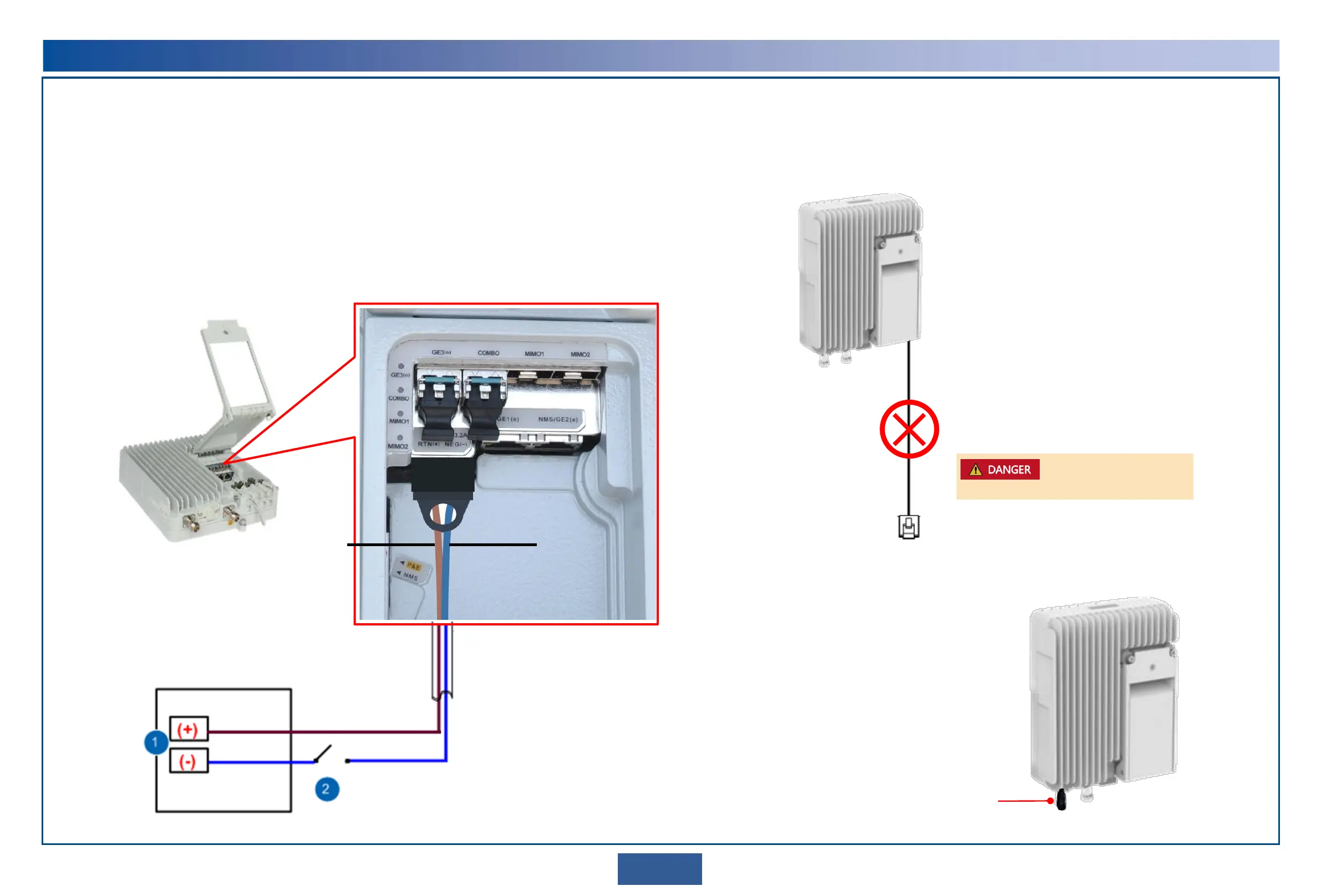
•Connect the power cables correctly to the positive and negative terminals of the power supply device (see circled No.1 in
the figure below). To prevent damage to power cables or devices caused by short-circuits, install a circuit breaker on the
negative terminal of the power supply device (see circled No.2 in the figure below). The recommended fuse capacity is 10
A to 16 A.
•Do not connect the OAU 2A to an AC power supply device. Otherwise, the OAU 2A may be damaged.
•Do not connect the RTN 320 to a DC power supply device providing power beyond the range of –38.4 V to –57.6 V.
Otherwise, the RTN 320 may be damaged.
Do not leave any service cable unconnected
Do not leave any service cable unconnected (see the following figure).
If a service port is not in use, remove the cable from it and plug it with a waterproof block.
IF port protection
If an IF port is not in use, cover it with a protective cap
delivered with the equipment.
Protective cap
RTN(+) RTN(-)
Brown (black): 0 V ground
cable
Blue: -48 V
Power supply device
SW
2
Safety Precautions
Do not leave any service cable unconnected.


 To Next Page