Appendix
56/57 >>
27
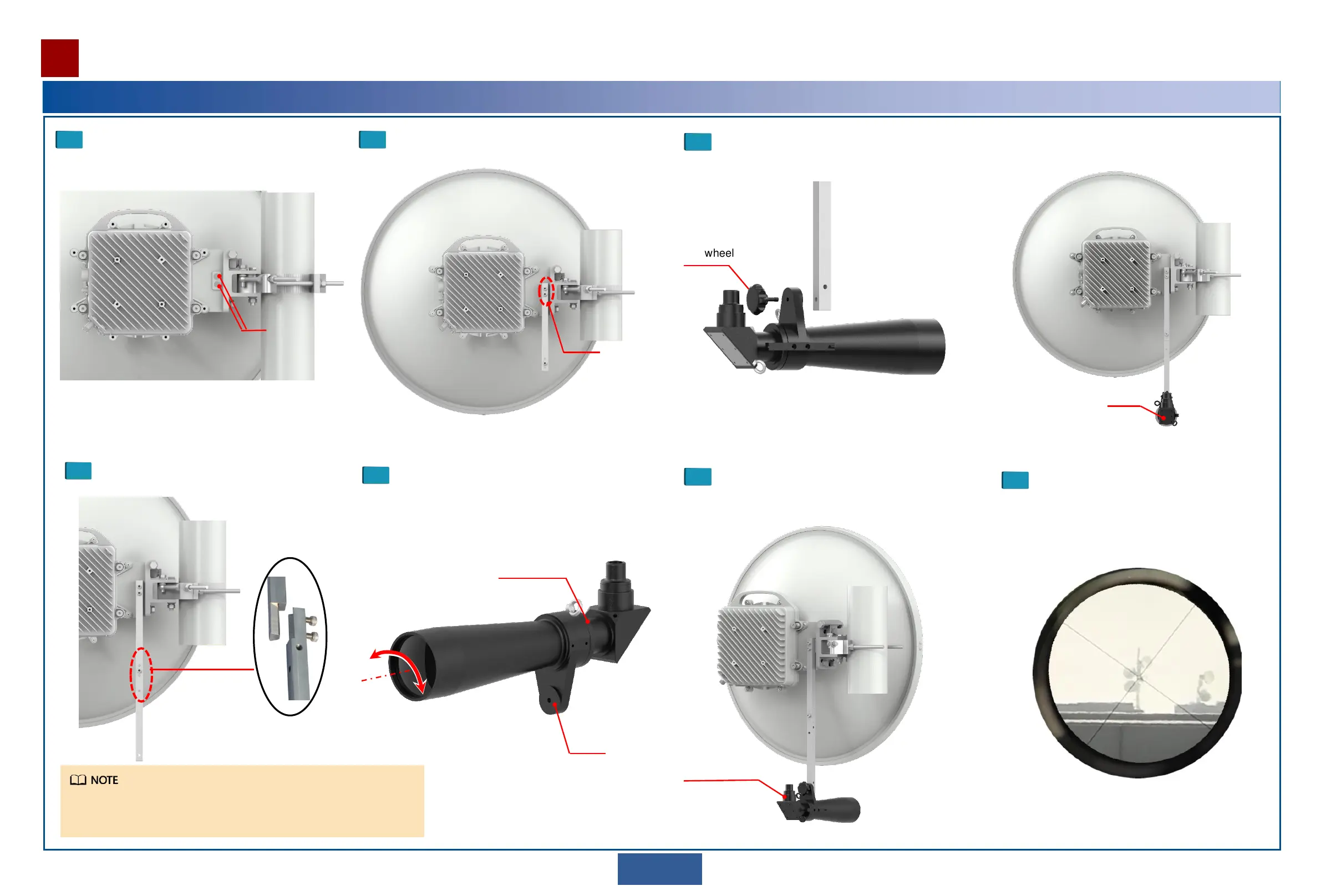
Installing an Alignment Scope
Remove the rubber plugs from the screw
holes reserved for installing the alignment
scope on the antenna mounting bracket.
1
Install support rod A on the antenna mounting bracket.
2
Captive
screw
(Optional) Install support rod B.
Use M6 hex socket
screws M6 to connect
support rods A and B.
Loosen the locking ring, adjust the support plate for
easy installation, and partially fasten the locking ring
to secure the objective lens tube in place.
4
Support
plate
3
Rubber plug
Loosen
Tighten
• Install only support rod A for a 0.2 m or 0.3 m antenna.
• Install both support rods A and B for a 0.6 m or larger antenna.
Locking ring
Secure the alignment scope to the support rod.
5
Handwheel
Loosen the locking ring, adjust the
alignment scope to the desired angle, and
tighten the locking ring.
6
Adjust the antenna horizontally or vertically
until crosshairs line up on the target tower
or pole.
7
Eye lens tube
Alignment scope


 To Next Page