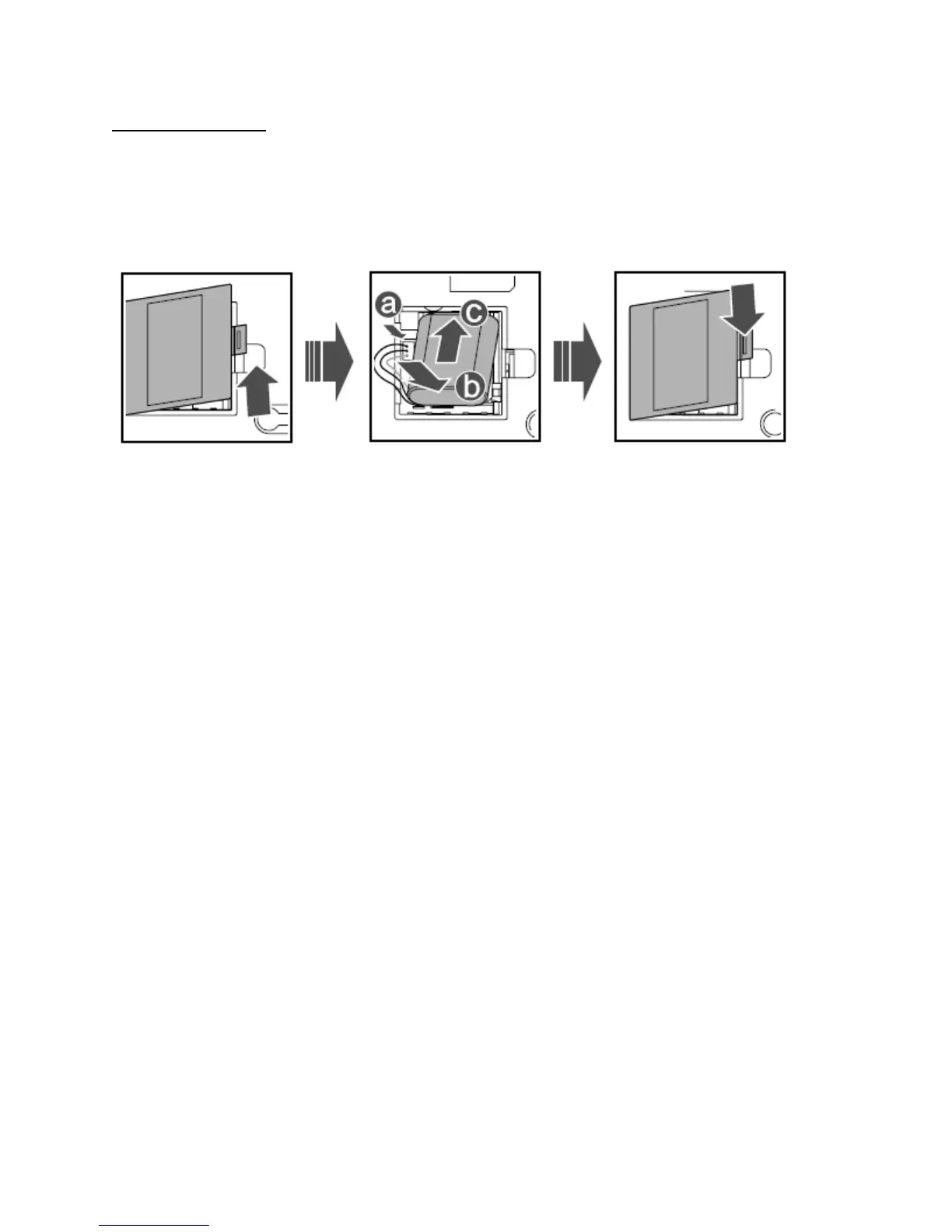
Installing the Battery:
Power off the FWP and unplug the power cable, and install the battery as shown. Make sure that the
battery cord plug matches the battery jack. Do not insert the battery reversely.
Using the Menu
In standby mode, press Left soft key to display the main menu.
2. Press Up/Down key to select a menu item.
3. Press Left soft key to display submenu.
4. Access the submenu in either of the ways:
Press Up/Down key to scroll to a submenu item and press Left soft key to access it.
Press the number key corresponding to the number of a submenu to access it.
5. Press Right soft key to return to the previous menu or return to the home screen.
6. Press End key to return to the standby mode.
Intelligent Input (eZiEn)
In eZiEn input mode, press number keys to enter English words.
1. According to the word to be entered, press the corresponding number keys once, and the FWP makes
out the candidate words.
2. Press Up/Down key or press * repeatedly to select the word.
3. Press Left/Right key to confirm your selection. The word is displayed in the input area. Alternatively,
press the 0 key to confirm your selection and enter a space behind the word.
Warnings and Precautions



 To Next Page