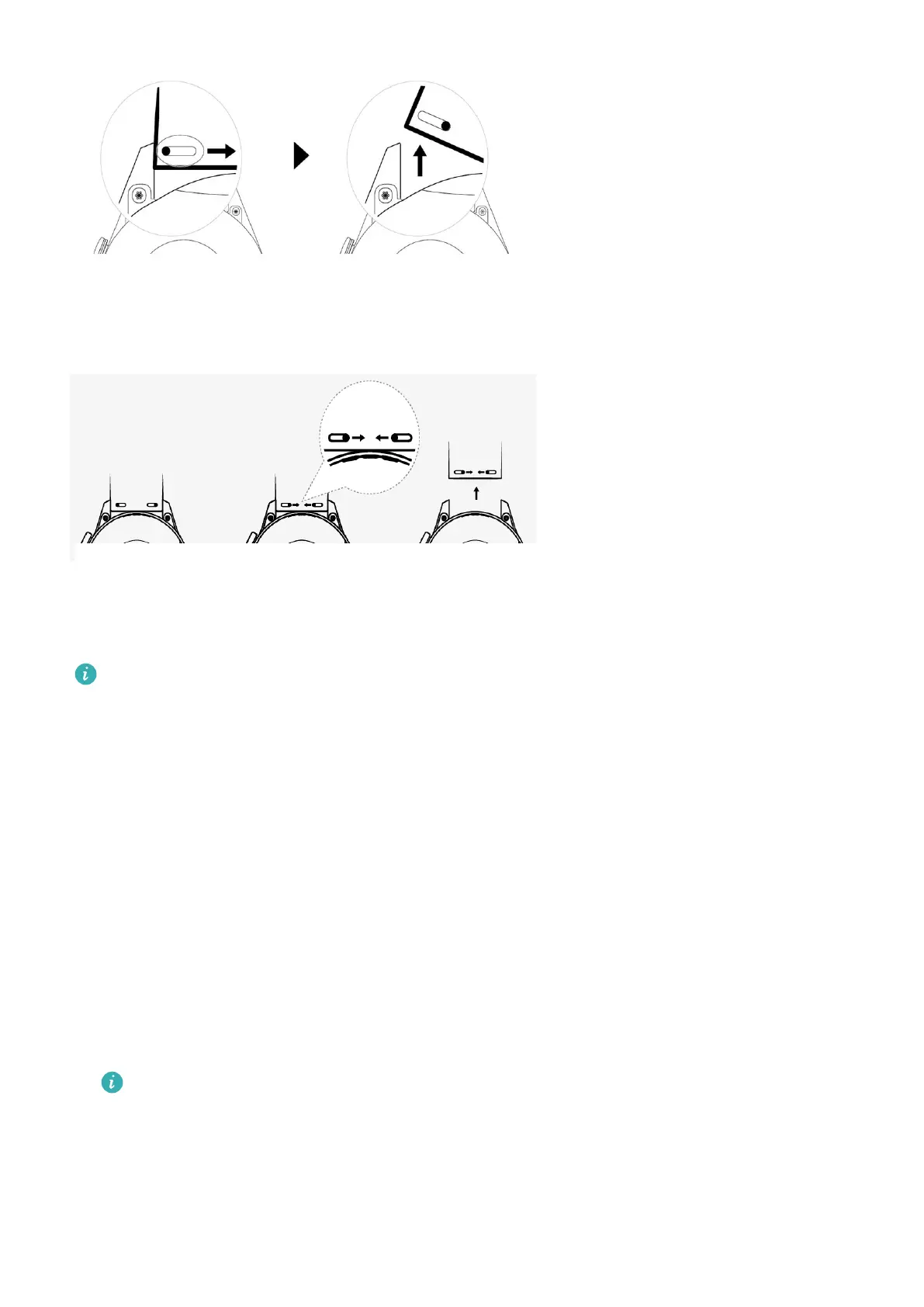
To remove a metal strap, perform the steps shown in the following gure. Follow the steps in
the reverse order to install a new strap.
Setting Gallery watch faces
• Only available on Android phones. If you are using iOS, unpair the device, then pair it
with an Android phone and follow the instructions to transfer photos. The photos will
be saved and you can unpair the device and pair it with your iOS phone again
• This feature requires that the Health app by updated to version 10.0.0.633 or above
and the watch updated to 1.0.1.16 or above.
• You may not be able to set Gallery Watch faces in certain countries and regions.
1 Open the Huawei Health app, touch Devices, go to Watch faces > More > Mine, and
touch Gallery.
2 Touch + and choose to either upload an image from your phone's Gallery or take a new
photo. Then select your desired image and touch Save.
3 On the Gallery screen in the Huawei Health app, touch Style to customize the font and
color of the displayed time and date.
4 Touch Layout to adjust the position of the displayed time and date.
• Only still images can be used as watch faces. There are no restrictions on the le
format
• A maximum of 20 images can be transferred at one. If you transfer multiple images
an image will be selected randomly and displayed each time the screen wakes up.
You can switch between the images by tapping the screen when it's on.
More guidance
37









 To Next Page