
 Need help?
Do you have a question about the Huawei HONOR Band 5 and is the answer not in the manual?
Details the Honor band 5's features including waterproofing, battery life, AMOLED screen, health tracking, and reminders.
Refers to an external post for detailed information on icons displayed on the smart band's screen.
Guides on correctly wearing the smart bracelet to ensure optimal operation of monitoring features.
Details touch and button operations for navigating the Honor band 5 screen and its functions.
Step-by-step instructions for pairing the Honor band 5 with Android and iOS smartphones via the app.
Explains that time and language synchronize automatically from the connected smartphone.
Provides instructions on using the charging base for proper contact and charging the Honor band 5.
Outlines the procedures for turning the Honor band 5 on, shutting it down, and restarting it.
Describes two methods to change the watch face or dial theme on the Honor band 5.
The Huawei Honor Band 5 is a smart band designed to help users monitor their health and facilitate daily life through a range of integrated features. It boasts a 50-meter waterproof rating and an ultra-long battery life, making it suitable for various activities and extended use without frequent charging. The device features an AMOLED multicolor screen, which enhances visibility and user interaction.
The primary functions of the Honor Band 5 revolve around health and activity tracking, communication, and timekeeping. It integrates activity records, allowing users to track their daily movements and exercise. Heart rate monitoring is a key feature, providing continuous or on-demand readings to help users understand their cardiovascular health. Sleep monitoring capabilities analyze sleep patterns, offering insights into sleep quality and duration. Additionally, the band provides message reminders, ensuring users stay connected by displaying notifications from their paired smartphone.
The Honor Band 5 is designed for ease of use with its intuitive control system. The 0.95-inch AMOLED color screen, made from 2.5D arc glass material, supports full-screen touch interactions. Users can navigate the interface through various gestures, including sliding up, down, and right, as well as long-press operations. A dedicated HOME key further simplifies navigation.
Screen Control:
Wearing the Band: To ensure accurate movement, sleep, and heart rate monitoring, the band should be worn correctly as depicted in the user guide. The bracelet strap features a horseshoe buckle anti-lost design. When wearing, one side of the strap is inserted into the hole of the horseshoe buckle, and then the strap buckle is pressed into the other hole of the strap to secure it firmly.
Pairing with a Smartphone: For first-time use, the Honor Band 5 automatically powers on when connected to its charging base. Bluetooth pairing is enabled by default. The band requires a smartphone running Android 4.4 or above, or iOS 9.0 or above, with Bluetooth turned on.
Setting Time and Language: The Honor Band 5 does not require manual time and language settings. When synchronized with a mobile phone, the band automatically adopts the language and time settings of the phone's system. Any modifications to the phone's language, region, time, or time format will be synchronously updated on the smart bracelet once it is normally connected via Bluetooth.
Power On, Shutdown, and Restart:
Changing Dial Themes: The Honor Band 5 offers a variety of dial themes that users can customize.
Charging: The Honor Band 5 is charged using a dedicated charging base. To charge, the plastic positioning boss on the charging base must be inserted into the positioning hole of the bracelet strap. The clasp is then fastened firmly to ensure good contact with the charging port. Once the clasp is closed, a charging icon and power prompt will appear on the Honor Band 5 screen. A full charge typically takes about 100 minutes.
Battery Information: Users can check the battery information directly on the Honor Band 5 itself or through the Huawei Sports Health APP on their paired smartphone.
 General
| Display Type | AMOLED |
|---|---|
| Display Size | 0.95 inches |
| Resolution | 240 x 120 pixels |
| Battery Life | Up to 14 days |
| Water Resistance | 5ATM |
| Connectivity | Bluetooth 4.2 |
| Compatibility | Android 4.4 or later, iOS 9.0 or later |
| Weight | 22.7 grams |
| Strap Material | Silicone |
| Sensors | Accelerometer, Gyroscope, Heart Rate Sensor |
| Charging Time | Approximately 1.5 hours |
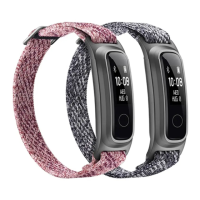
| Colors | Black, Blue, Pink |









 To Next Page
