EasyManua.ls Logo

Huawei HWV33 - Page 74

Huawei HWV33
129 pages
Print Icon
To Next Page IconTo Next Page
To Previous Page IconTo Previous Page
Loading...
73
Getting Ready
c






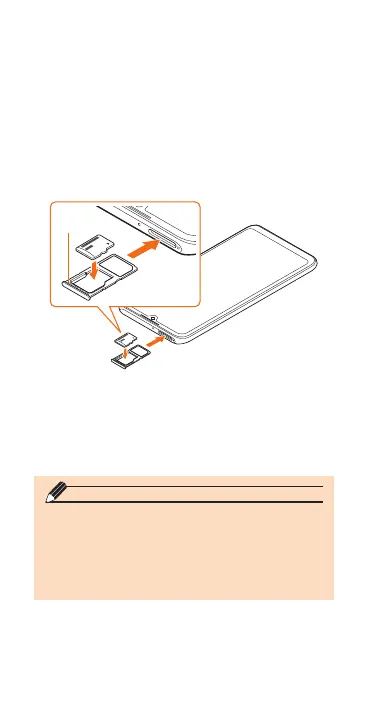
Insert the microSD memory card so
that it is tightly attached to the tray.
Tray
d



u
memo
Insert a microSD memory card with the right
side up in the appropriate direction.
Inserting a microSD memory card forcefully
into the slot could result in failure to remove
the microSD memory card or damage to the
microSD memory card.

Related product manuals