EasyManua.ls Logo

Huawei KOB-W09 - User Manual

Huawei KOB-W09
12 pages
Print Icon
To Next Page IconTo Next Page
Loading...
Quick Start Guide
902170_02
华为信息资产
仅供TUV-SUD公司使用
严禁扩散
Question and Answer IconNeed help?

Do you have a question about the Huawei KOB-W09 and is the answer not in the manual?

Summary

Your Device at a Glance

Device Overview and Controls

Identifies key hardware components like cameras, speakers, buttons, and ports on the device.

Getting Started

Device Setup and Card Insertion

Provides instructions for initial device setup and inserting cards, with safety notes.

For More Information

Online Resources and Legal Information

Guides users to websites for downloads, FAQs, support, and accessing legal/safety info via device settings.

Safety Information

Operation and Safety Precautions

Details crucial safety guidelines for device operation, including hearing protection, power adapters, and temperature limits.

Disposal and Recycling Information

Proper Waste Disposal and Recycling

Explains the importance of proper disposal of electronic waste and batteries according to local regulations.

Hazardous Substances and EU Conformance

Reduction of Hazardous Substances

States compliance with regulations on hazardous substances like REACH and RoHS, directing to the website for details.

EU Regulatory Conformance

Covers body-worn operation RF specifications, SAR values, and EU Directive compliance statement.

RF Band Restrictions and Accessories

Frequency Band Restrictions

Outlines restrictions for 2.4 GHz and 5 GHz bands, including indoor use limitations for specific frequencies.

Frequency Bands and Power

Lists operating frequency bands and maximum radio-frequency power transmission limits for Wi-Fi and Bluetooth.

Recommended Accessories

Lists recommended accessories such as adapters and batteries, with model numbers provided.

FCC Regulatory Compliance

FCC Certification Information (SAR)

Details SAR limits set by the FCC for the USA and reported SAR values for ear and body usage.

FCC Statement and Interference

Provides FCC compliance statement for Class B digital devices and guidance on mitigating radio interference.

Legal Notice

Trademarks and Permissions

Lists trademarks and permissions related to HUAWEI, Android, Bluetooth, Wi-Fi, and ENERGY STAR.

Privacy Policy Information

Directs users to the official website for the privacy policy concerning personal information.

Summary

Your Device at a Glance

Device Overview and Controls

Identifies key hardware components like cameras, speakers, buttons, and ports on the device.

Getting Started

Device Setup and Card Insertion

Provides instructions for initial device setup and inserting cards, with safety notes.

For More Information

Online Resources and Legal Information

Guides users to websites for downloads, FAQs, support, and accessing legal/safety info via device settings.

Safety Information

Operation and Safety Precautions

Details crucial safety guidelines for device operation, including hearing protection, power adapters, and temperature limits.

Disposal and Recycling Information

Proper Waste Disposal and Recycling

Explains the importance of proper disposal of electronic waste and batteries according to local regulations.

Hazardous Substances and EU Conformance

Reduction of Hazardous Substances

States compliance with regulations on hazardous substances like REACH and RoHS, directing to the website for details.

EU Regulatory Conformance

Covers body-worn operation RF specifications, SAR values, and EU Directive compliance statement.

RF Band Restrictions and Accessories

Frequency Band Restrictions

Outlines restrictions for 2.4 GHz and 5 GHz bands, including indoor use limitations for specific frequencies.

Frequency Bands and Power

Lists operating frequency bands and maximum radio-frequency power transmission limits for Wi-Fi and Bluetooth.

Recommended Accessories

Lists recommended accessories such as adapters and batteries, with model numbers provided.

FCC Regulatory Compliance

FCC Certification Information (SAR)

Details SAR limits set by the FCC for the USA and reported SAR values for ear and body usage.

FCC Statement and Interference

Provides FCC compliance statement for Class B digital devices and guidance on mitigating radio interference.

Legal Notice

Trademarks and Permissions

Lists trademarks and permissions related to HUAWEI, Android, Bluetooth, Wi-Fi, and ENERGY STAR.

Privacy Policy Information

Directs users to the official website for the privacy policy concerning personal information.

Overview

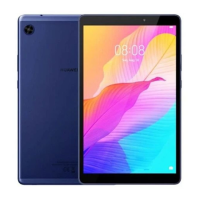
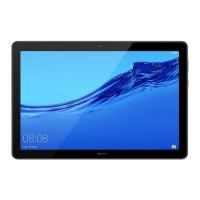
This document describes the HUAWEI MediaPad T3, a tablet device designed for general use. It provides essential information for getting started, safety, regulatory compliance, and product specifications.

Function Description

The HUAWEI MediaPad T3 is a tablet designed for various functions including communication, entertainment, and productivity. It features a display, front and rear cameras, a speaker, and a headset jack for audio output. The device is powered by a battery and can be charged using a compatible power adapter. It supports wireless connectivity via Wi-Fi and Bluetooth. The tablet runs on a software system that allows users to access various applications and features.
Important Technical Specifications

  • Model: KOB-W09
  • Operating Temperatures: Ideal operating temperatures are 0 °C to 35 °C.
  • Storage Temperatures: Ideal storage temperatures are -40 °C to +70 °C.
  • SAR Values (Highest Reported):
    • At the ear: 1.80 W/kg (EU), 0.72 W/kg (USA)
    • On the body: 1.13 W/kg (EU), 1.19 W/kg (USA)
  • Wireless Connectivity:
    • Wi-Fi 2.4G: 20dBm
    • Bluetooth: 20dBm
    • Wi-Fi 5G: 5150-5350MHz: 23dBm, 5470-5725MHz: 30dBm
  • Power Adapter: Recommended model HW-050100X01 (X denotes different plug types).
  • Batteries: Recommended models HB3080G1EBW, HB3080G1EBC.
  • Earphones: MEMD1532B528000, HA1-3, 1293#+3283# 3.5MM-150.
  • Product Software Version: KOB-W09:KOB-W09C100B252CUSTC100D001.
  • Memory Card: Supports microSD cards.
  • Ports: Micro USB port, Headset jack.

Usage Features

  • Power On/Off: To power on, press and hold the power button until the screen turns on. To power off, press and hold the power button and then touch the power off icon.
  • Force Restart: To force a restart, press and hold the power button until the device vibrates.
  • Navigation: The device includes volume keys and a power key for interaction.
  • Card Tray: The device features a card tray for inserting a microSD card. An eject pin is provided for opening the tray.
  • Information Access: Users can access legal information, safety information, authentication info, and certification logos through the device's "Settings" > "About tablet" menu.
  • Wireless Operation: The WLAN function is restricted to indoor use only when operating in the 5150 to 5350 MHz frequency range.
  • Accessories: Optional accessories may be available and can be purchased from licensed vendors.

Maintenance Features

  • Software Updates: Software updates will be released by the manufacturer to fix bugs or enhance functions. All released software versions are compliant with relevant rules.
  • Cleaning and Environment:
    • Avoid using the device in dusty, smoky, damp, or dirty environments or near magnetic fields to prevent damage to parts or internal circuits.
    • Keep the device and battery away from excessive heat and direct sunlight. Do not place them on or in heating devices like microwave ovens, stoves, or radiators.
  • Charging: Ensure the power adapter is plugged into an easily accessible socket near the device. Unplug the charger from electrical outlets and the device when not in use.
  • Battery and Device Disposal: Dispose of the device, battery, and accessories according to local regulations. They should not be disposed of in normal household waste. The crossed-out wheeled-bin symbol indicates that electronic products and batteries must be taken to separate waste collection points for recycling.
  • Eject Pin Handling: Store the eject pin out of reach of children to prevent accidental swallowing or injury. Be careful not to scratch yourself or the device when using the eject pin.
  • Hearing Protection: To prevent possible hearing damage, avoid listening at high volume levels for long periods.
  • Approved Components: Use only approved or compatible power adapters, chargers, or batteries to avoid damaging the device, shortening its lifespan, or causing hazards like fire or explosion.
  • RF Parameters: All RF parameters (frequency range, output power) are not user-accessible and cannot be changed.

Huawei KOB-W09 Specifications

General IconGeneral
BrandHuawei
ModelKOB-W09
CategoryTablet
LanguageEnglish

Related product manuals