21
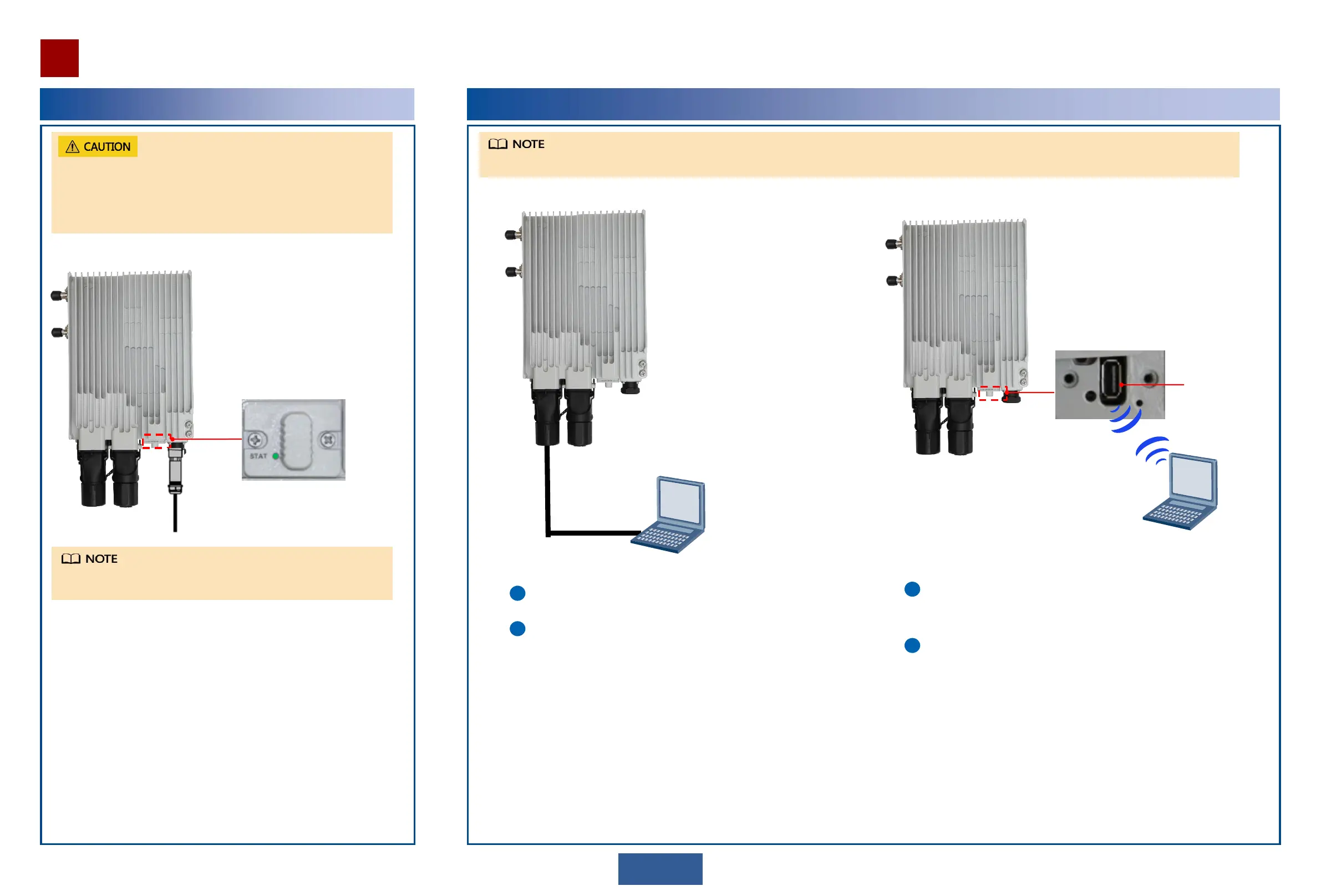
System indicator
Use the Web LCT to configure NE data. For details, see the
Commissioning and Configuration Guide.
Use the Web LCT to configure NE data. For details, see the
Commissioning and Configuration Guide.
Connect the Web LCT to the equipment through WLAN. For
information about how to connect the Web LCT to the equipment
through WLAN, see the Commissioning and Configuration Guide.
Connect the computer where the Web LCT is installed to
the RJ45 port.
Before powering on the equipment, ensure that:
The P&E cable and the PI power cable are installed.
Power on the equipment within 24 hours of unpacking.
During maintenance, the power-off time of the equipment cannot be
longer than 24 hours.
In normal conditions, the system indicator is on. For a description of
indicator states, see the Product Description.
The OAU 2F supports use of a network cable to directly connect the NMS port to the Web LCT. It also supports use of a WLAN module to connect to the Web LCT.


 To Next Page