29
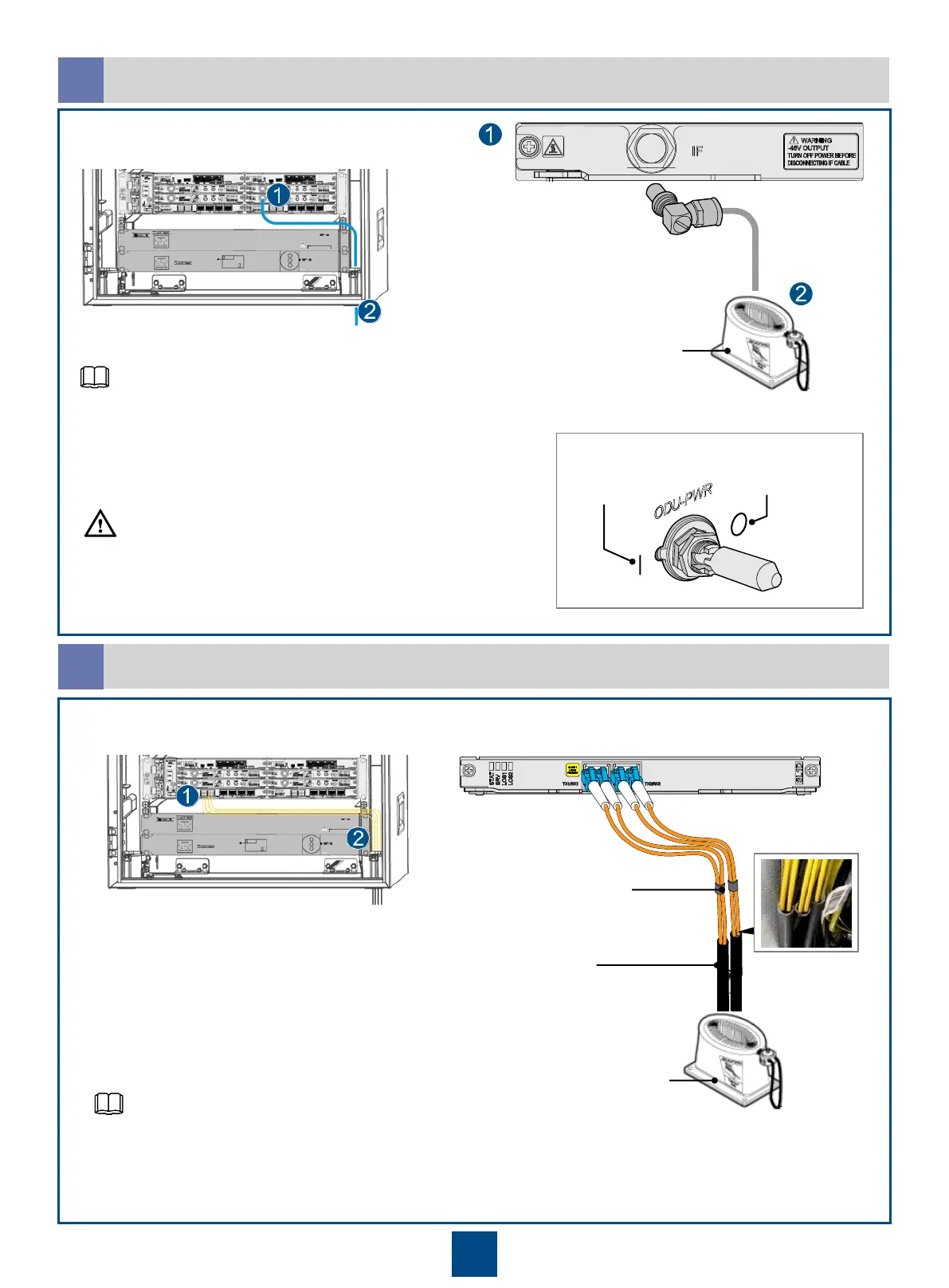
Installing IF Cables
c
Installing Fibers
d
Do not remove or insert the IF cables when the
ODU is powered on.
CAUTION
Insulation tube
Binding strap
Cable bag
APM30H/TMC11H Ver.C and earlier versions use rubber blocks to
lead out cables, and APM30H/TMC11H Ver.D and later versions use
cable bags to lead out cables.
If the IF board is IF1/IFU2/IFX2/ISV3/ISU2/ISX2, turn off the ODU-
PWR switch on the IF board. If the IF board is ISM6, skip this
operation.
Off
On
I:
O:
Turning off the ODU-PWR switch on the IF
board
APM30H/TMC11H Ver.C and earlier versions use rubber blocks to
lead out cables, and APM30H/TMC11H Ver.D and later versions use
cable bags to lead out cables.
Cable bag
NOTE
NOTE



 To Next Page