12
4 Tab Pages on the PCU User Interface
For more information about the PCU software functions, please refer to the following
details.
Main Tab Page
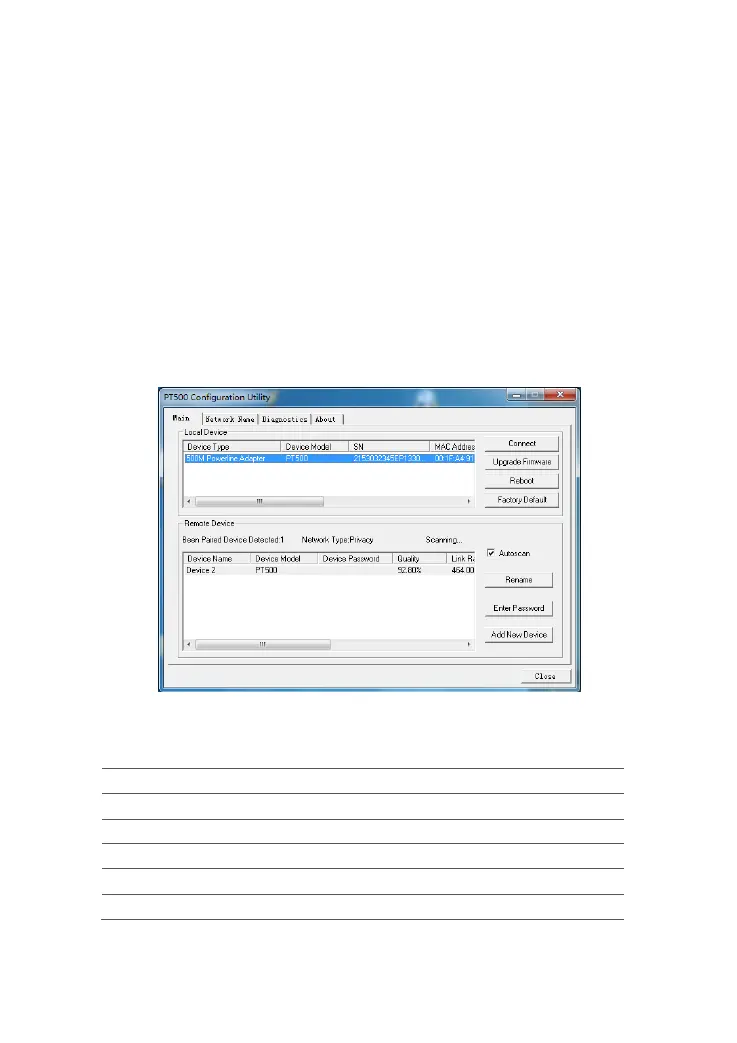
Main Tab Page includes two areas. The Local Device area shows the information of
device which connects your current PC and the Remote Device area show the
information of other device which in your network.
Figure 4-1 shows the Main tab page.
Figure 4-1 Main tab page
Table 4-1 describes the buttons on the Main tab page.
Table 4-1 Buttons on the Main tab page
Button Description
Connect Connect to the specified remote device.
Upgrade Firmware Upgrade the firmware.
Reboot Restart a specified device.
Restore Default Restore a specified device to default settings.
Rename Rename a specified device.



 To Next Page