4
2 PT500 Installation
Network cables and power line adapters are required if you want to use power lines to
connect terminal devices to a LAN.
Connecting the Hardw are
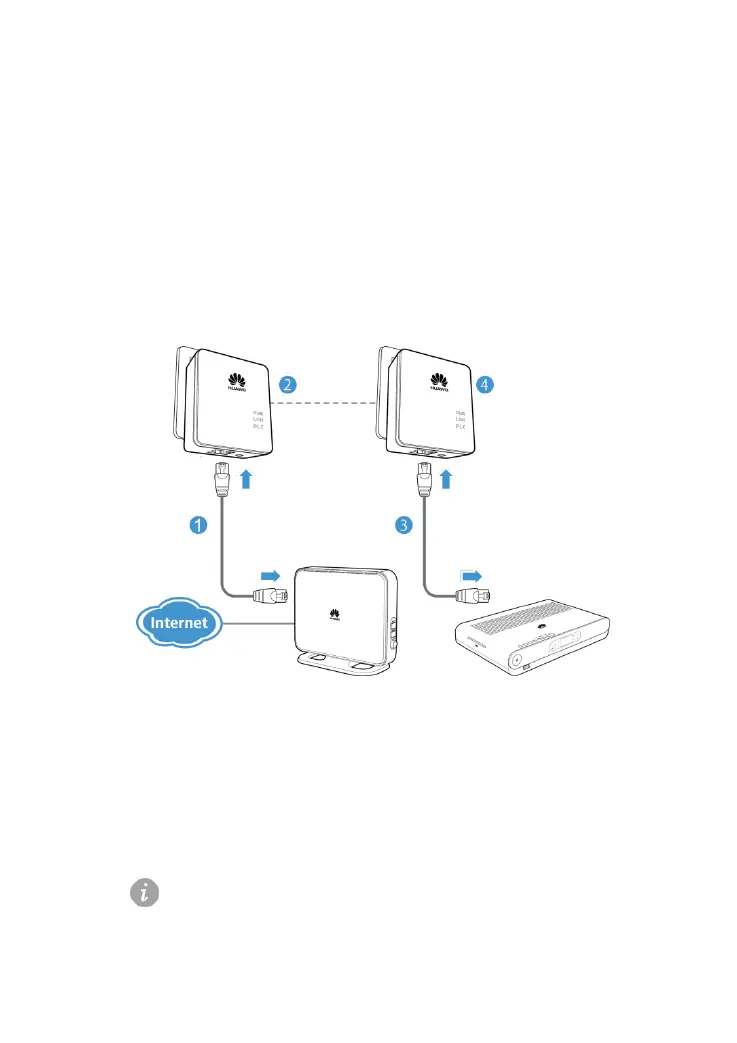
Figure 2-1 shows how to use the power line adapter to set up a network.
Figure 2-1 Using the power line adapter to set up a network
1. Use a network cable to connect a PT500 and network device, such as a
gateway.
2. Connect the PT500 to a power socket. The PWR indicator turns steady on.
3. Use another network cable to connect the other PT500 and an STB or other
terminal devices.
Connect the second PT500 to another power socket. The PWR indicator turns
steady on.
One PT500 is required to add each terminal device to the network.
Number of required PT500 adapters = Number of terminal devices + 1



 To Next Page