3
Indicators
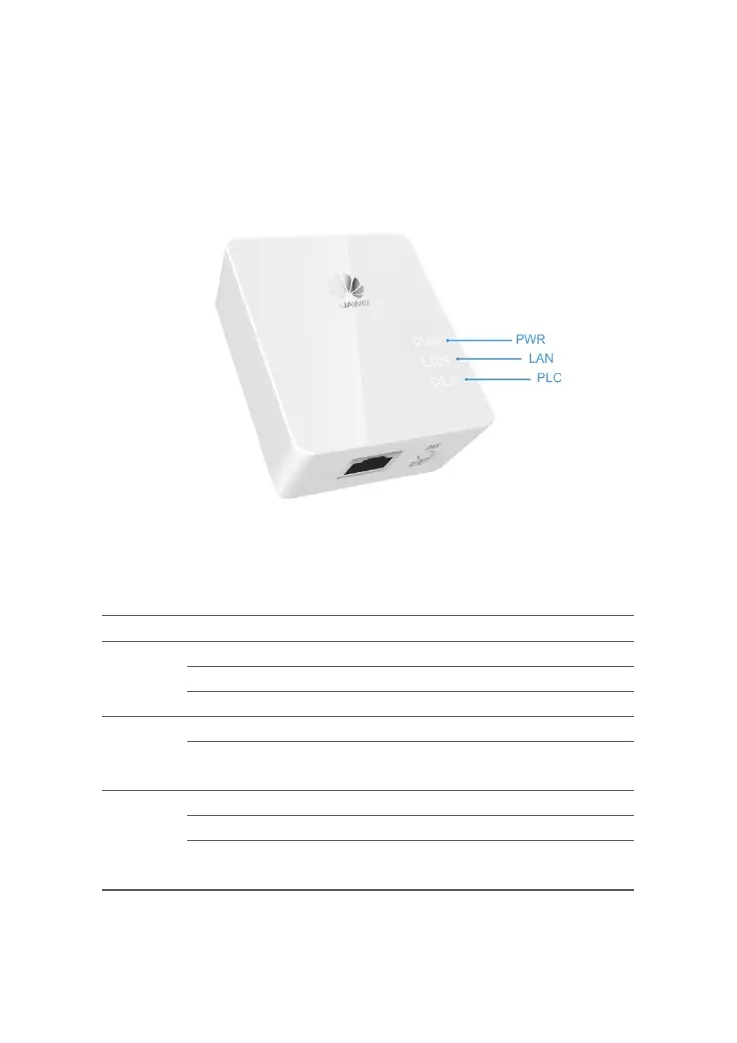
Figure 1-3 shows the indicators on the PT500 panel.
Figure 1-3 Indicators on the PT500 panel
Table 1-2 describes the indicators on the PT500 panel.
Table 1-2 Indicators on the PT500 panel
PWR Steady on The PT500 is running.
Flicker The PT500 is running in energy saving mode.
Off The PT500 is powered off.
LAN Steady on The PT500 is connected to the network.
Off The PT500 is not connected to the network or is running in
energy saving mode.
PLC Steady on The PT500 is connected to a device of the same type.
Blinks The PT500 is searching for a network.
Off The PT500 is not connected to the network or is running in
energy saving mode.



 To Next Page