EasyManua.ls Logo

Huawei R240D - Appendix; Cable Assembly and Installation

Huawei R240D
112 pages
Print Icon
To Next Page IconTo Next Page
To Previous Page IconTo Previous Page
Loading...
R240D
Hardware Installation and Maintenance Guide
2 AP Installation
Huawei Proprietary and Confidential
Copyright © Huawei Technologies Co., Ltd.
17
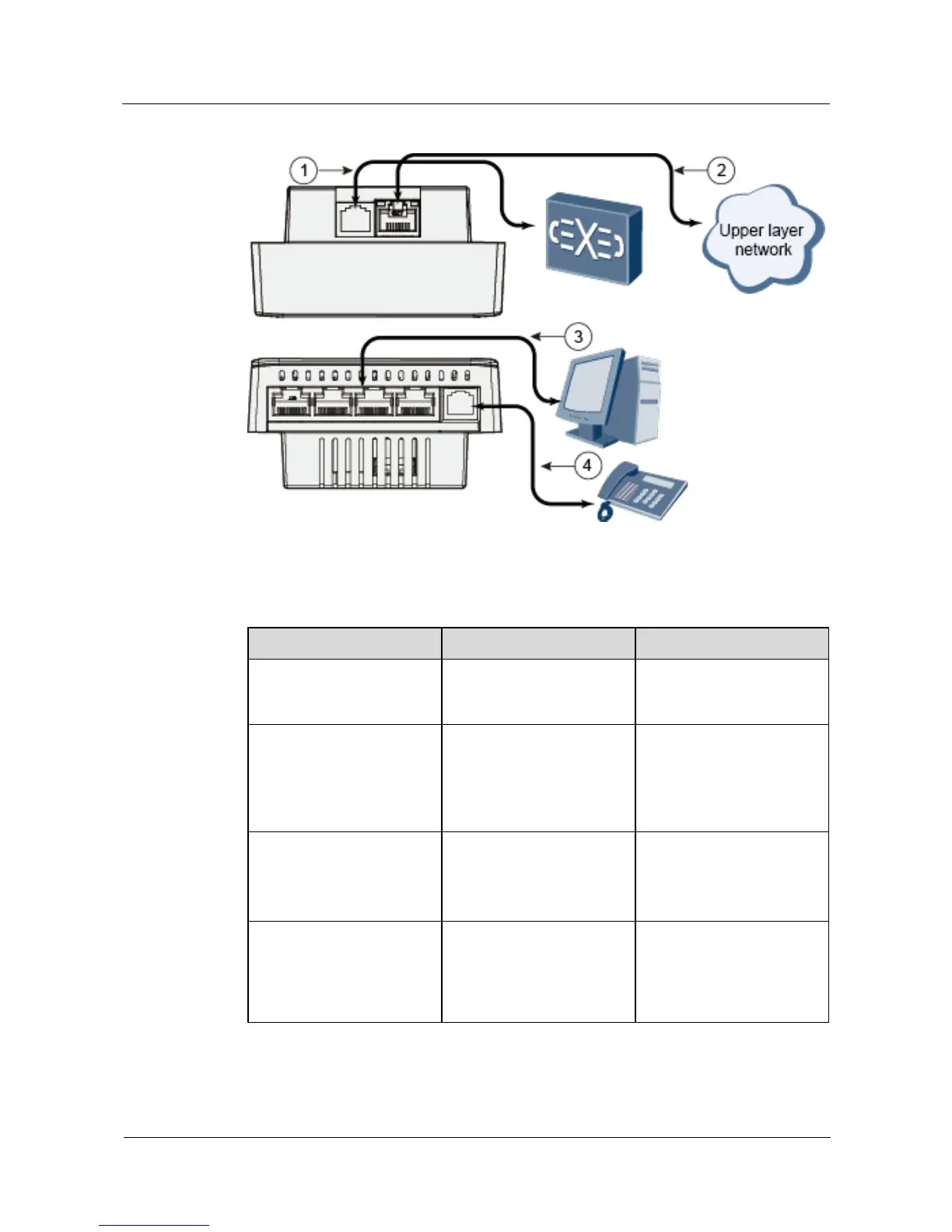
Figure 2-3 Interfaces of the R240D
Table 2-3 shows cable connections of the R240D.
Table 2-3 Cable connections
No.
Cable
Description
1
Phone cable
Connects the uplink phone
interface to the traditional
PSTN.
2
Ethernet cable
Connects the Ethernet
interface to the upstream
PSE Ethernet interface.
CAT5E cables or higher
must be used.
3
Ethernet cable
Connects the Ethernet
interface to the terminal.
CAT5 cables or higher must
be used.
4
Phone cable
Connects the downstream
phone interface to the
traditional phone (POTS
phone) or modem
equipment.

Table of Contents

Other manuals for Huawei R240D

Related product manuals