7
Getting Start
English
3. Getting Start
3.1 Charge Eclipse+
• Connect the charging cradle with a 5V 2A power adaptor (not included.)
• Put Eclipse+ on the charging cradle.
3.2 Power on Eclipse+
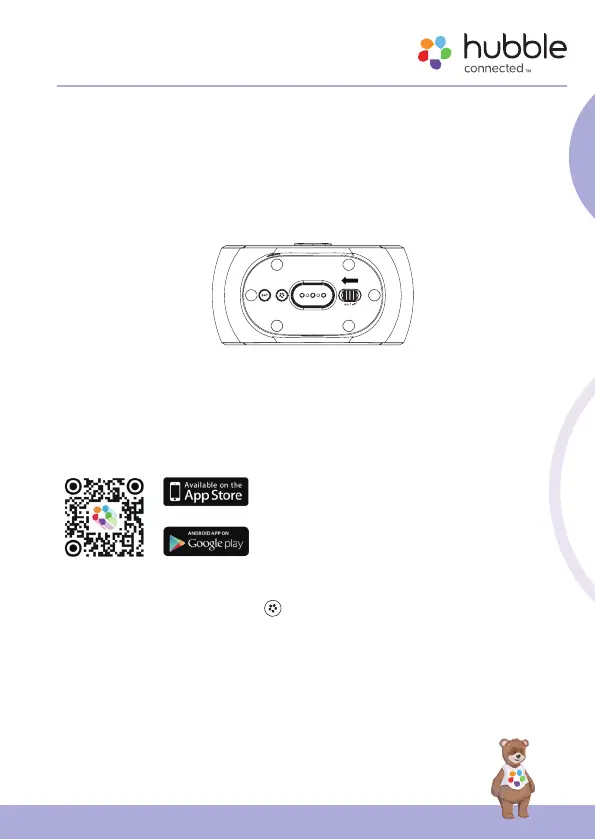
Slide the Power Switch to switch on Eclipse+. The Night Light, Digital Clock
and backlight of the touch keys will turn on.
3.3 Connect to HubbleClub
• Scan the QR code with your smart device
and download HubbleClub by Hubble
Connected App from the App Store for
iOS devices or from the Google Play™
Store for Android™ devices.
• Install HubbleClub by Hubble Connected
App on your device.
1. Press and hold Hubble Pair
button at the bottom of Eclipse+.
2. The LED indicator blinks in red and blue alternatively for 180 s at pairing
mode.
3. Follow the instructions of HubbleClub App to create your HubbleClub
account.
4. Select Wellness and then Eclipse+, follow the in-app instructions to
connect Hubble Eclipse+ to your account.


 To Next Page