
 Need help?
Do you have a question about the Huddly L1 and is the answer not in the manual?
Device intended for ambient temperatures between 0 °C and 35 °C. Avoid heat sources or direct sunlight.
Modifications to thermal solution, components, or enclosure violate compliance and may induce safety hazards.
Use the 1/4” tripod mount to attach bracket, mount L1 at max 2m height, ensure ventilation.
Powered by PoE PSE adhering to 37-57V DC and 0.35A max current.
L1 supports streaming via RTSP and ONVIF protocols.
Procedure to reset L1 to factory default using reset button and Ethernet cable.
Industry Canada statement for Class A digital apparatus, CAN ICES-3 (A)/NMB-3(A).
FCC compliance statement for Part 15 of FCC Rules, commercial environment operation.
C-Tick marked Class A product. May cause radio interference in domestic environments.
EU Single Point of Contact and EMC Directive conformance for Class A equipment.
End User Licence Agreement terms available at www.huddly.com/eula.
Privacy policy available at www.huddly.com/privacy-policy.
Further compliance information at www.huddly.com/L1/compliance.
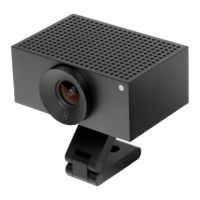
The Huddly L1 is a camera designed for easy installation and use in professional environments, primarily for video conferencing and streaming applications. It leverages a single RJ45 Ethernet cable for both power and communication, simplifying its setup and integration into existing network infrastructures. This design choice highlights a focus on efficiency and reduced cable clutter, which is beneficial in various installation scenarios.
The Huddly L1 functions as a high-quality video camera capable of streaming content over standard network protocols. Its core purpose is to capture video and transmit it to a host computer or a network-enabled device. The camera supports Real Time Streaming Protocol (RTSP) and Open Network Video Interface Forum (ONVIF), which are widely adopted standards for video streaming and network video management. This broad compatibility ensures that the L1 can be integrated into a wide range of existing video conferencing systems and network surveillance platforms without proprietary software requirements. The use of Power over Ethernet (PoE) means the camera receives electrical power through the same Ethernet cable that carries its data, eliminating the need for a separate power adapter and outlet. This feature enhances installation flexibility, allowing the camera to be placed in locations where power outlets might be scarce or inconvenient. The L1 is designed to operate within specific ambient temperature ranges, ensuring reliable performance in typical indoor office environments. Its robust design is intended to prevent modifications to the thermal solution or internal components, as such alterations could compromise regulatory compliance and safety.
The Huddly L1 is engineered for straightforward deployment and operation. Installation is facilitated by a 1/4” tripod mount located on the bottom face of the camera, allowing it to be attached to various brackets or mounting accessories. The recommended maximum mounting height is 2 meters, which is suitable for most room setups, from small huddle spaces to larger conference rooms. Proper airflow is crucial for the camera's performance and longevity, so it must be installed in a location where its top and bottom venting holes are unobstructed. This attention to thermal management ensures stable operation during extended use.
Connecting the camera involves a minimum Cat5e rated Ethernet cable, which should be terminated in a PoE-enabled host or midspan adapter. This ensures both power delivery and data communication. For users who opt for third-party Ethernet cables, the manual advises prioritizing cables with short connectors, as longer connectors might be more challenging to disconnect. This practical tip helps prevent potential issues during setup or maintenance.
The L1's power requirements are met by a PoE Power Sourcing Equipment (PSE) that adheres to specific voltage and current ranges (37-57V DC and a maximum current of 0.35A). These specifications are standard for PoE devices, making it compatible with a wide array of network switches and injectors.
To ensure users always benefit from the latest enhancements and features, Huddly provides software updates. Users are encouraged to visit the Huddly website for instructions on how to update their camera's software, ensuring optimal performance and access to new functionalities.
The Huddly L1 incorporates a factory reset function, which is a key maintenance feature for troubleshooting or reconfiguring the device. This process allows users to restore the camera to its default settings, which can resolve various software-related issues or prepare the camera for a new deployment. The factory reset procedure is simple and involves disconnecting the Ethernet cable, pressing a small reset button located in the connector cavity with a thin object, and then reinserting the Ethernet cable while keeping the button pressed for 10 seconds after power is reapplied. This method ensures that the reset is intentional and prevents accidental resets during normal operation.
Beyond functional maintenance, Huddly emphasizes environmental responsibility through its recycling guidelines. At the end of the product's life, users are instructed to follow local rules and regulations regarding electronic waste. The L1 is designed to be recyclable, and if applicable and possible, it should be handed over to a designated collection point for recycling purposes. This commitment to sustainability aligns with broader environmental protection efforts.
Huddly also provides comprehensive support resources. Users can find additional information, including End User License Agreement (EULA) terms and privacy policy details, on the Huddly website. Furthermore, specific compliance information for the L1 is available online, ensuring transparency regarding regulatory standards and certifications. This accessible support infrastructure empowers users to manage their devices effectively and stay informed about important legal and technical aspects. The device's compliance with various international standards, including those for Canada, the United States (FCC), Australia, New Zealand, and the European Union (CE mark), underscores its suitability for global markets and its adherence to strict quality and safety regulations. The Class A designation in these regions indicates its intended use in commercial environments, with specific warnings regarding potential radio interference in domestic settings, prompting users to take appropriate measures if used outside its intended environment.
 General
| Mounting kit | Yes |
|---|---|
| Cables included | LAN (RJ-45) |
| Megapixel | 20.3 MP |
| Sensor type | CMOS |
| Optical sensor size | 1/1 \ |
| Aperture range (F-F) | 2.9 - 2.9 |
| Vertical field of view | 65 ° |
| Horizontal field of view | 92 ° |
| Windows operating systems supported | Windows 10 |
| Maximum frame rate | 30 fps |
| Supported video modes | 720p, 1080p |
| Maximum video resolution | 1920 x 1080 pixels |
| Package depth | 280 mm |
| Package width | 188 mm |
| Package height | 96 mm |
| Product color | Black |
| USB 3.2 Gen 1 (3.1 Gen 1) Type-A ports quantity | 1 |
| Harmonized System (HS) code | 85258900 |
 Weight and Dimensions
| Depth | 90 mm |
|---|---|
| Width | 122 mm |
| Height | 53 mm |
| Weight | 600 g |

 To Next Page
