KNOW YOUR WELDER
Description
POWERTIG 300DP
III is a digitization model can be used for MMA、DCTIG and PULSE TIG, the
parameters can be preset and showed, welding current can real-time display, this is very easy operation.
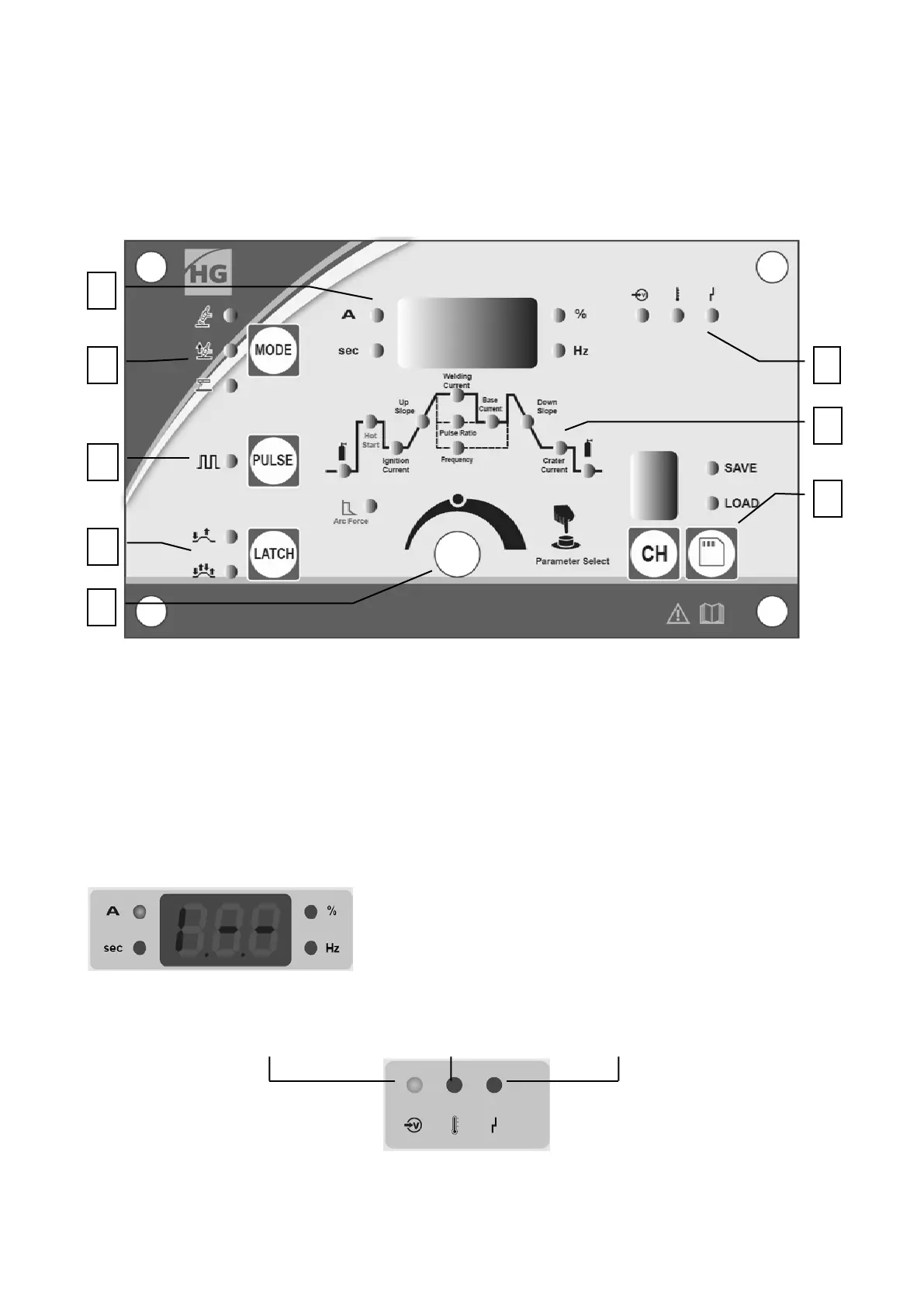
1. Front panel
1. 1. Know the Front panel
1. Numerical displays and units lights of the panel
2. Welding mode choose and indicator
3. TIG pulse function indicator
4. Welding process control choose
5. Choose and adjustment of welding parameter
6. Save and load of parameters
7. Type of parameter indicator
8. Status indicator of welder
1.2. Numerical displays and units lights of the panel
Display of welding current when machine is working and preset
parameter, such as “Up slope”, ”Pulse Ratio”, when machine is
idle and meanwhile the related units lights is on.
1.3. Status indicator of welder
Machine on Heat protection Over or under-voltage
The state light of machine on is on when the machine is powered on.
1
2
3
4
6
7
8
5


 To Next Page