1. Recline and incline the chair to ensure that the brake is operating smoothly.
2. If the brake does not lock the chair in place when the brake lever is released, remove the armrest and then:
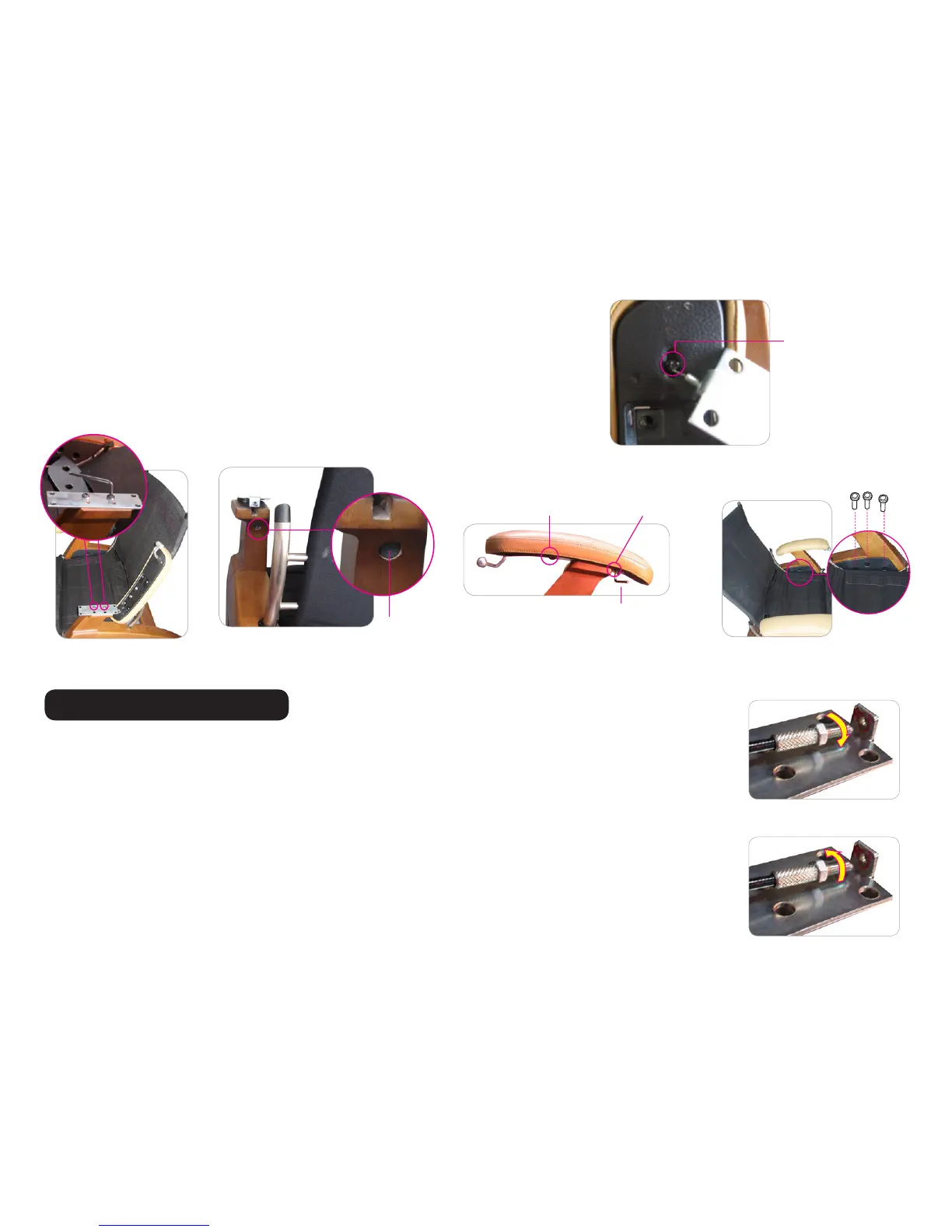
a. Loosen the nut at the end of the cable on the underside of the armrest, then turn the bolt clockwise one revolution (Fig.19).
b. Tighten the nut.
c. Recline and incline the chair to test the brake operation.
d. If the problem still exists, repeat steps a through c.
3. If the chair does not recline when the brake lever is pulled up, remove the armrest and then:
a. Loosen the nut at the end of the cable on the underside of the chair, then turn the bolt counter-clockwise one revolution (Fig.20).
b. Tighten the nut.
c. Recline and incline the chair to test the brake operation.
d. If the problem still exists, repeat steps a through c.
TESTING/ADJUSTING THE CABLE
4
© 2016 Human Touch
®
, LLC.
9. Install the cable end into the cable clamp, then use a needle-nosed pliers to gently crimp the cable
clamp closed, securing the cable (Fig.14).
10. Position the armrest mounting plate onto the wood arm, then, using a 5/16” Allen wrench, replace
the two Allen bolts to secure it (Fig.15). NOTE: You may need to reposition the slotted receiving
stud on the wood arm to align the bolt holes properly (Fig.16).
11. Place the armrest into position, then use a 5/16” Allen wrench to replace the four Allen bolts,
securing the armrest to the chair (Fig.17).
12. Place the left-hand inner side panel into position, then use a 5/16”Allen wrench to replace
the three Allen bolts, securing the side panel to the chair (Fig.18).
(Fig.16)
Cable clamp
(Fig.14)
(Fig.15)
(Fig.17)
2 Allen bolt front 2 Allen bolt back
Allen wrench
Allen bolt
(Fig.18)
Stud
(Fig.19)
(Fig.20)


 To Previous Page
 Loading...