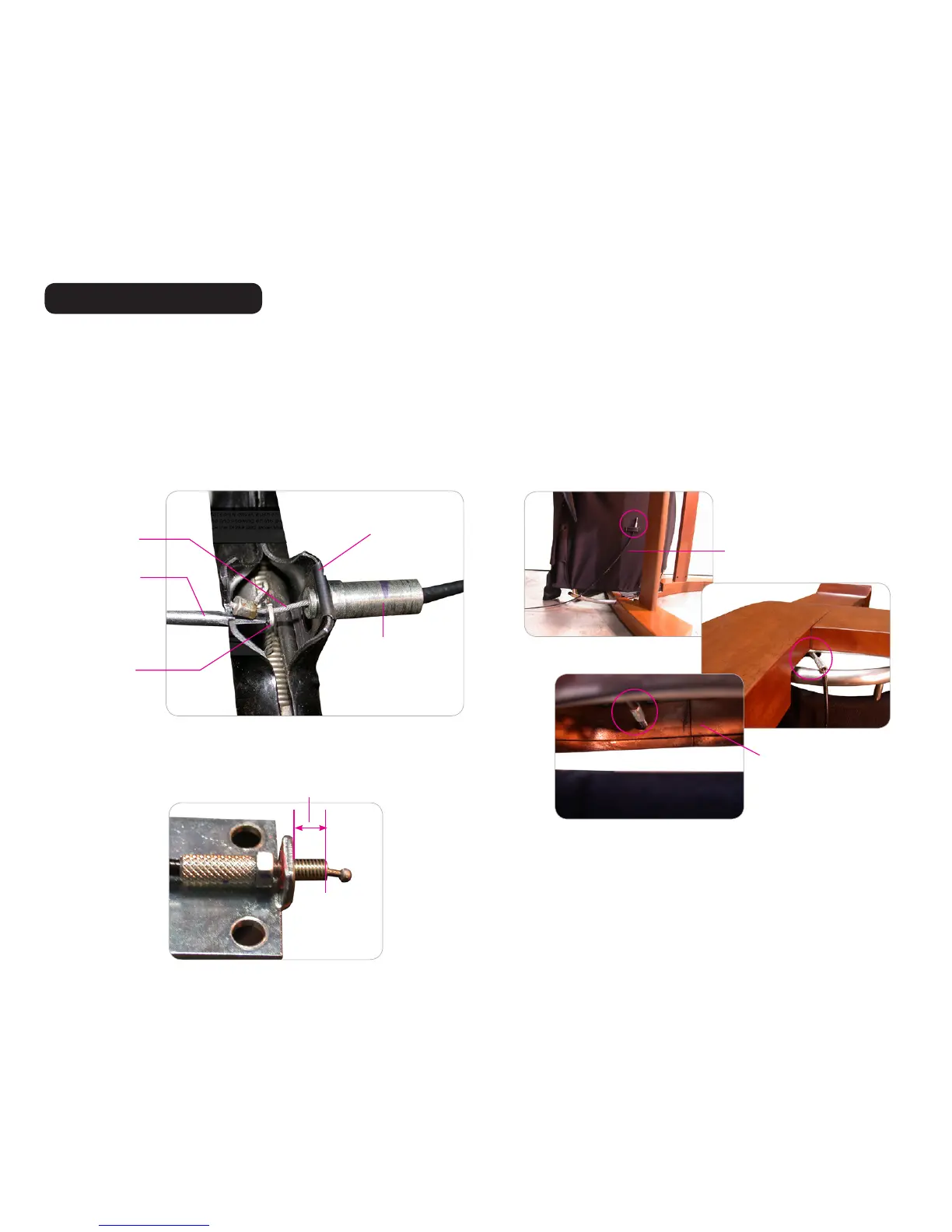
1. Remove the retaining clip from the old brake calbe and install it onto the new brake cable.
2. Install the retaining clip and cable onto the brake, until it clicks into place (Fig.11).
3. Using a small flat-head screwdriver, push the tab inward and hold it, use your fingers or a needle-nosed pliers to gently thread the cable end through the brake tab, then release the tab. (Fig.11).
4. Route the cable through the fabric tab on the underside of the chair canvas, under the glide rail, between the glide rail and the leg, through the cable guide on the inside of
the left-hand side panel, and up through the wood arm (Fig.12).
5. Gently return the chair to an upright position.
6. Place the nut back onto the cable, then thread the cable end through the metal bracket on the underside of the armrest.
7. Position the cable with the same amount of threading visible on the side of the bracket facing the cable end as you measured prior to removing the cable (Fig.13).
8. Apply a small amount of Locktite to the threads on the nut side of the bracket, then use a 10mm wrench to tighten the nut to secure it firmly against the metal bracket.
INSTALLING THE NEW CABLE
Retainer clip
Recline/Brake cable
Brake tab
Small flat-head
screwdriver
(Fig.11)
Cable
Wood arm
Cable
(Fig.12)
3
(Fig.13)
Measure


 To Next Page