4
CABLE ROUTING HOOK
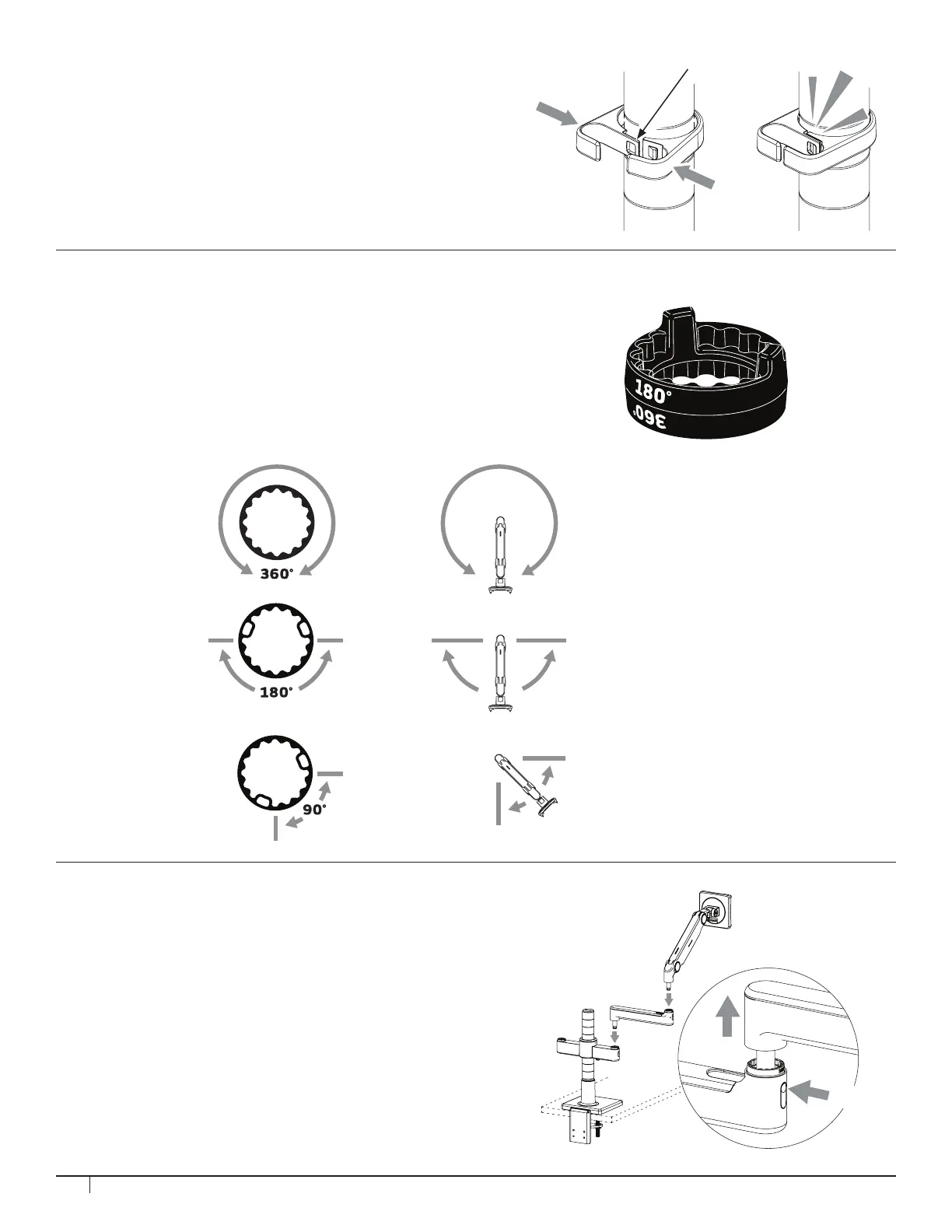
1. Spread the hooks around the post in the desired location.
2. Squeeze the two sides until the Lock (K) snaps together.
3. To release, use ngernail to disengage the Lock.
Before adding each link, adjust the Smart Stop according to
Step 3.
1. Insert the rst link into the mount until the release button
(A) locks in place.
2. Insert the next link into the rst link.
3. To remove a link, press the release button and lift upward
near the joint.
NOTE: Triple link congurations are not supported.
The installation order of the links must not allow
the monitor to pass behind the rear edge of the unit.
STEP 4: ATTACH ARMS TO BRACKET
STEP 3: SMART STOP ADJUSTMENT
A Smart Stop Ring is included at every Quick Attach joint.
Position the Smart Stop Ring to limit the arm’s range of motion.
The marked angle will be in the center of the range of motion.
NOTE: The stop rings must be congured in such a way that
does not allow the monitor to pass behind the rear edge of
the unit.
Arm can rotate
without stopping
Arm can rotate 180˚
Arm can rotate 90˚
A
K


 To Next Page