5
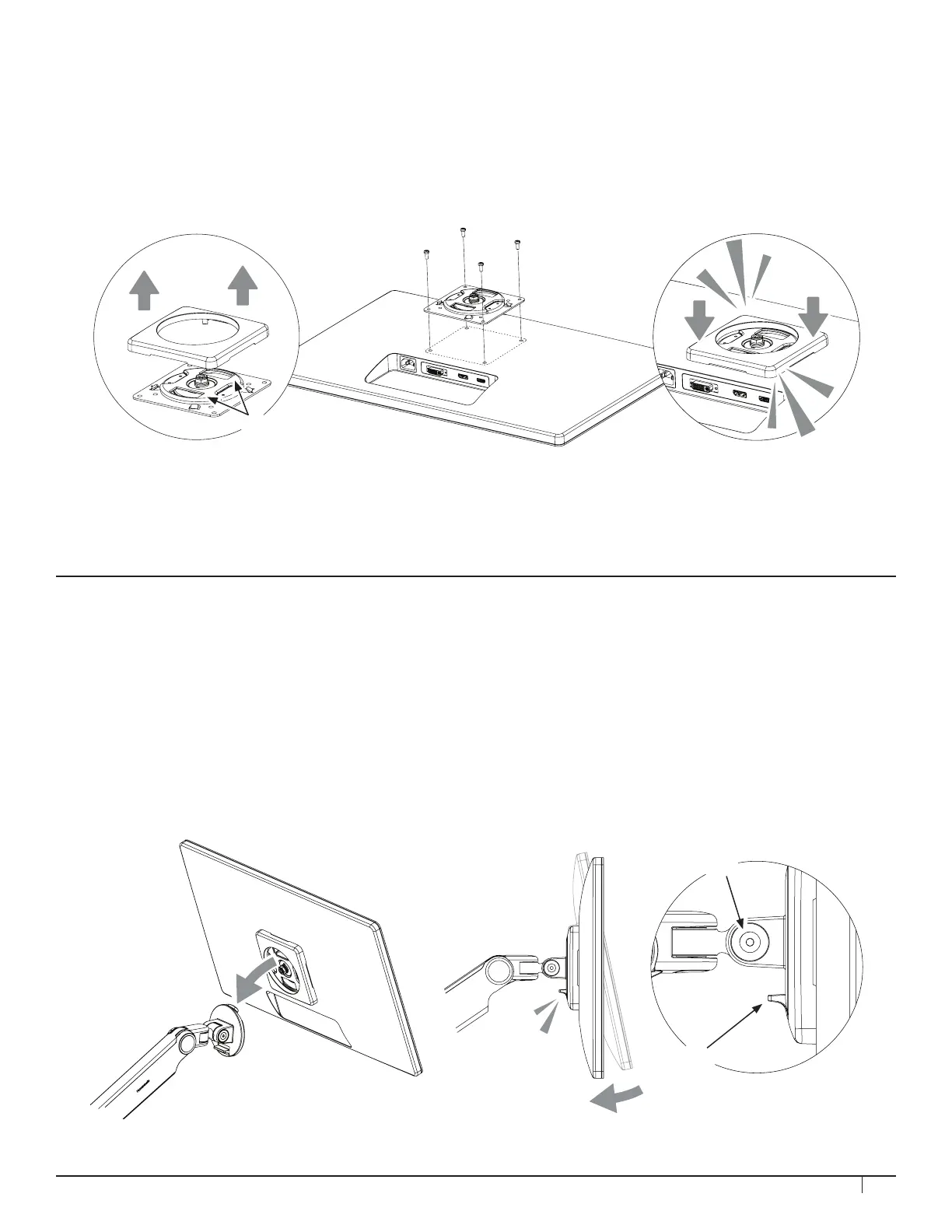
1. Separate the VESA cover from the VESA plate.
2. Position the VESA plate over the mounting holes on the back of monitor with the
D-shaped cutouts (A) in a vertical orientation. Attach using provided VESA screws.
3. Snap the VESA cover back in place.
The VESA plate features 75 mm and 100 mm hole patterns.
You may also use the screws which came with your monitor to attach the VESA plate.
If you must offset the plate from the monitor, use the plastic spacers and extended screws provided.
STEP 5: ATTACH VESA BRACKET TO MONITOR
STEP 6: ATTACH MONITOR TO ARM
1. Hold the monitor at an angle and lower it onto the arm. Fit the hook at the top of the arm into the
D-shaped cutout in the VESA plate.
2. Push the bottom of the monitor back until the Quick Release Tab (B) on the arm snaps into position.
3. To remove the monitor, lift the Quick Release Tab and pull the bottom of the monitor away from the
arm, then lift free of the hook.
NOTE: If needed, adjust the Tension Screw (A) to hold the monitor in position.
A
B
A


 To Next Page