6
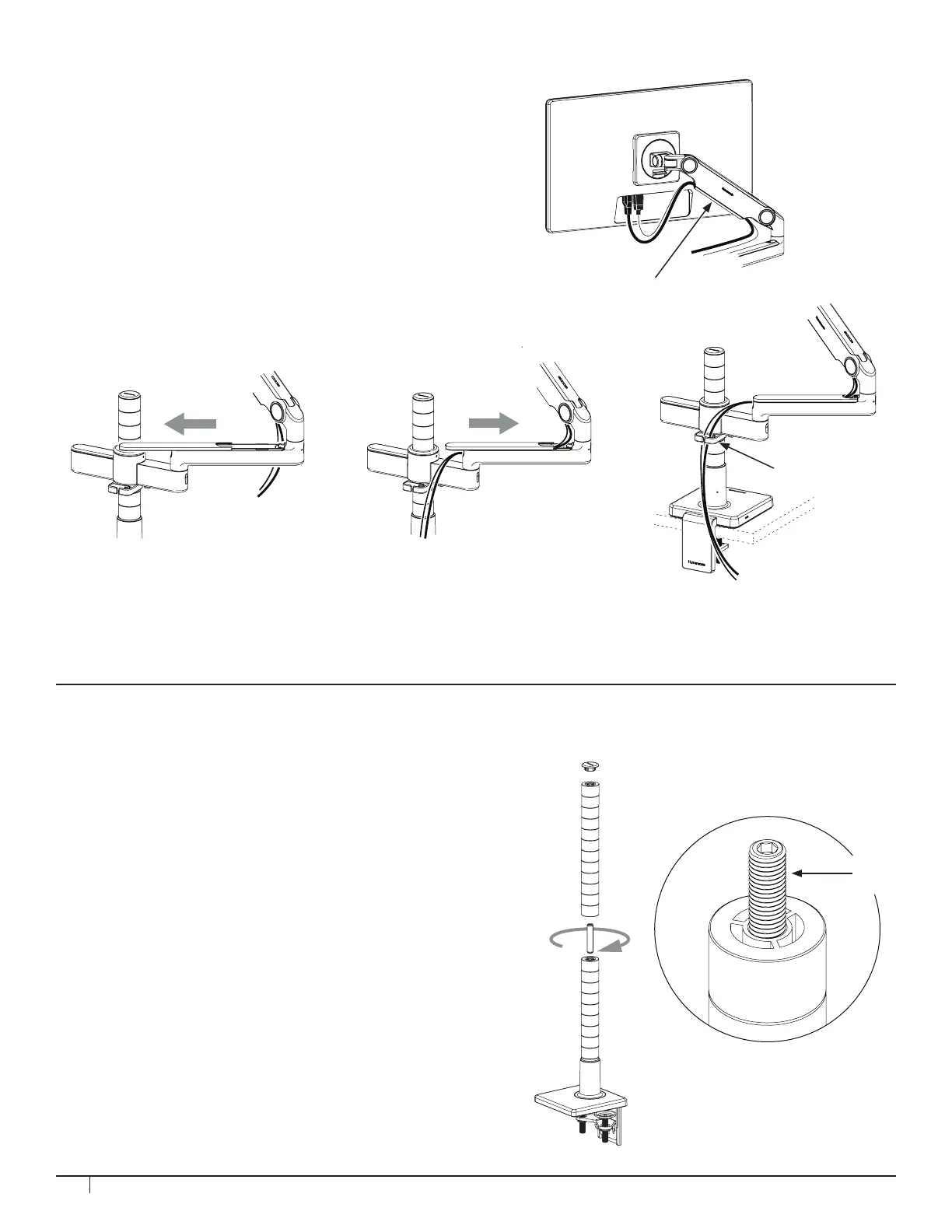
STEP 7: CABLE MANAGEMENT
1. Route power and monitor cables through
the exible Cable Clips (A) on the Upper Link.
2. Slide the Cover (B) off of the Straight Link.
3. Route cables into the Straight Link and
replace the Cover, sliding until it clicks
into place.
4. Route cables through Cable Routing
Hook (C).
CAUTION: Don’t insert extension cords. Don’t insert
any cord connecting one workstation to another.
1. Remove Cap from the top of the rst Post.
2. Install the Coupling Screw (A) into the top of
Post. Leave half of the Screw sticking out.
3. Screw second Post onto the Coupling Screw.
Posts must be tightly seated against each other.
4. Push Cap on top of second Post.
CAUTION: Do not install a Post, or a combination
of Posts, that exceed 24” (610 mm) in height.
STEP 8: ADDING A SECOND ROW OF MONITORS
B
A
C
A


 To Next Page