Inspection, care and maintenance
289
Electrical system
1
2
3
4
5
6
7
8
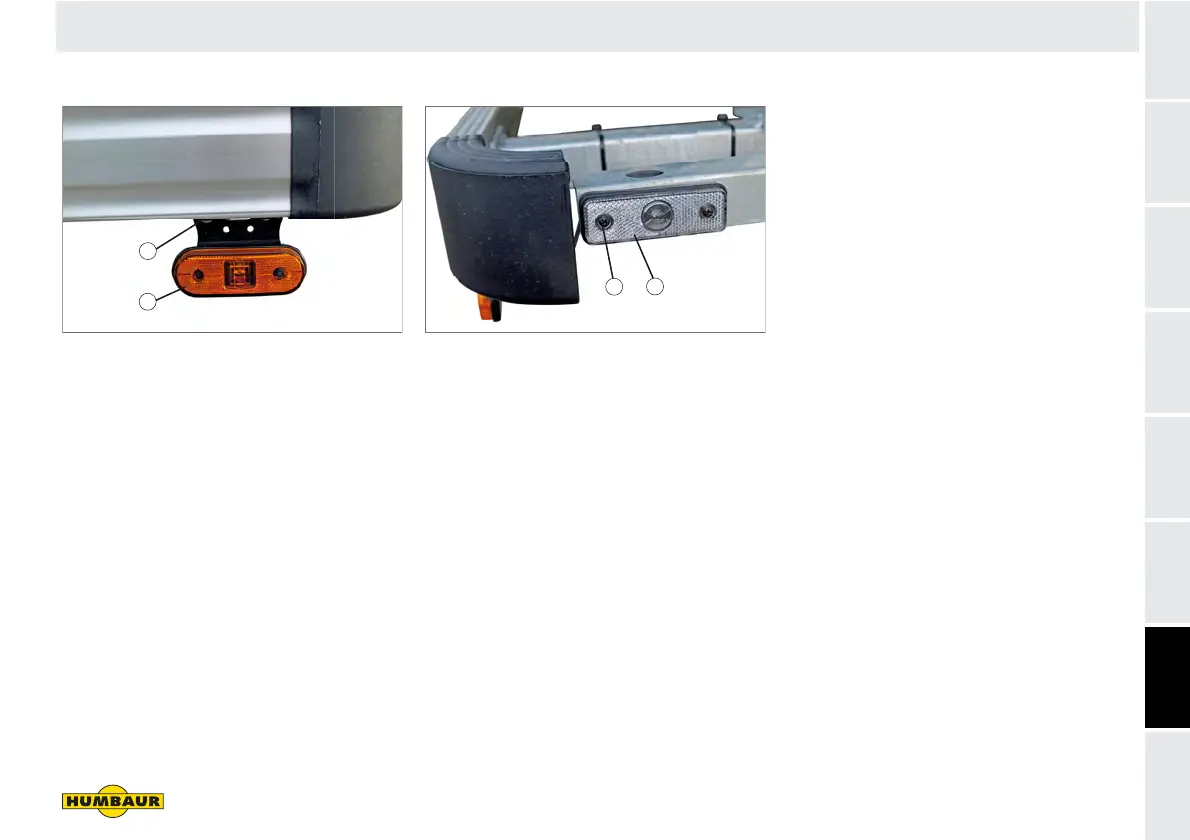
Side marker lights
Fig. 67 “LED” side marker light
1 Fixing screw
2 LED light body (orange)
A defective LED light must be replaced
completely.
Release the fixing screws (Fig. 67/1).
Remove the LED light (Fig. 67/2) -
remove connection.
Insert the new LED light.
Screw in the fixing bolts securely, but
not too tightly.
Clearance lights
Fig. 68 Clearance light, front wall
1 Fixing screw
2 LED light (white)
A defective LED light must be replaced
completely.
Release the fixing screws (Fig. 68/1).
Remove the LED light (Fig. 68/2) -
remove connection.
Insert the new LED light.
Screw in the fixing bolts securely, but
not too tightly.
W - 056
1
2
W - 057
1
2


 To Next Page