44110-01 • 01/09/2012
Using Your Total Air Sanitizer
Initial Setup and Operation
1. Take the air sanitizer out of the box and remove the
clear plastic protective bag and place the unit on a
firm, level surface.
2. Before turning on the air sanitizer, you need to conrm that
the lter is rmly in place and has not become loose during
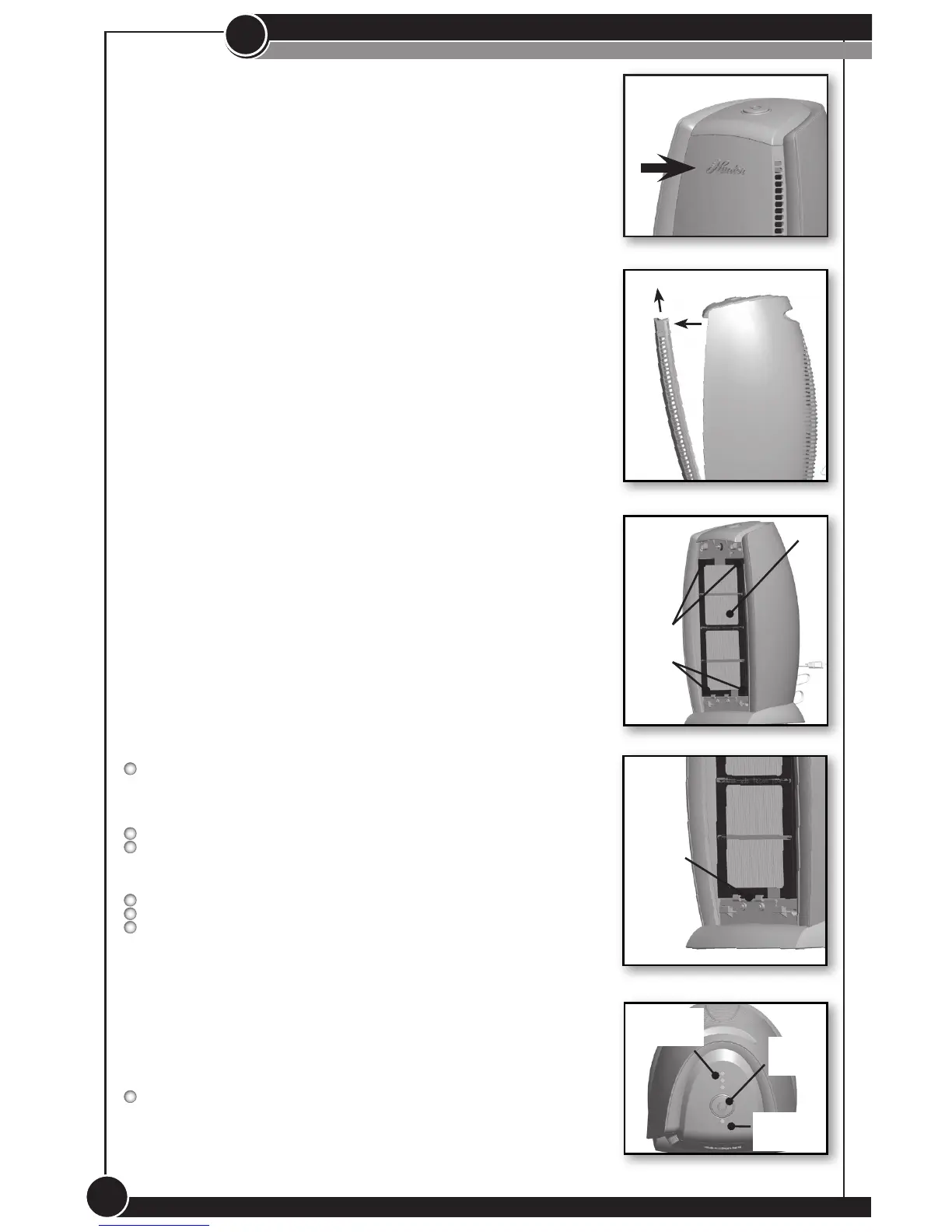
shipping. To release the door, push down on the Hunter
logo on the door to release the front grill. Figure 1.
3. Gently pull the door away from the unit and lift away.
Figure 2.
4. The HEPA
®
Filter will be resting inside the unit. The lter
will say “This side faces you” to indicate the direction
the lter should be placed in the unit. Ensure the lter is
seated fully into the unit by pressing all four corners of
the lter. Figure 3. In addition, the lter should be secured
with the lter bracket. Figure 4.
5. NOTE: If the lter is not seated properly inside the unit,
the air sanitizer will not operate.
6. Set the tabs on the each side of the bottom of the door into
the notches in the base of the unit and rock the door up
until the top of the door makes contact with the magnet.
7. Push the Hunter logo in until the front door “clicks” into place.
8. Plug the unit into a 120V electrical outlet.
Figure 1
Figure 2
Figure 3
Filter
Figure 4
Figure 5
Filter
Bracket
II
Sensor
Pad
Filter
Indicator
Indicator
Lights
Press
Here
Operation:
See Figure 5.
OFF - Press the sensor pad until all speed indicator lights are
off. This will turn the unit off.
1. The fan speed can be adjusted at any time by touching
the sensor pad on the top of the unit.
Low speed - Recommended for use when soft
background noise is unwanted.
Medium speed - Typical usage setting. Soft
background noise is not an issue.
High speed - Use when quick, efficient results to a
room’s air quality are desired.
Filter Indicator - When the lter life counter exceeds 4000
hours, the lter indicator will ash red as a reminder that
you should check the lter. Touch the sensor pad for 3
seconds to reset the lter counter.
4


 To Next Page