VTX Series Maintenance and Safety Manual 704-0211-215 Using This Manual — vii
USING THIS MANUAL
This documentation uses several conventions to explain the safety features and
emphasize key concepts. These conventions are described in this section.
Additional information is available on the machine’s Documentation CD.
Sample Screens
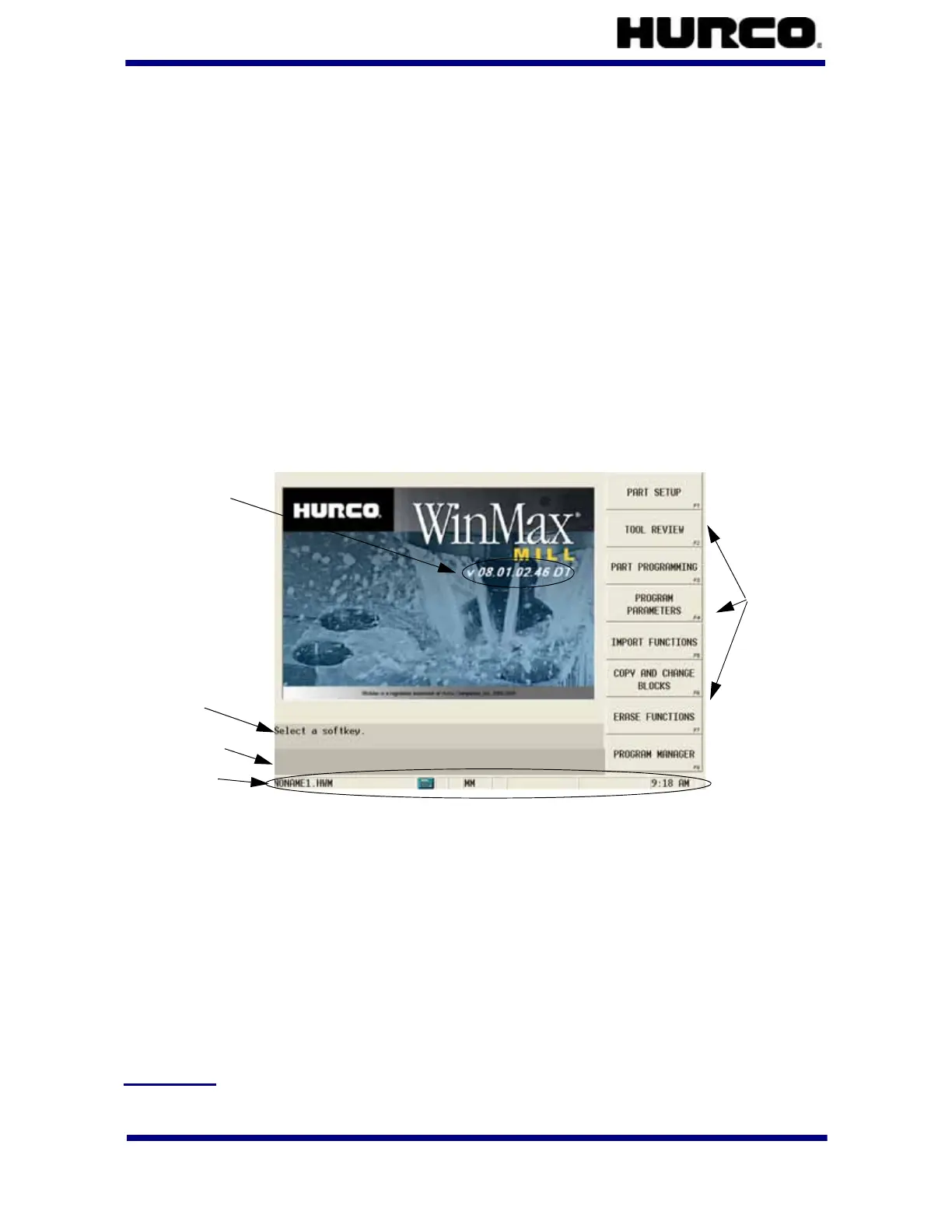
Sample screens in this documentation were taken from a WinMax Mill single-screen
control. All screens are subject to change. The screens on your system may vary slightly.
The sample screen here illustrates softkeys and includes a software version.
Softkeys
Softkeys are located on the side of the screen. You can set the softkeys to appear on
either the right or left side of the screen. Refer to the Getting Started with WinMax Mill for
information about making this selection. Softkeys may change upon field entries or other
softkey selection. References to softkeys in the documentation appear with the softkey’s
corresponding F-key. For example, the Part Setup softkey from the Input screen above is
referenced as the PART SETUP F1 softkey.
Screen Areas
The screens are divided into the following areas, in addition to the row of softkeys:
Data Entry
The data entry area is located on the opposite side of the screen from the softkeys.
Softkeys
Status Bar
Error/Status area
Prompts
WinMax Version



 To Next Page