13
7. How to Use Blender
Auto Mode: SMOOTHIE, ICE CRUSH, SOUP, GRIND, CLEANING
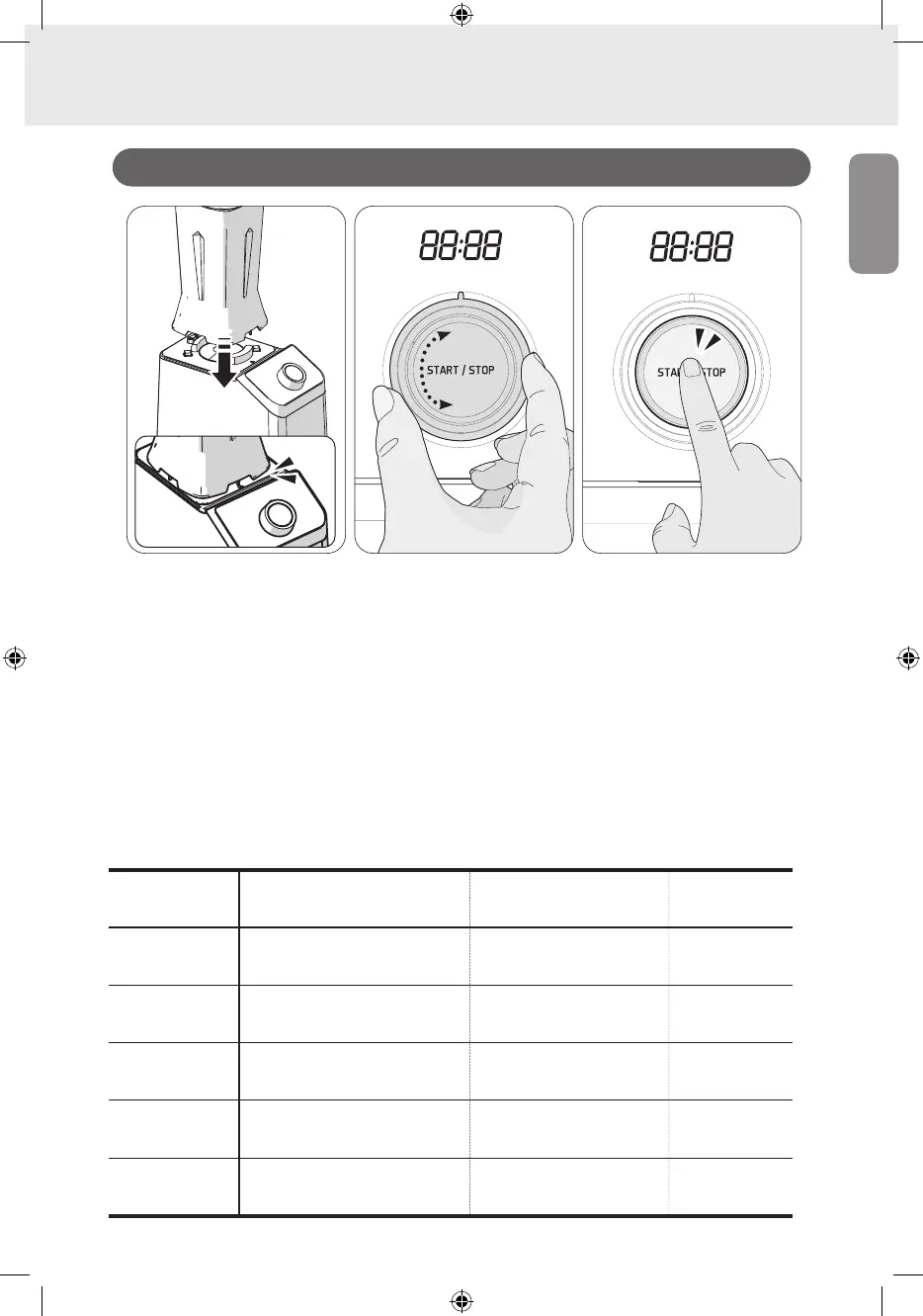
01. Check if the container in which ingredients are inserted is installed on the product body
and if the cover is closed.
* If it is not prepared, please refer to How to Assemble Blender on Page 08.
02. Turn the jog dial counterclockwise to select a desired Auto menu.
* You may choose from 5 Auto menus and please refer to the following table for each menu.
03. When pressing the [START/STOP] button, the selected [Auto Mode] begins.
Once cooking finishes, the operation stops automatically.
* To stop the operation, return the dial to the Power Display Lamp position or press the
[START/STOP] button, which cancels the operation and switches to the Standby Mode.
7-2. How to Use Auto Mode
Auto Program Purpose of Auto Program
Recommended amount of
use
Program
operation time
[ SMOOTHIE ]
For smoothies
Soft and thickly concentrated
smoothie using vegetables, soft
fruits, nuts, etc.
Min. 100ml / Max. 1,000ml 55 sec.
[ ICE CRUSH ]
For ice or frozen
fruits
Sherbet and slushies using ice
and frozen fruits
Min. 100ml / Max. 500ml
(refer to the recipe)
50 sec.
[ SOUP ]
For soup
Warm soup and latte
Min. 100ml / Max. 500ml
(refer to the recipe)
7 min. 30 sec.
[ GRIND ]
For grinding
Quickly grind dry ingredients
(coffee beans, etc.) in extremely
fine pieces
Max. 200g 40 sec.
[ CLEANING ]
For cleaning
Self-cleaning mode helps easily
wash even the areas that are
difficult to be cleaned by hand
Min. 100ml / Max. 1,000ml 19 sec.
01
03
02


 To Next Page