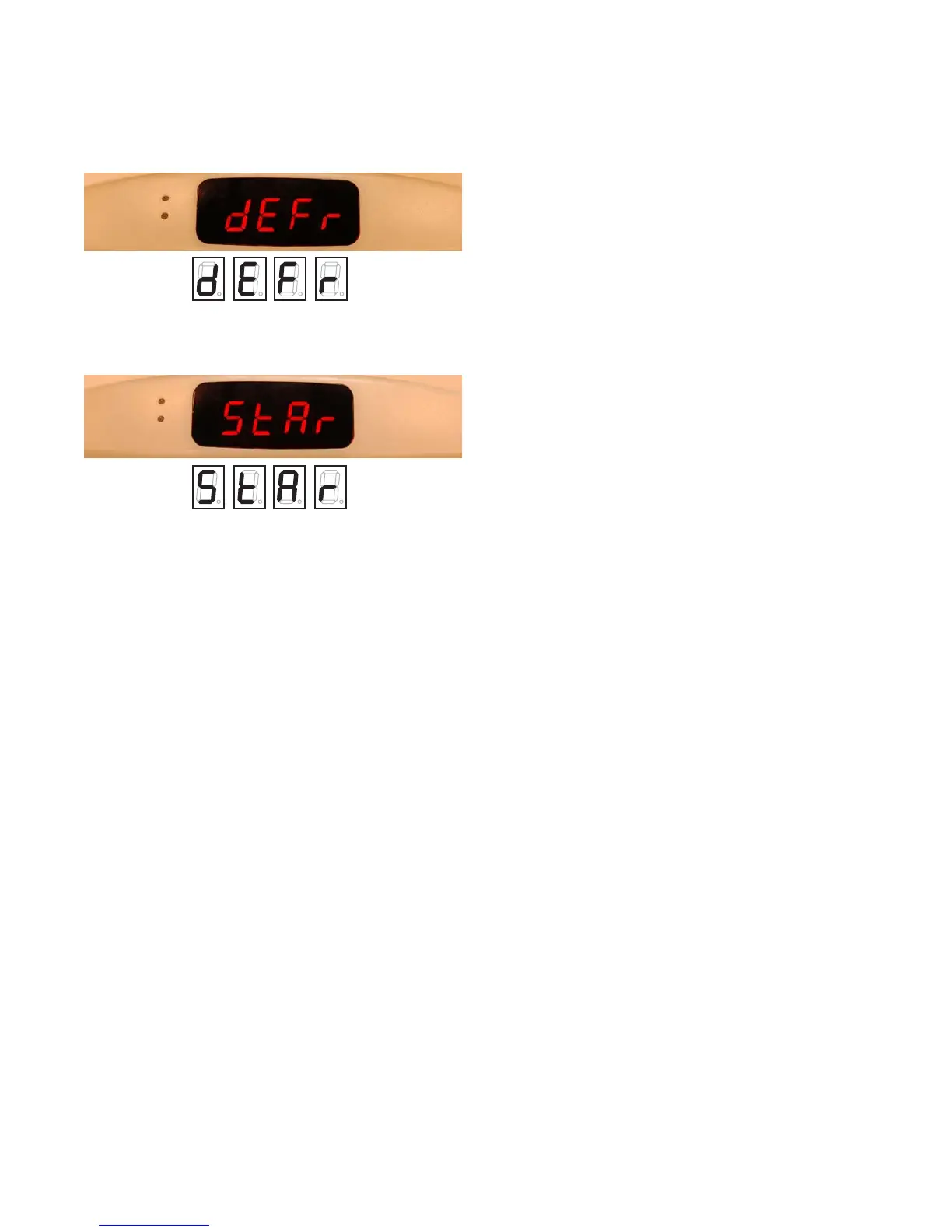
Set Defrost Time (Pass Code Needed)
• Press the SELECT button (top left button).
• Then press the DOWN button once to get to
StAr and press SELECT.
• Press the UP or DOWN button to change
minutes; press SELECT.
• Press the UP or DOWN button to change
hours; press SELECT.
The second defrost will follow 12 hours later. If
this change meets the needs of your business,
replace the Safe-NET cover and grille.
Change Standard Defrost Time
(Pass Code Required)
Your business may need defrost times that are
not evenly spaced, or staggered, such as 0300
(3:00 a.m.) and 1400 (2:00 p.m.) because your
business is open later. Or you may need more
than two defrosts due to peak sales or high
humidity—0300, 0900, 1500 and 2100 are even-
ly spaced, while 0300, 1000, 2100 are staggered
defrost times. Safe-NET can handle 2 or 3 stag-
gered defrosts or 2 to 8 evenly spaced defrosts
in 24 hours.
ndEF
The ndEF parameter sets the number of defrost
cycles in a 24-hour period. The number works
in conjunction with the StAr parameter
discussed above. The ndEF (number of
defrosts) determines the number of defrosts
that occur in a 24-hour period beginning with
the StAr (first defrost) parameter. The
maximum number of defrosts allowed in a
24-hour period is 8. The defrosts are spaced
evenly across the 24-hour period beginning
with the StAr time. The formula for calculating
defrost start times is as follows:
Defrost interval = 24/ndEF
First defrost cycle start time = StAr
Second start time = StAr + Interval
Third start time = StAr + 2 X Interval
~
Eighth start time = StAr + 7 X Interval
For example, with a StAr value of 01:00 and
an ndEF setting of 4, the defrost cycle start
times are:
1:00 A.M.
7:00 A.M.
1:00 P.M.
7:00 P.M.
This scheme applies to all types of defrosts.
Press the SELECT button, then DOWN three
times. After navigating to the ndEF submenu
item, the display will cycle between ndEF and
the current setting. While the setting is being
displayed, press the SELECT button to edit
this value. When the Safe-NET display module
begins flashing the value, use the UP /DOWN
buttons to increase or decrease the value to the
desired setting.
10
Safe-NET software Version 9.03 or later
1 October 2009 — P/N 0512887_A
ARV-570 & ARV-1230
©2009 HUSSMANN CORPORATION • BRIDGETON, MO 63044-2483 U.S.A.
U.S. & CANADA 1-800-922-1919 • MEXICO 1-800-522-1900 • WWW.HUSSMANN.COM



 To Next Page